
IPTV Catch-Up TV (also called replay TV or time-shift viewing) lets you watch programs you missed without recording them yourself. Unlike local DVR recording that stores content on your device, catch-up streams previously-aired shows directly from your provider’s server — similar to how Netflix lets you watch past episodes of a series.
However, not all IPTV plans include catch-up, and even when available, limitations on how far back you can go, which channels support it, and how long content stays available vary significantly by provider and plan tier. This guide explains how IPTV catch-up works, what to expect from different service tiers, which apps support it best, and how to verify what your plan actually includes before subscribing.
Article Update History
October 16, 2026
– Initial publication
– Verified Echo Best IPTV catch-up availability (Ultra €49.90/year and Ultimate €69.90/year plans only)
– Confirmed Economy and VIP plans do not include catch-up TV
– Reviewed catch-up limitations across IPTV providers and app implementations
– Distinguished server-based catch-up from local recording capabilities
How IPTV Catch-Up TV Works (vs Local Recording)
Understanding the difference between catch-up TV and local recording prevents confusion about what your IPTV service actually provides:
Server-Based Catch-Up (What Most IPTV Providers Offer)
How it works: Your IPTV provider records live channels on their servers. When you want to watch a program you missed, you stream it from their server — you’re not downloading or storing anything on your device.
Key characteristics:
- No storage space used on your device (Fire Stick, phone, etc.)
- Content availability controlled by provider (they decide how far back and which shows)
- Typically limited to 3-7 days back (some providers offer up to 14 days)
- Not all channels include catch-up (depends on provider’s recording infrastructure)
- Requires internet connection to watch (streaming from server each time)
- Usually included only on higher-tier subscription plans
Example: You missed a news program that aired at 6 PM yesterday. With catch-up, you open your IPTV app, navigate to that channel’s catch-up section, scroll back to yesterday 6 PM, and stream the program — all without having pressed “record” beforehand.
Local Recording (Separate Capability, Often Confused with Catch-Up)
How it works: Your IPTV app downloads and stores programs directly on your device’s storage. You can watch them anytime, even offline, but only if you manually scheduled the recording before the program aired.
Key characteristics:
- Uses your device’s storage space (Fire Stick, phone, computer hard drive)
- Must manually schedule recordings in advance
- Content stays as long as you don’t delete it (no provider time limit)
- Can watch offline (no internet needed after download completes)
- Quality/space tradeoff (4K recordings consume significant storage)
- App-specific feature (TiViMate supports it, VLC supports it, IPTV Smarters limited support)
Example: You know your favorite show airs Friday at 8 PM. You schedule a recording in your IPTV app Thursday. The app downloads the show Friday night. You can now watch it anytime, even if your internet goes down, but if you forgot to schedule it beforehand, you can’t record shows that already aired.
Why the Distinction Matters
Many customers assume “catch-up TV” means they can record anything. The reality:
- Catch-up = Provider recorded it for you automatically, but only keeps it 3-7 days and only for specific channels
- Local recording = You record it yourself in advance, keeps forever, uses your storage, works on any channel
Echo Best IPTV’s catch-up feature (available on Ultra €49.90/year and Ultimate €69.90/year plans) is server-based catch-up. Economy (€29.90/year) and VIP (€39.90/year) plans do not include catch-up TV.
IPTV Plan Tiers and Catch-Up Availability
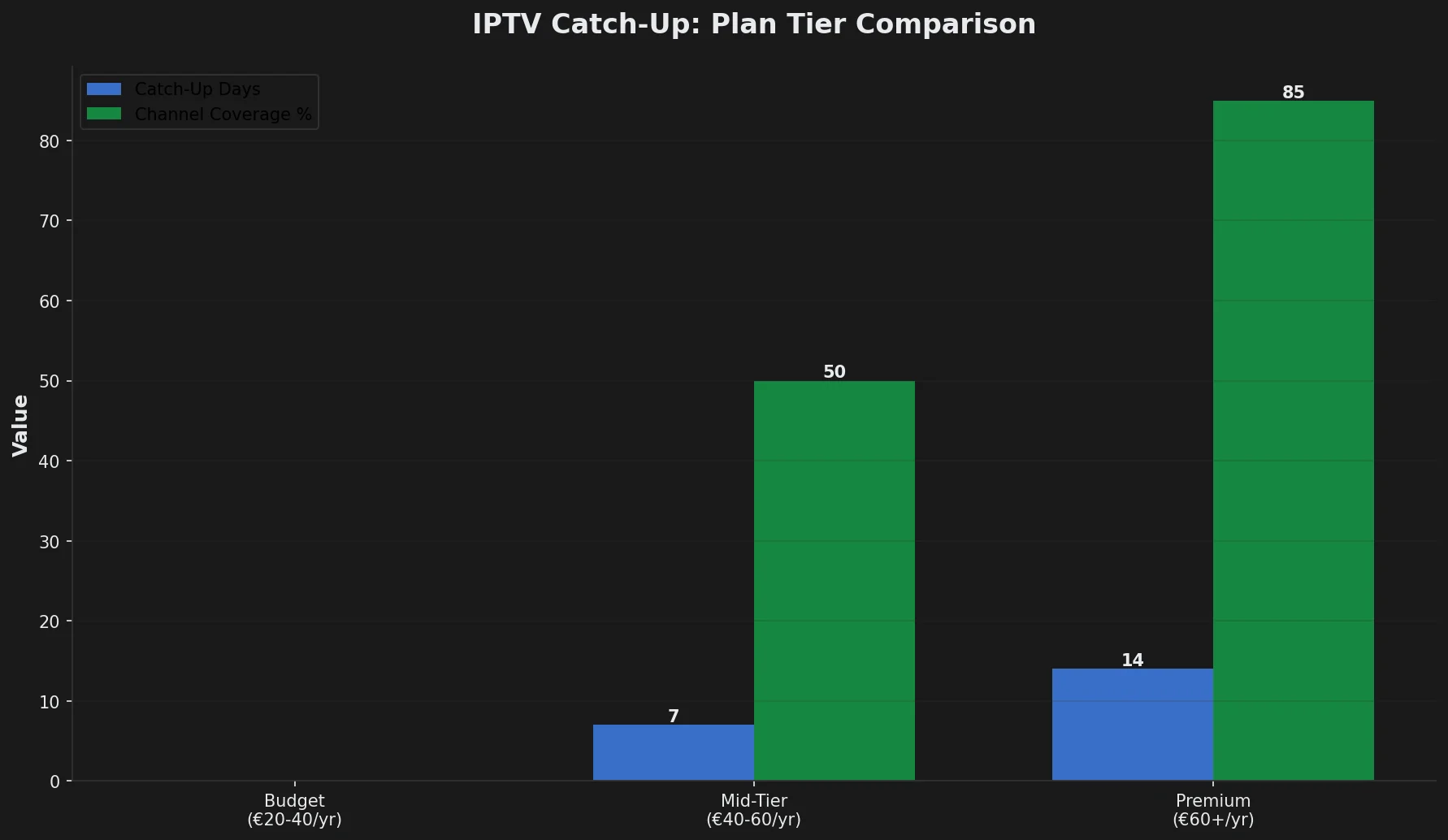
Catch-up TV typically appears only on mid-tier and premium IPTV plans. Here’s how providers generally structure catch-up across plan levels:
Budget Plans (€20-40/year) — Usually No Catch-Up
What you get: Live channels only, no catch-up, no recording capabilities in most cases.
Why providers exclude it: Storing days of recorded content across hundreds of channels for thousands of customers requires significant server infrastructure. Budget plans can’t afford this operational cost.
Echo Best IPTV example:
- Economy (€29.90/year): 10,000+ channels, 50,000+ movies, 20,000+ series — no catch-up TV
- VIP (€39.90/year): 15,000+ channels, 50,000+ movies, 50,000+ series — no catch-up TV
If catch-up is essential for your viewing habits, budget plans won’t meet your needs.
Mid-Tier Plans (€40-60/year) — Catch-Up Often Included
What you get: Live channels plus server-based catch-up, typically 3-7 days back on major channels.
Typical limitations:
- Not every channel has catch-up (usually 30-60% of channels support it)
- News and entertainment channels more likely to have catch-up than niche channels
- Catch-up window varies by provider (3, 5, or 7 days most common)
Echo Best IPTV example:
- Ultra (€49.90/year): 20,000+ channels, 50,000+ movies, 70,000+ series — catch-up TV included
- Ultimate (€69.90/year): More than Ultra channels, 50,000+ movies, more than Ultra series — catch-up TV included
If you regularly miss shows and need catch-up, mid-tier plans provide this capability at reasonable annual cost.
Premium Plans (€60+/year) — Extended Catch-Up Windows
What you get: Longer catch-up windows (7-14 days), more channels with catch-up support, sometimes downloadable catch-up content.
Additional features:
- Extended catch-up duration (up to 2 weeks back on some providers)
- More channels support catch-up (80-90% coverage)
- Some providers allow downloading catch-up content for offline viewing
- Better catch-up search and browsing interfaces
How to Verify Catch-Up Availability Before Subscribing
Marketing materials often claim “catch-up TV included” without clarifying critical limitations. Before subscribing, verify these specific details:
1. Confirm Catch-Up is Actually Included in Your Plan Tier
What to ask: “Does the [specific plan name] include catch-up TV, or only higher tiers?”
Why this matters: Providers advertise catch-up as a service feature, then bury “only on Premium plan” in fine print. Confirm your specific plan tier includes it.
Echo Best IPTV clarity: We explicitly state catch-up TV is available on Ultra and Ultimate plans only — not on Economy or VIP. No hidden fine print.
2. Ask How Many Days Back Catch-Up Extends
What to ask: “How many days back does catch-up go? 3 days? 7 days? 14 days?”
Why this matters: If you watch shows 4-5 days late, a 3-day catch-up window won’t help you. Know the exact window before subscribing.
Common windows:
- 3 days: Minimum offered by budget-conscious providers
- 7 days: Industry standard for mid-tier plans
- 14+ days: Premium feature, relatively rare
3. Verify Which Channels Support Catch-Up
What to ask: “What percentage of channels include catch-up? Can I see a list of channels with catch-up?”
Why this matters: “Catch-up TV included” might mean only 30% of channels actually support it. If your must-watch channels don’t have catch-up, the feature is useless to you.
Request specifics: Ask provider to confirm your top 3-5 favorite channels support catch-up before subscribing.
4. Test Catch-Up During Your Trial Period
What to do: During your trial (Echo Best IPTV offers 24-hour trial), navigate to catch-up on 3-4 different channels and verify:
- Catch-up actually loads content (not just an empty menu)
- You can scroll back to yesterday and day before (testing the window)
- Playback works smoothly (some providers’ catch-up streams buffer more than live)
- The channels you personally care about have catch-up, not just random channels
If catch-up doesn’t work during trial: Don’t assume it will “work better after subscribing.” Test results during trial are what you’ll get long-term.
Need IPTV with Reliable Catch-Up TV?
Echo Best IPTV Ultra (€49.90/year) and Ultimate (€69.90/year) plans include server-based catch-up TV. Test it risk-free during our 24-hour trial. With 8 years serving 50,000+ customers and 24/7 support, we clearly communicate what each plan includes — no hidden limitations.
IPTV Apps and Catch-Up Support
Even if your IPTV provider offers catch-up, your chosen app must support it. Not all IPTV apps handle catch-up equally:
Apps with Excellent Catch-Up Support
TiViMate (Android/Android TV/Fire TV):
- Clean catch-up interface with calendar-style browsing
- Shows which channels have catch-up available (visual indicators)
- Easy scrubbing through catch-up timeline
- Can schedule catch-up content for local recording (download for offline)
- Limitation: Premium version required for full catch-up features
IPTV Smarters Pro (Cross-platform):
- Supports catch-up on all platforms (Android, iOS, Fire TV, Smart TV)
- EPG integration shows catch-up programs in program guide
- Click past programs in guide to access catch-up
- Limitation: Interface less intuitive than TiViMate for catch-up navigation
Perfect Player (Android):
- Supports catch-up when provider implements it correctly
- Light-weight app works well on older devices
- Limitation: Catch-up depends heavily on provider’s implementation
Apps with Limited or No Catch-Up Support
VLC Media Player:
- No catch-up support — VLC plays M3U playlists but doesn’t access catch-up features
- Can play recordings if you download them separately, but no integrated catch-up browsing
- Alternative: Use VLC for basic live TV, use TiViMate or Smarters for catch-up
Kodi PVR IPTV Simple Client:
- Limited catch-up — depends on provider implementing specific catch-up protocol
- When it works, catch-up appears in Kodi’s EPG timeline
- Issue: Configuration complex, many providers’ catch-up doesn’t work through Kodi
Native Smart TV Apps:
- Hit-or-miss catch-up support depending on TV brand and app version
- Samsung/LG Smart TV IPTV apps often have outdated catch-up implementations
- Recommendation: Use external device (Fire Stick with TiViMate) for better catch-up experience
Common Catch-Up Problems and Solutions
When catch-up doesn’t work as expected, these are the most common causes and fixes:
Problem: Catch-Up Menu Appears But Shows No Content
Cause: Provider hasn’t actually recorded content for that channel yet, or catch-up feature isn’t fully implemented despite being advertised.
Solution:
- Try a different channel (some channels may not support catch-up even on plans that include it)
- Wait 1-2 hours after a program airs (catch-up content takes time to process server-side)
- Contact provider to verify which channels actually have working catch-up
Problem: Catch-Up Buffers More Than Live Streams
Cause: Catch-up streams from different servers than live content, sometimes geographically distant or more loaded.
Solution:
- Check internet speed — catch-up may require higher bandwidth than live
- Try ethernet instead of WiFi (catch-up video files larger than live streams)
- Contact provider about alternative catch-up server if they offer multiple servers
- Lower playback quality in app settings if option exists
Problem: Catch-Up Only Goes Back 1-2 Days Despite Advertised 7-Day Window
Cause: Provider advertising full service capability, but your specific plan tier has shorter window, or catch-up recently launched and historical content hasn’t built up yet.
Solution:
- Verify your plan tier includes full 7-day catch-up (not a shorter window for lower tiers)
- Check if catch-up is new feature still rolling out (wait 7 days for full window to populate)
- Contact provider support to confirm advertised window matches your plan
Problem: Can’t Find Catch-Up Option in App
Cause: App doesn’t support catch-up, or catch-up feature hidden in non-obvious menu location.
Solution by app:
- TiViMate: Long-press OK button on channel in EPG to access catch-up
- IPTV Smarters: Catch-up accessed through EPG — click past programs
- Perfect Player: Enable catch-up in Settings → Playlist → Enable timeshift
If catch-up genuinely isn’t in your app, switch to TiViMate or IPTV Smarters Pro which both support it well.
Catch-Up TV vs VOD vs Recording: Choosing the Right Feature
IPTV services offer multiple ways to watch content on your schedule. Understanding which feature solves your specific need prevents paying for capabilities you don’t actually use:
When Catch-Up TV is the Right Solution
Best for:
- You regularly miss live shows but watch them within 1-3 days
- You want “set it and forget it” — no manual recording
- You don’t want to use device storage for recordings
- You primarily watch news, current events, or timely content
Example scenario: You work evenings and miss the 6 PM news. Each morning, you catch up on last night’s news via catch-up TV. By the time you watch it, it’s 12-18 hours old but still relevant. A 7-day window is plenty.
When VOD (Video on Demand) is Better
Best for:
- You watch movies and series, not live TV
- You want permanent access to content (no 7-day expiration)
- You re-watch favorites multiple times
- You don’t care about live broadcast timing
Example scenario: You want to watch a specific movie. You don’t care when it aired on TV — you just want to pick it from a library and watch anytime. Echo Best IPTV’s VOD library (50,000+ movies, up to 70,000+ series depending on plan) serves this need better than catch-up.
Key difference: VOD is permanent on-demand library. Catch-up is temporary replay of linear TV.
When Local Recording is Necessary
Best for:
- You need to keep content longer than provider’s catch-up window
- You want offline viewing (travel, no internet)
- You watch niche content provider doesn’t record for catch-up
- You have sufficient device storage
Example scenario: Your favorite show airs weekly, but you travel frequently without reliable internet. You schedule recordings before each trip, download episodes to your tablet, watch offline during flights. Catch-up wouldn’t work (requires internet) and VOD might not have current episodes yet.
Experience Full-Featured IPTV with Echo Best
Join 50,000+ satisfied customers streaming with Echo Best IPTV
- ✓ Catch-up TV on Ultra and Ultimate plans
- ✓ 50,000+ movies & 70,000+ series in VOD library
- ✓ 20,000+ live channels on higher tiers
- ✓ 24/7 customer support throughout your subscription
- ✓ 24-hour trial to test all features
Get Started with Echo Best IPTV →
Annual plans from €29.90/year | Catch-up on Ultra €49.90 & Ultimate €69.90
Frequently Asked Questions
Does catch-up TV use my device storage?
No. Server-based catch-up TV (what most IPTV providers offer, including Echo Best IPTV) streams content from the provider’s server each time you watch. Nothing is stored on your Fire Stick, phone, or computer.
You’re essentially streaming a recorded version of a live program, similar to how you stream a Netflix show — it doesn’t download to your device, it plays as you watch.
Storage consideration: While catch-up itself uses no storage, if your IPTV app caches stream data temporarily, it may use 100-500 MB of cache space that clears automatically. This is negligible compared to actual recordings which can consume gigabytes.
Can I download catch-up content to watch offline?
This depends on your IPTV app and provider, but most providers don’t support offline catch-up:
Standard catch-up TV: Requires internet connection to stream from provider’s server each time. No offline viewing.
Apps with recording capability: Some apps (TiViMate Premium, for example) let you record catch-up content to local storage for offline viewing later. This is a separate feature from catch-up itself — you’re manually saving catch-up content as a local recording.
Workaround: If you need offline viewing, use your app’s recording feature to download catch-up content you want to keep, converting server-based catch-up into a local recording you own.
Why do some channels have catch-up and others don’t?
Providers choose which channels to record based on several factors:
Technical factors:
- Server storage cost (recording hundreds of channels 24/7 is expensive)
- Channel popularity (providers prioritize high-viewership channels)
- Content licensing (some channels’ contracts prohibit catch-up redistribution)
Common pattern: News, major entertainment, and popular channels get catch-up. Niche channels, regional channels, and less-watched content often don’t.
Verify before subscribing: If specific channels are critical for you, ask provider to confirm those channels include catch-up before paying for a plan with catch-up.
How far back does IPTV catch-up typically go?
Industry standards by plan tier:
- Budget plans: No catch-up at all
- Mid-tier plans: 3-7 days typical (Echo Best Ultra: included)
- Premium plans: 7-14 days (Echo Best Ultimate: included)
- Specialty providers: Rarely up to 30 days (very uncommon)
Why not longer: Storage costs scale linearly with catch-up duration. Recording 100 channels for 7 days requires 7x the storage of a 1-day window. Providers balance storage cost against customer needs, settling on 7 days as the sweet spot for most users.
Exception: Sports-focused providers sometimes offer extended catch-up for major events, but Echo Best IPTV is a movies/series/general entertainment provider, not sports-focused.
Is catch-up TV the same as DVR or cloud DVR?
No, though they’re related concepts with important differences:
Catch-up TV:
- Provider decides what to record (you have no control)
- Provider decides how long to keep it (typically 3-7 days, then auto-deletes)
- Available to all customers on that plan tier
- No storage quota — watch as much catch-up as you want
Cloud DVR (different feature, less common in IPTV):
- YOU schedule what to record
- Content kept as long as your storage quota allows (often 50-100 hours total)
- Personal library — only you see your recordings
- Storage quota limits how much you can record
Most IPTV providers offer catch-up, not cloud DVR. Traditional TV streaming services (YouTube TV, Hulu+Live TV) offer cloud DVR. Know which feature your service provides to set correct expectations.
Will catch-up work if I’m traveling or using VPN?
Catch-up typically works while traveling or on VPN, but with potential complications:
While traveling:
- Works if you have internet connection (hotel WiFi, mobile data)
- May be slower if you’re far from provider’s catch-up servers geographically
- Some providers geo-restrict catch-up by country (verify with your provider)
While using VPN:
- Usually works, but VPN adds latency which may increase buffering
- Fast VPN (30+ Mbps) minimizes buffering
- Cheap/free VPNs often too slow for smooth catch-up streaming
Provider policies: Echo Best IPTV works internationally and with VPNs. Some providers restrict this — verify policies before subscribing if you travel frequently.
Can I use catch-up on multiple devices simultaneously?
This depends on your plan’s simultaneous connection limit, not on catch-up specifically:
How connections work: Catch-up streams count as active connections the same as live TV streams. If your plan allows 1 simultaneous connection, you can watch either live TV OR catch-up on one device at a time, not both simultaneously on different devices.
Echo Best IPTV example: All our plans (Economy, VIP, Ultra, Ultimate) include 1 simultaneous connection. If you’re watching catch-up on your living room TV, someone else can’t watch live or catch-up on their phone simultaneously until you finish.
Multi-connection plans: If your household needs multiple people watching simultaneously (live or catch-up), you need a plan with 2+ simultaneous connections or separate subscriptions.
Does catch-up TV cost extra data/bandwidth compared to live TV?
No. Catch-up streams consume the same data per hour as live streams of the same quality:
Data consumption by quality:
- SD catch-up: ~1-2 GB per hour (same as SD live)
- HD catch-up: ~3-5 GB per hour (same as HD live)
- 4K catch-up: ~7-15 GB per hour (same as 4K live)
Why it feels like more: When watching live TV, you might channel surf or leave it on in background. Catch-up tends to be intentional viewing of full programs, so you accumulate more actual streaming hours even though per-hour data is identical.
Internet requirement: Same speed needed as live: 10+ Mbps for HD, 25+ Mbps for 4K.
What happens to catch-up content after the window expires?
It’s permanently deleted from the provider’s server and becomes unavailable:
Example with 7-day window:
- Program airs Monday at 8 PM
- Available in catch-up until Monday 8 PM next week (7 days later)
- Monday 8:01 PM next week: deleted, no longer accessible
No grace period: When provider says “7-day catch-up,” they mean exactly 7 days. Content doesn’t linger for “a few more hours” — it’s automated deletion at the deadline.
If you need to keep it longer: Use your IPTV app’s recording feature to download catch-up content as a local recording before the catch-up window expires. Once downloaded, you keep it regardless of provider’s deletion timeline.

