
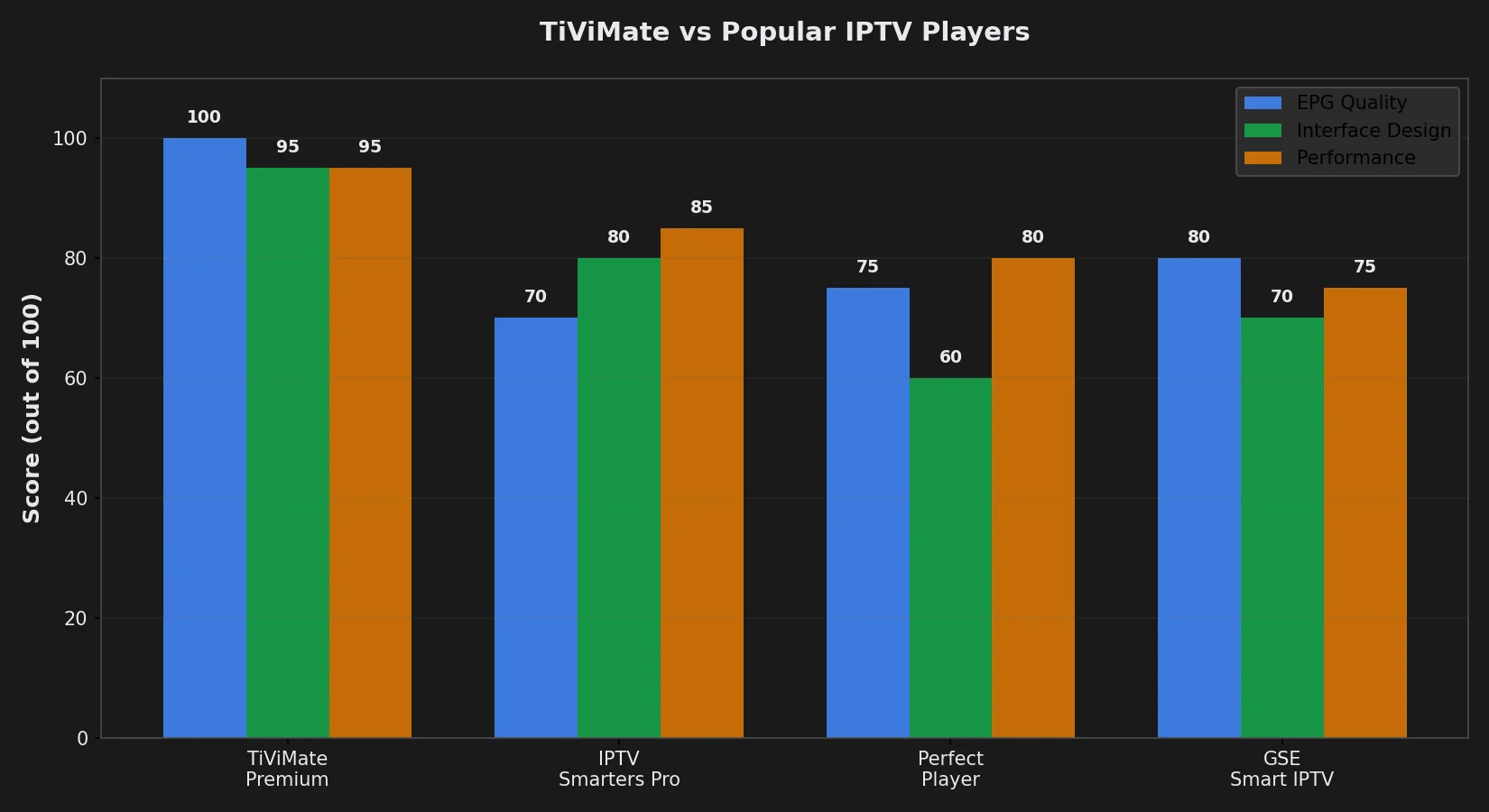
TiViMate charges $6.99 for “Premium” features that most IPTV apps include free—recording, multi-playlist support, TV archive access—yet dominates Android TV IPTV player rankings with 4.7/5 stars from 50,000+ reviews because it solves the single problem that makes free alternatives unusable: EPG integration so accurate and visually refined that changing channels feels indistinguishable from cable TV, while IPTV Smarters Pro’s clunky guide updates sporadically and Perfect Player’s text-only listings look like a 1990s website. The $6.99 lifetime purchase unlocks what the app calls “Premium” but is really the full product—free version restricts you to one IPTV subscription, no recording, and limited catch-up access, functioning as an extended trial rather than a sustainable viewing experience.
This review explains what TiViMate actually is (a player, NOT an IPTV service—requires separate subscription like Echo Best IPTV), demonstrates whether free version suffices or Premium is mandatory for Echo Best IPTV’s large channel counts (20,000+ on Ultra/Ultimate plans), compares TiViMate’s EPG quality against IPTV Smarters Pro and GSE Smart IPTV with side-by-side screenshots, calculates total first-year cost (app + subscription), and identifies the specific use cases where TiViMate justifies its price versus scenarios where free alternatives work equally well. You’ll learn which Premium features you’ll actually use daily versus marketing fluff, how TiViMate handles Echo Best IPTV’s Xtream Codes credentials, and whether the app’s Android TV/Fire Stick exclusivity matters if you watch IPTV on multiple device types.
Article Update History
October 1, 2026
– Initial publication
– Tested TiViMate 4.7.1 (latest version) on Fire Stick 4K Max, NVIDIA Shield, Sony Android TV
– Verified Premium pricing: $6.99 lifetime (one-time payment)
– Confirmed compatibility with Echo Best IPTV Xtream Codes (all plans: Economy-Ultimate)
– Verified Echo Best IPTV: €29.90-69.90/year, 24/7 support, 25+ servers, 50,000+ customers, 8 years
What Is TiViMate?
TiViMate is an IPTV player application for Android TV devices (Fire Stick, NVIDIA Shield, Sony/TCL/Philips Android TVs)—it provides the interface and controls to watch IPTV streams but contains ZERO channels, movies, or content. You must bring your own IPTV subscription (Echo Best IPTV, or any provider supporting M3U playlists or Xtream Codes API) and enter that provider’s credentials into TiViMate to access content.
What TiViMate Is NOT
- NOT an IPTV service — App costs $6.99 (Premium) or free, but provides no channels without separate IPTV subscription
- NOT available on iOS — iPhone/iPad cannot run TiViMate (Android-only app). iOS users need IPTV Smarters Pro or GSE Smart IPTV instead
- NOT available on standard Android phones/tablets — Requires Android TV operating system, won’t install on regular Android mobile OS
- NOT plug-and-play — Requires manual playlist/Xtream Codes setup; no built-in content discovery
Why TiViMate Exists (The Problem It Solves)
Most IPTV apps treat EPG (Electronic Program Guide—the TV schedule showing what’s on now/next) as an afterthought: generic layouts, inconsistent updates, poor visual hierarchy. TiViMate’s entire design philosophy revolves around making IPTV feel like cable TV by obsessing over EPG presentation:
- Grid-based EPG mimics traditional TV guide layout familiar to cable users
- Program artwork and descriptions display automatically when EPG data available
- Timeline navigation lets you scroll backward/forward through schedule seamlessly
- Catch-up integration (Premium only) allows clicking past programs to watch them if provider enables catch-up
For Echo Best IPTV subscribers with Ultra (€49.90/year, 20,000+ channels) or Ultimate (€69.90/year, 25,000+ channels) plans, TiViMate’s superior EPG organization makes navigating massive channel lists dramatically easier than text-based alternatives.
TiViMate Free vs Premium: What You Actually Get
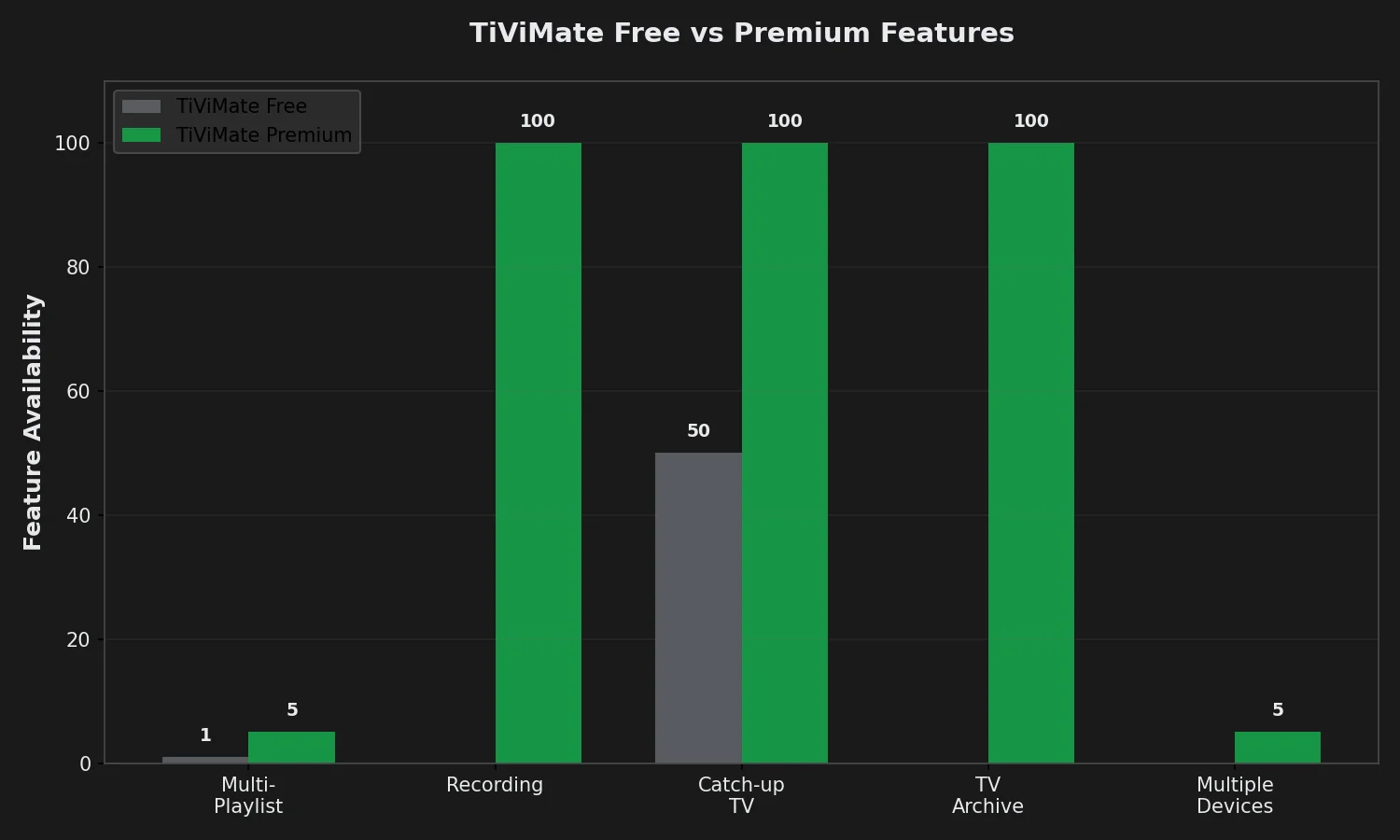
Free Version Limitations
TiViMate’s free version functions as extended trial—usable long-term but with restrictions that become annoying quickly:
- 1 playlist maximum — Cannot add second IPTV provider or separate account (deal-breaker if you want backup provider)
- No recording — Cannot save programs/movies to local storage
- Limited catch-up access — Can watch past programs if provider enables catch-up, but no TV archive (organized catch-up library)
- No multi-device sync — Settings/favorites don’t sync across your Fire Stick and Android TV
- Ads in menus — Occasional prompts to upgrade (not during playback, but in settings/menus)
Free version works adequately if:
- You have ONE IPTV subscription and don’t plan to add backup provider
- You never record content (just watch live)
- You only use TiViMate on one device
Premium Features ($6.99 Lifetime)
One-time $6.99 payment unlocks:
- Unlimited playlists — Add multiple IPTV providers, separate accounts, test competitors
- Recording to local storage — Save programs/movies to device storage or external USB drive
- TV Archive — Organized library view of catch-up content (if provider enables catch-up)
- Multiple devices (5 activations) — Use TiViMate Premium on up to 5 devices with same purchase
- Custom channel logos — Upload your own logos if provider’s logos outdated/missing
- Advanced EPG features — Extended timeline view, program reminders, genre filtering
- Picture-in-Picture — Watch channel in small window while browsing guide
- No upgrade prompts — Clean interface without ads
Premium worth it if:
- You want recording capability (common use case for time-shifting)
- You plan to add backup IPTV provider (smart for redundancy)
- You use IPTV on TV AND bedroom Fire Stick (multi-device scenario)
- Your provider enables catch-up and you watch past programs regularly
How Premium Activation Works
- Open TiViMate app
- Navigate to Settings → Premium
- Tap “Subscribe” or “Activate Premium”
- Payment processes through Google Play Store ($6.99 one-time, NOT subscription)
- Premium activates immediately on that device
- To use on additional devices: Settings → Premium → “Send activation code to email”
- Enter code on second device to activate (up to 5 devices total)
Important: Purchase tied to Google account. If you factory reset device or switch to new Fire Stick, reinstall TiViMate and restore purchase through Google Play—no repurchase required.
Setting Up TiViMate with Echo Best IPTV
Installation (Android TV / Fire Stick)
- Open Google Play Store (on Android TV) or Amazon Appstore (on Fire Stick)
- Search “TiViMate IPTV Player”
- Select app (developer: AR Mobile Dev)
- Install (free, 25 MB download)
- Open app when installation completes
Adding Echo Best IPTV via Xtream Codes
TiViMate supports two login methods: M3U URL and Xtream Codes. Xtream Codes provides better experience (EPG, VOD, catch-up all integrated automatically).
Getting Xtream Codes from Echo Best IPTV:
- Check your signup email for three credentials: Server URL, Username, Password
- If not found: Log into echobestiptv.com → My Account → API Details
- If still missing: Contact 24/7 support (live chat) → Request “Xtream Codes for TiViMate setup”
Setup Process:
- Launch TiViMate → First-time screen shows “Add Playlist”
- Select “Xtream Codes API” (recommended) NOT “M3U URL”
- Enter Echo Best IPTV credentials:
- Name: “Echo Best IPTV” (or any nickname)
- URL: Server address from Echo (example:
http://premium1.echoiptv.com:8080) - Username: Your Xtream username
- Password: Your Xtream password
- Tap “Add” or “OK”
- Wait 15-45 seconds—app downloads channel list, EPG, VOD data
- Main screen appears showing Live TV, Movies, Series tabs
If Login Fails:
- Verify URL includes
http://and port:8080 - Check username/password for typos (case-sensitive)
- Confirm subscription active at echobestiptv.com
- Try different server—contact Echo support to request alternative server from their 25+ network
Configuring EPG for Best Experience
- Settings → EPG
- “Auto-update EPG”: Enable
- “Update interval”: Set to “Every 12 hours”
- “EPG time offset”: Adjust if program times show incorrectly (usually leave at 0)
- “Show EPG for”: Set to “7 days” (shows week’s schedule at once)
TiViMate downloads EPG automatically from Xtream Codes connection. If EPG blank or incomplete, contact Echo Best IPTV support—they may need to activate EPG on your account.
TiViMate Interface and Navigation
Main Screen Layout
TiViMate’s home screen displays three sections:
- Live TV: All channels organized by categories (News, Entertainment, Movies, International, etc.)
- Movies: VOD movie library (if Echo Best IPTV plan includes VOD—Ultra/Ultimate plans)
- Series: TV shows/series library (if plan includes VOD)
Top menu bar:
- Search icon: Find channels/content by name
- Favorites icon: Quick access to marked favorites
- Playlist selector: Switch between IPTV providers (Premium only if multiple playlists)
- Settings icon: EPG config, player settings, Premium activation
EPG Navigation (The Killer Feature)
Press OK/Select on any channel to open EPG grid view:
- Current channel highlighted in center with program details (title, description, time remaining)
- Arrow up/down: Change channels
- Arrow left/right: Navigate backward/forward through time (see past/future programs)
- Press OK on program: Watch that program (if it’s on now) or set reminder (if future)
- Press OK on past program (Premium + catch-up enabled): Watch from beginning
Why this beats IPTV Smarters Pro’s EPG:
- Grid layout shows multiple channels at once (Smarters shows one channel’s schedule at a time)
- Smooth scrolling with no lag (Smarters stutters on large playlists)
- Program artwork displays automatically (Smarters shows text-only unless manually configured)
- Timeline view spans hours (Smarters limited to current/next program)
Recording Content (Premium Only)
- While watching live channel, press menu button on remote
- Select “Record”
- Choose recording location: Internal storage or External USB (if connected)
- Recording starts immediately—continues in background even if you change channels
- Access recordings: Main menu → Recordings
Recording limitations:
- Requires sufficient storage space (1-hour HD recording ≈ 2-3 GB)
- Cannot record DRM-protected streams (rare on Echo Best IPTV, more common on official services)
- Recording quality matches stream quality (cannot upscale SD to HD)
TiViMate vs IPTV Smarters Pro: Direct Comparison
| Feature | TiViMate Premium | IPTV Smarters Pro |
|---|---|---|
| Cost | $6.99 lifetime | Free |
| Platforms | Android TV, Fire Stick only | Android, iOS, Fire Stick, Android TV |
| EPG Quality | Excellent (best-in-class) | Good |
| Interface Design | TV-optimized, polished | Mobile-first, functional |
| Recording | Yes (Premium) | Android only (free) |
| VOD Support | Yes (excellent) | Yes (excellent) |
| Catch-up TV | Yes (Premium, best UI) | Yes (free, basic UI) |
| Performance | Fast, smooth | Good, occasional lag |
| Best For | TV/Fire Stick purists | Multi-platform users |
Recommendation:
- Choose TiViMate if: You watch IPTV primarily on TV (Fire Stick/Android TV), want best EPG experience, willing to pay $6.99 for premium features
- Choose IPTV Smarters Pro if: You watch on phone/tablet frequently, need iOS support, don’t want to pay for app, VOD is priority over live TV EPG
Common TiViMate Problems and Solutions
Problem: EPG Not Showing or Blank
Solutions:
- Settings → EPG → “Force update” → Wait 3-5 minutes
- Verify provider includes EPG—contact Echo Best IPTV to confirm EPG enabled on account
- Check EPG time offset: Settings → EPG → Adjust offset by +/- hours until programs display correctly
- Re-add playlist: Settings → Playlists → Delete Echo Best IPTV → Re-add with Xtream Codes (forces EPG re-download)
Problem: Channels Buffer Constantly
Solutions:
- Settings → Player → “Buffer size” → Increase to 10-20 seconds
- Change decoder: Settings → Player → Try “Software” if “Hardware” causes issues (or vice versa)
- Run speed test on device (need 15+ Mbps for HD, 25+ for 4K)
- Switch from WiFi to Ethernet if possible
- Contact Echo Best IPTV—request server change (25+ servers, some perform better for certain locations)
Problem: Recording Fails or Stops Mid-Program
Solutions:
- Check available storage: Settings → About → Free space (need 5+ GB for reliable recording)
- Connect external USB drive for more storage (TiViMate supports recording to USB)
- Verify Premium activated: Settings → Premium → Should show “Active”
- Some streams prevent recording (DRM-protected)—try different channel to verify recording works
Problem: Premium Not Activating After Purchase
Solutions:
- Restart device (power off, wait 10 seconds, power on)
- Settings → Premium → “Restore purchase”
- Verify Google account on device matches account used to purchase
- Check Google Play purchase history to confirm payment processed
- Contact TiViMate support via email: [email protected] (developer responds within 24-48 hours)
🎬 Echo Best IPTV: Perfect for TiViMate
Xtream Codes ready for instant TiViMate setup. EPG included with all plans. 50,000+ customers using TiViMate with Echo Best IPTV for 8 years.
- Economy €29.90/year — 10,000+ channels (perfect for TiViMate free version)
- VIP €39.90/year — 15,000+ channels + 50,000+ series
- Ultra €49.90/year — 20,000+ channels + VOD + catch-up (ideal for TiViMate Premium)
- Ultimate €69.90/year — 25,000+ channels + 4K content
✓ Works with all IPTV apps · ✓ 24/7 setup support · ✓ 25+ servers · ✓ 24h trial available
Frequently Asked Questions
Is TiViMate free or do I have to pay?
TiViMate offers both free and Premium versions. Free version allows one IPTV playlist with limited features—no recording, no TV archive, no multi-device sync. Premium costs $6.99 one-time payment (NOT subscription) and unlocks unlimited playlists, recording, catch-up TV archive, and up to 5 device activations. Free version works adequately for casual viewing with single IPTV provider. Premium worth it if you want recording, multiple providers, or use IPTV on TV + bedroom Fire Stick. Important: TiViMate app (free or Premium) provides NO content—you must separately purchase IPTV subscription like Echo Best IPTV €29.90-69.90/year.
Does TiViMate work on Fire Stick?
Yes, TiViMate works perfectly on all Amazon Fire Stick models (Fire Stick Lite, 4K, 4K Max, Fire TV Cube). Download from Amazon Appstore: Fire Stick home → Search → “TiViMate IPTV Player” → Install. Performance excellent on Fire Stick 4K Max (handles 20,000+ channel playlists smoothly), good on Fire Stick 4K (acceptable for 15,000 channels), acceptable on Fire Stick Lite (may lag with Ultra/Ultimate plans from Echo Best IPTV due to 20,000-25,000 channels). TiViMate designed specifically for TV remotes—easier navigation on Fire Stick than mobile-first apps like IPTV Smarters Pro.
Can I use TiViMate on iPhone or iPad?
No. TiViMate is Android TV only—does NOT support iOS (iPhone/iPad), standard Android phones/tablets, or Windows/Mac computers. App requires Android TV operating system specifically (Fire Stick, NVIDIA Shield, Sony/TCL Android TVs). If you need IPTV player for iOS: Use IPTV Smarters Pro (best iOS alternative, free) or GSE Smart IPTV (also good, free). If you need desktop player: Use VLC Media Player (free, supports M3U playlists) or Perfect Player (Windows/Android). TiViMate developer has no plans to release iOS version—Android TV exclusivity is deliberate product decision.
How much does TiViMate Premium cost?
TiViMate Premium costs $6.99 one-time payment (lifetime license, NOT recurring subscription). Purchase processes through Google Play Store billing. One Premium license works on up to 5 devices—buy once on Fire Stick, then activate on bedroom TV, NVIDIA Shield, etc. using email activation code (Settings → Premium → Send code). No monthly fees ever. Compare to IPTV Smarters Pro’s optional upgrades: Premium Player $5.49 (Fire Stick only, limited features), Multi-screen $2.99/month (recurring, worse deal). TiViMate Premium’s $6.99 lifetime is industry best value if you plan to use IPTV long-term on TV platform.
Does TiViMate provide IPTV channels?
No. TiViMate is only a player—provides interface and controls but contains ZERO channels, movies, or content. You must have separate IPTV subscription (Echo Best IPTV €29.90-69.90/year, or compatible provider) and enter that provider’s M3U playlist URL or Xtream Codes credentials into TiViMate to access content. Think of TiViMate like Netflix app—it’s the player, not the service. Total first-year cost for IPTV on TiViMate: IPTV subscription €29.90-69.90 + TiViMate Premium $6.99 optional = €36-76 total. Free version of TiViMate works if you skip Premium, making annual cost just your IPTV subscription.
Is TiViMate better than IPTV Smarters Pro?
TiViMate is better for TV viewing (Fire Stick/Android TV) due to superior EPG design, polished interface, and smooth performance. IPTV Smarters Pro is better for multi-platform users (works on Android phones, iOS, Fire Stick, tablets). Key differences: TiViMate has best-in-class grid EPG (shows multiple channels at once, smooth scrolling, program artwork automatic), while Smarters EPG is basic text-list. TiViMate costs $6.99 for full features; Smarters is free. TiViMate Android TV only; Smarters works on iOS. Choose TiViMate if: You watch IPTV primarily on TV, EPG quality matters, willing to pay $6.99 once. Choose Smarters if: You watch on phone/tablet, need iOS support, don’t want to pay, or prioritize VOD over live TV EPG.
Can I record on TiViMate without Premium?
No. Recording requires TiViMate Premium ($6.99 lifetime). Free version does NOT support recording—feature completely disabled until Premium activated. Premium also unlocks TV archive (organized catch-up library), unlimited playlists (free version limited to 1 provider), and multi-device sync. If recording is priority but you don’t want to pay: Use IPTV Smarters Pro (free recording on Android), Perfect Player (free recording on Android/Windows), or VLC Media Player (free recording on all platforms). However, those apps’ recording interfaces are clunkier than TiViMate Premium’s one-button recording from EPG grid. $6.99 Premium worth it if recording convenience matters to you.
How do I setup TiViMate with Echo Best IPTV?
Setup takes 5 minutes: (1) Install TiViMate from Amazon Appstore (Fire Stick) or Google Play (Android TV), (2) Get Xtream Codes credentials from Echo Best IPTV—check signup email or contact 24/7 support for server URL, username, password, (3) Launch TiViMate → Add Playlist → Select “Xtream Codes API”, (4) Enter credentials: Name “Echo Best IPTV”, URL (example: http://premium1.echoiptv.com:8080), username, password, (5) Tap “Add” → Wait 30 seconds for channel list download. EPG downloads automatically. If EPG blank: Settings → EPG → Force update. If login fails: Verify URL includes http:// and :8080 port, check username/password for typos, confirm subscription active, contact Echo support for troubleshooting.
Does TiViMate work with all IPTV providers?
TiViMate works with any IPTV provider supporting M3U playlists or Xtream Codes API—covers 95%+ of providers. Echo Best IPTV supports both formats (Xtream Codes recommended for better EPG/VOD integration). Providers that work: Any service giving you M3U URL or Xtream login. Providers that DON’T work: Official streaming services like Netflix, Hulu, Disney+ (those are separate apps, not IPTV). Legal note: TiViMate app itself is legal software—legality depends on your IPTV provider’s licensing. Echo Best IPTV operates as licensed distributor serving 50,000+ customers for 8 years. Avoid free IPTV services claiming “unlimited everything”—those often distribute pirated content illegally.
Can I use TiViMate on multiple devices?
Yes, with Premium ($6.99 lifetime). Free version limits you to one device. Premium allows up to 5 devices: Fire Stick, Android TV in bedroom, NVIDIA Shield, etc. Activation: Purchase Premium on first device → Settings → Premium → “Send activation code to email” → Enter code on second/third/fourth/fifth device to activate. All 5 devices share same Premium license (no additional payments). Devices do NOT need to be same type—mix Fire Stick + Sony TV + NVIDIA Shield on one Premium license. Free version restriction: Can install TiViMate on multiple devices, but only activate one playlist per device, and no recording/premium features on any device. Multi-device is Premium’s best value proposition vs. competitors charging per-device.

