
Cutting the cord no longer means giving up live TV. Global IPTV users passed 380 million in 2025, and the market is projected to reach $194 billion by 2030 (Grand View Research, 2025). If you have landed here, you are probably comparing plans, wondering what a fair price looks like, and trying to figure out how to actually get channels onto your screen without a technical headache.
This guide walks you through the four things that matter most before you pay for any IPTV subscription: the types available, what pricing actually buys you, how activation works step by step, and the checklist to pick the right provider on the first try. By the end, you will be able to compare offers with confidence and avoid the traps that catch most first-time buyers.
What you will learn:
– The four main IPTV subscription types and who each one suits
– Realistic pricing in the $10-25 per month range and what changes at each tier
– A step-by-step activation guide that works on any device
– A decision checklist to pick a provider you will still be happy with in six months
Time to read: 10 minutes
Difficulty: Beginner-friendly
What Is an IPTV Subscription?
IPTV stands for Internet Protocol Television. Instead of receiving channels through a cable line or satellite dish, your TV or device streams them over your regular internet connection. A subscription gives you a login and an M3U playlist link (or an app) that unlocks live channels, video-on-demand libraries, and often TV catch-up.
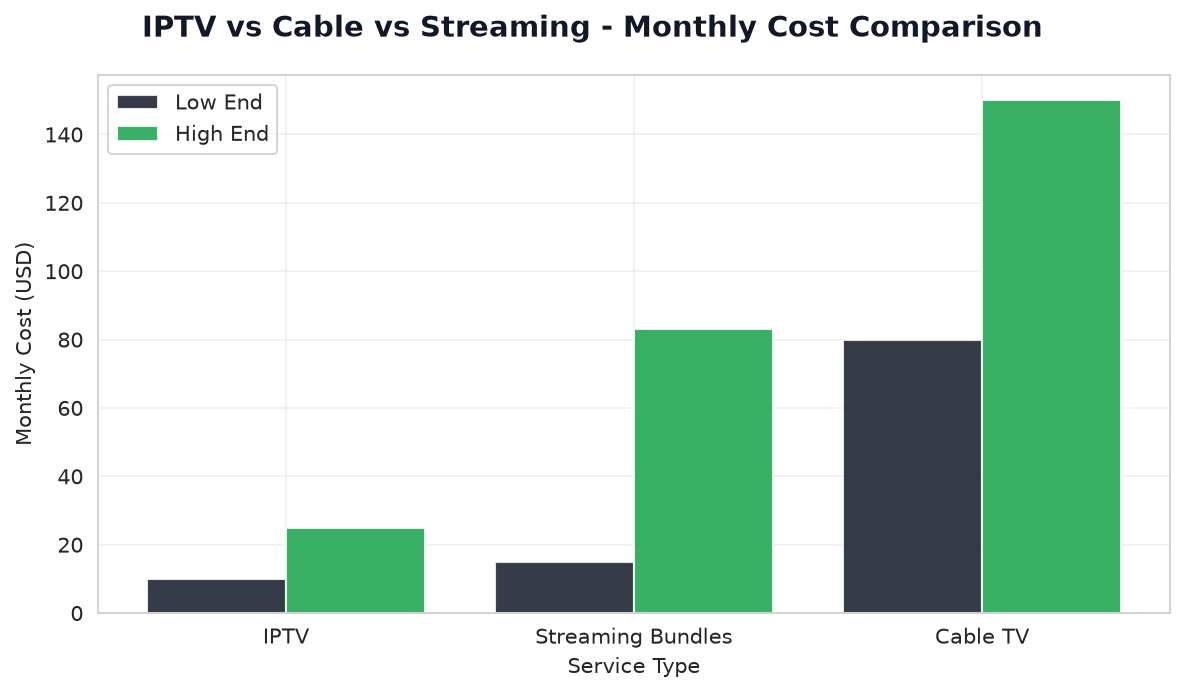
The mechanics matter because they explain the price. There is no dish to install, no coaxial cable, and no regional monopoly setting rates. That is why IPTV subscriptions typically cost $10-25 per month while traditional cable in the US averages $83 per month (Leichtman Research Group, 2025).
The 4 Main Types of IPTV Subscriptions
Not every “IPTV subscription” is the same product. Choosing the wrong type is the single biggest reason people cancel within the first month.
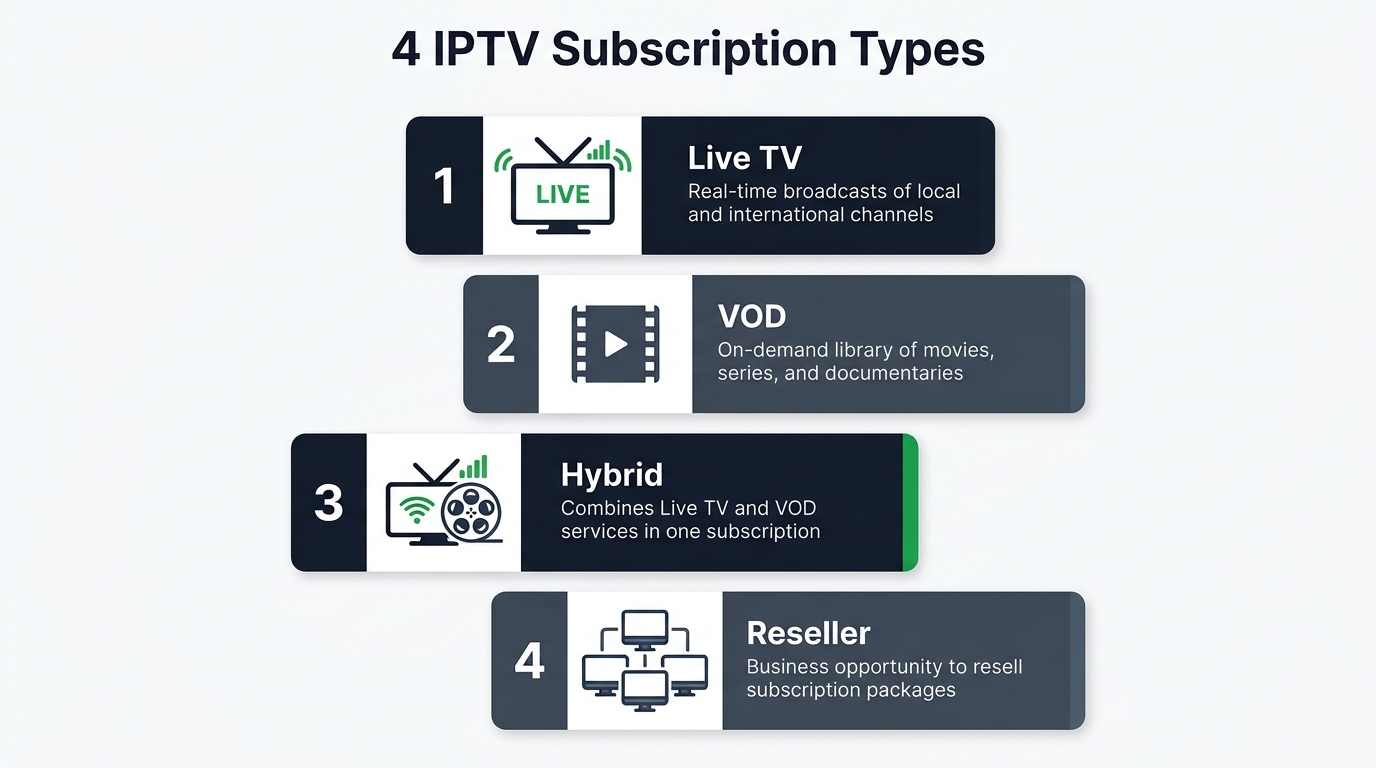
1. Live TV IPTV
The classic model. You get a large channel list (usually 5,000-20,000 channels) streamed in real time, organized by country or category. Best for sports fans, news watchers, and anyone replacing a cable bundle.
2. Video-on-Demand (VOD) IPTV
Focused on movies and series libraries rather than live channels. Think of it as a private streaming catalog. Best if you rarely watch anything live and mostly binge-watch.
3. Hybrid IPTV (Live + VOD)
The most popular option in 2026. Combines a full channel list with a VOD library and often TV series in seasons and episodes. Best for households where different people want different things.
4. Restream / Reseller Panels
These are wholesale credit-based accounts sold by resellers. You get lines to distribute or use across multiple devices. Best for small business owners (bars, hotels) or families managing several TVs. Not recommended for casual viewers.
IPTV Subscription Comparison Table
Here is how the four types stack up on the criteria buyers actually care about:
| Type | Typical Price | Channels | VOD Library | Best For | Devices |
|---|---|---|---|---|---|
| Live TV | $10-15/mo | 8,000-15,000 | Small or none | Sports and news fans | 1-2 |
| VOD Only | $8-12/mo | 0-500 | 30,000+ titles | Movie and series bingers | 1-2 |
| Hybrid | $15-25/mo | 15,000-25,000 | 40,000-80,000 titles | Whole households | 1-3 |
| Reseller Panel | $50-150/mo | Full catalog | Full catalog | Multi-screen or resale | 5-100+ |
Prices reflect current market averages across major providers in early 2026. Annual plans typically cut the effective monthly rate by 40-50%.
IPTV Pricing Explained: What $10-25/Month Actually Buys
Pricing is where most buyers get confused, because the same $20 can buy a great service or a poor one depending on what is bundled. Break it down by tier:
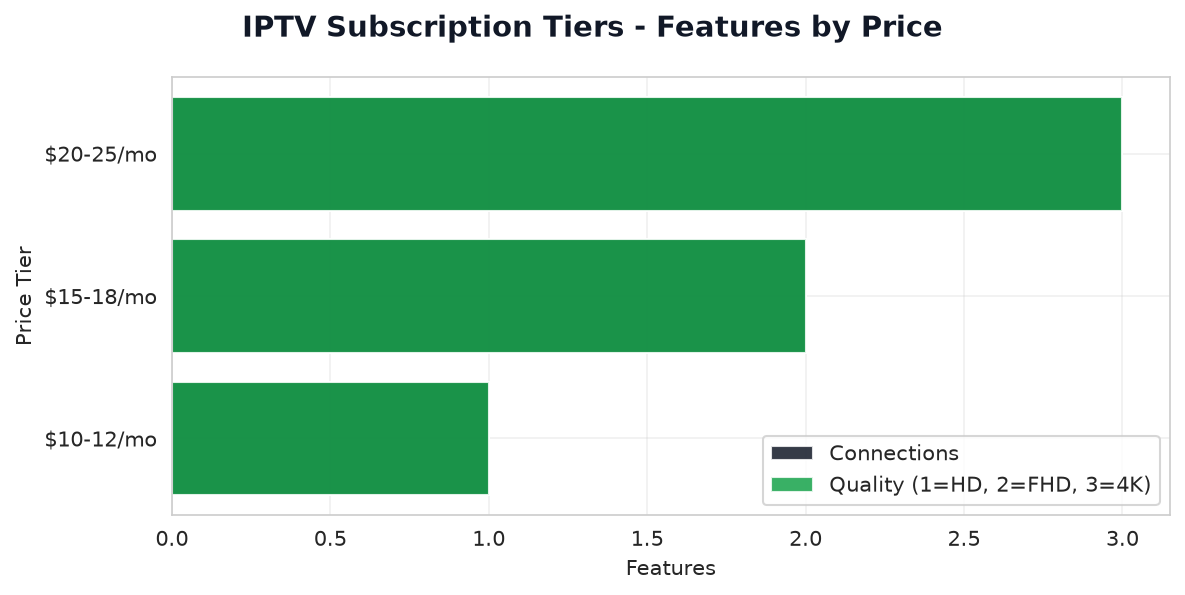
The $10-12/Month Tier
At this level, you are getting a functional live TV service, usually one connection, HD (1080p) streams, and a modest VOD library. Server capacity is often shared aggressively, so evening rush hours can be rougher. Annual billing tends to be the only way to hit this price. Good for a secondary TV or a single-user household.
The $15-18/Month Tier
The sweet spot for most buyers. You typically get 2 connections, Full HD with some 4K channels, EPG (electronic program guide) support, and a serious VOD library. Support is usually faster, and uptime commitments become realistic. This is where the best IPTV subscription plans tend to sit for households with two viewers.
The $20-25/Month Tier
Premium territory. Expect 3+ simultaneous connections, dedicated 4K servers, priority customer support, extended catch-up (7-14 days of TV rewind), and adult content sections if wanted. Multi-region channel packs (US, UK, EU, Latin America, MENA) are all included. Worth it for families or expat households watching multiple regions.
What Should Set Off Warning Bells
- Prices under $6/month for a lifetime deal (server almost always disappears within weeks)
- No trial available in any form
- Payment only via cryptocurrency with no invoice
- Vague answers when you ask about connection counts or 4K support
Industry reports consistently show that ultra-low-priced services (under $8/month) experience significantly higher failure rates within the first 90 days compared to moderately-priced providers in the $15-20 range. Cheapest is almost never the best value.
How to Activate Your IPTV Subscription: Step-by-Step
Activation is the step most guides skip over, and it is where new buyers give up. The process below works whether you are on a Smart TV, Firestick, Android box, iOS device, or PC.
Prerequisites
Before you start, have these ready:
– A stable internet connection of at least 25 Mbps for Full HD (50 Mbps for 4K)
– The M3U URL, Xtream Codes login (username, password, portal URL), or activation code sent by your provider
– A supported IPTV player app installed on your device
Step 1: Confirm Your Subscription Credentials
After purchase, most providers email a “Line Details” or “Activation” message. Look for one of three credential types:
- M3U URL — a long link ending in
.m3uor.m3u8 - Xtream Codes — a username, password, and portal address (e.g.,
http://server.example:8080) - Activation code — a short numeric or alphanumeric code used inside a branded app
Save the email. You will need it every time you re-install the app on a new device.
Step 2: Install a Compatible IPTV Player
Popular free and paid options in 2026:
– Smarters Pro — works on Firestick, Android, iOS, Smart TVs
– TiviMate — best-in-class EPG, Android TV and Google TV
– IPTV Smarters Player — cross-platform, free
– GSE Smart IPTV — iOS-friendly
Install one from the official app store on your device. Avoid sideloaded APKs from unofficial sources unless the provider explicitly requires it.
Step 3: Enter Your Login Details
Open the player and select “Add New User” or “Add Playlist.” Choose the input type that matches your credentials (M3U URL or Xtream Codes API).
- For Xtream: paste the portal URL, username, and password exactly as provided
- For M3U: paste the full URL, then set the EPG URL if a separate one was supplied
Give the profile a name you will recognize (e.g., “Home IPTV”).
Step 4: Wait for the Playlist to Load
The first sync usually takes 30 seconds to 3 minutes depending on catalog size. During this window, the app is downloading the channel list and the EPG. Do not close the app. If it hangs beyond 10 minutes, your credentials are likely wrong or the server is temporarily offline.
Step 5: Test Channels, VOD, and EPG
Once loaded, run three quick checks:
- Channel test: Open 3 channels from different categories. Each should start within 5 seconds and stay smooth for 60 seconds.
- VOD test: Play a movie from the library. Look for a clear thumbnail, working play/pause, and no watermark burn-in.
- EPG test: Confirm the program guide shows correct current and upcoming programs for at least the main channels.
If all three pass, activation is complete. If any fail, contact support before requesting a refund — it is almost always a fix, not a broken service.
Common Activation Mistakes
- Typos in the portal URL — the trailing port number (
:8080or:8000) is required - Wrong app for the credential type — some apps only accept M3U, others only Xtream
- VPN blocking the server — if you use a VPN, try connecting to a server in the country the provider is based in
- Firestick sleep mode — set the device to never sleep during setup
How to Choose the Right IPTV Subscription: 7-Point Checklist
A shiny channel count means nothing if the provider disappears in 30 days. Use this checklist before paying.
1. Does It Offer a Trial?
Any provider confident in their service offers at least a 24-hour trial. If they refuse, walk away. Reputable providers give you 6-72 hours before you commit real money.
2. What Server Region Do You Connect To?
Servers physically close to you deliver lower buffering. If you are in North America, look for providers with US or Canadian servers. In Europe, prefer Netherlands, Germany, or UK-hosted infrastructure. Ask before you buy — good providers answer within an hour.
3. Is There a Real Refund Policy?
Look for a written refund policy on the site itself, not just in a chat message. A 7-day money-back window is standard in 2026. No policy or a “no refunds” clause hidden in the terms is a red flag.
4. How Many Connections Do You Actually Need?
One “connection” equals one simultaneous device. A family of four watching in three different rooms needs 3-4 connections. Paying for more than you need is waste; paying for fewer causes screen freezes when someone else logs on.
5. Does It Support Your Device?
Your existing hardware matters. Check compatibility with Firestick 4K, Apple TV, Nvidia Shield, LG webOS, Samsung Tizen, and your specific Android box before purchase.
6. What Is the Payment Method?
Legitimate providers accept credit cards, PayPal, or Stripe. Crypto-only providers with no invoice are riskier because you have zero recourse if the service dies. This is not a moral judgment on crypto — it is a practical note about refund pathways.
7. What Do Real Users Say This Month?
Check Trustpilot, Reddit’s r/IPTV, and independent review sites within the last 30 days. IPTV services can degrade in quality quickly, so a glowing review from 2023 tells you almost nothing about 2026 performance.
Legal and Safety Notes
IPTV technology itself is fully legal. The key factor is whether your chosen provider has proper licensing for the content they distribute. Legitimate providers exist across various price points, from budget options to premium services.
When evaluating any IPTV service, focus on these safety practices:
– Pay with a method that has chargeback protection (credit card, PayPal)
– Verify the provider has transparent business information and support
– Use a reputable VPN to protect your privacy on your ISP’s network
– Avoid services that only accept cryptocurrency with no invoice
– Check for independent user reviews from the past 30 days
Security researchers have documented elevated malware and fraud risks associated with unlicensed streaming services, particularly those priced significantly below market rates. Choose providers with established reputations and transparent business practices.
Frequently Asked Questions
How much should an IPTV subscription cost in 2026?
Expect $10-25 per month for a quality service, with the sweet spot at $15-18. Prices under $8 usually signal an unstable server or short-lived reseller.
Do I need a VPN for IPTV?
You do not technically need one, but a VPN is strongly recommended for privacy on public or shared connections. Choose a VPN that does not throttle streaming speeds.
Can I use IPTV on my Smart TV without extra hardware?
Yes, if your Smart TV supports a compatible IPTV player app. Samsung and LG models from 2021 onward run Smarters Pro natively. Older TVs need a Firestick, Chromecast with Google TV, or Android box.
What is the difference between M3U and Xtream Codes?
M3U is a playlist file format. Xtream Codes is an API that also delivers a playlist but with faster refreshes, EPG sync, and better parental controls. Xtream Codes credentials work in more modern apps.
Are lifetime IPTV subscriptions worth it?
Rarely. Servers get shut down, providers rebrand, and “lifetime” almost never means what it sounds like. A monthly or annual plan from a stable provider is safer.
How many channels do I really need?
Most viewers watch 15-30 channels regularly. A subscription offering 8,000 channels is not four times better than one with 2,000 — it is often just padded with duplicates. Focus on the channels you actually watch.
What internet speed do I need for IPTV?
At minimum, 25 Mbps for smooth Full HD and 50 Mbps for 4K. Wired Ethernet beats Wi-Fi every time for consistency.
Ready to Choose Your IPTV Subscription?
You now know the four subscription types, what fair pricing looks like, exactly how activation works, and the seven-point checklist to pick a provider you will still love in six months. The next step is putting it into practice.
Start with a trial, run the three-test check on channels, VOD, and EPG, and only commit to an annual plan once you have watched a full evening on the service without issues. If the provider fails any test, move on — there are plenty of good options in the $15-18 range.
Ready to compare vetted providers? Explore our top-rated IPTV subscriptions for 2026 with current pricing, trial links, and verified user reviews at Echo Best IPTV. Every provider recommendation has passed the seven-point checklist in this guide.

