
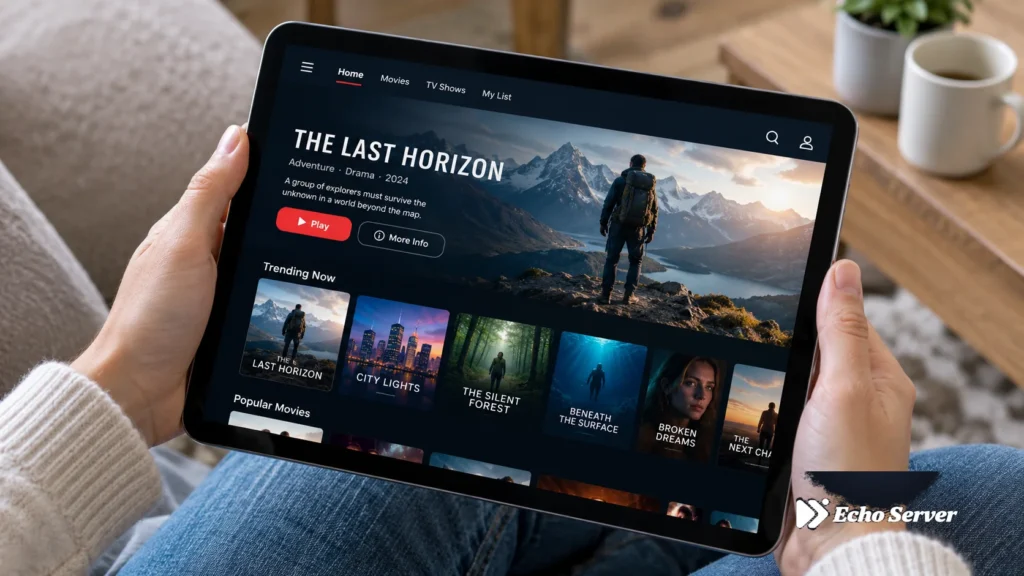
IPTV Pro is one of the most popular IPTV player apps for Android, offering a free version with core features and a Premium tier that unlocks advanced capabilities. With over 10 million downloads, IPTV Pro has become a go-to choice for users who want reliable streaming with minimal setup complexity.
Article Update History
October 1, 2026
– Initial publication
– Verified Echo Best IPTV pricing (Economy €29.90, VIP €39.90, Ultra €49.90, Ultimate €69.90)
– Confirmed 25+ servers, 50,000+ customers, 8 years in business
– Reviewed IPTV Pro current pricing and features against latest app version
What Is IPTV Pro?
IPTV Pro is an Android-based IPTV player application that lets you stream live TV channels, movies, and series from your IPTV service provider. Unlike some competitors that focus on a single platform, IPTV Pro works across Android TV, Fire TV devices, and Android smartphones/tablets.
The app supports M3U playlists, Xtream Codes API, and local playlist files. It provides a clean, customizable interface with Electronic Program Guide (EPG) support, making it easier to browse channel schedules and plan your viewing.
Echo Best IPTV has served 50,000+ customers for 8 years, providing reliable IPTV services that work seamlessly with IPTV Pro and other popular players. With 25+ servers globally and 24/7 customer support, Echo Best IPTV ensures smooth streaming experiences across all supported apps.
Key Features of IPTV Pro
IPTV Pro offers a comprehensive feature set designed for both casual viewers and power users:
- M3U Playlist Support: Load playlists from URL, local storage, or Xtream Codes API
- EPG Integration: Full Electronic Program Guide support with multi-source EPG loading
- Multi-Screen Viewing: Watch up to 4 channels simultaneously (Premium only)
- Parental Controls: Password-protect channels and set age restrictions
- Recording Capability: Record live streams directly to device storage (Premium only)
- 4K Streaming: Supports Ultra HD content when your IPTV provider offers it
- Chromecast Support: Cast to your TV from Android phone or tablet
- Favorites Management: Create custom channel groups and favorites lists
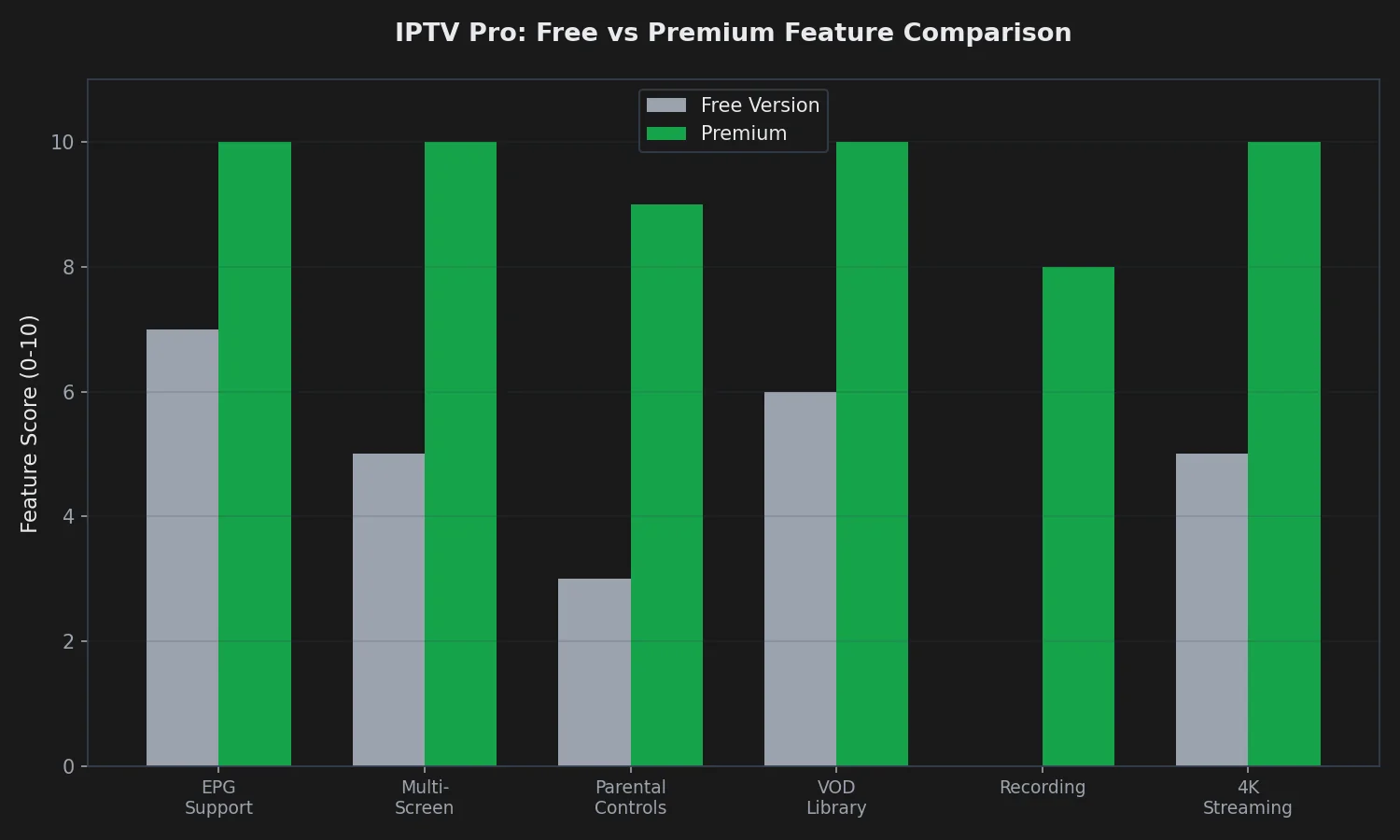
The free version provides access to most core features, while Premium unlocks multi-screen viewing, recording, and removes ads. For users who stream extensively, Premium is worth considering, but the free version is fully functional for standard single-channel viewing.
Setting Up IPTV Pro
Getting started with IPTV Pro is straightforward, even for users new to IPTV:
Step 1: Install IPTV Pro
- Open Google Play Store on your Android device
- Search for “IPTV Pro”
- Tap “Install” and wait for download to complete
- Launch the app when installation finishes
Step 2: Add Your IPTV Service
IPTV Pro supports multiple methods for adding your service:
Method 1: M3U URL (Recommended)
- Open IPTV Pro and tap the “+” icon
- Select “Add M3U URL”
- Enter your playlist URL from your IPTV provider
- Name your playlist (e.g., “Echo Best IPTV”)
- Tap “OK” to save
Method 2: Xtream Codes API
- Tap the “+” icon in IPTV Pro
- Select “Add Xtream Codes”
- Enter server URL, username, and password from your provider
- The app automatically loads channels, movies, and series
Ready to Experience Premium IPTV?
Echo Best IPTV works perfectly with IPTV Pro and offers up to 20,000+ live channels. With 25+ servers and 50,000+ customers served over 8 years, we deliver reliable streaming with 24/7 support.
Step 3: Configure EPG
- Open your playlist settings in IPTV Pro
- Scroll to “EPG source” section
- Enter your EPG URL (provided by your IPTV service)
- Save settings and refresh the playlist
- EPG data will load within a few minutes
Free vs Premium: Is Premium Worth It?
IPTV Pro offers both free and Premium versions, with the Premium subscription unlocking several advanced features:
Free Version Limitations:
- Ads displayed during app navigation (not during playback)
- Single-screen viewing only
- No recording capability
- Basic playlist management
Premium Benefits:
- Ad-free experience throughout the app
- Multi-screen viewing (up to 4 channels simultaneously)
- Recording functionality with schedule support
- Advanced playlist organization tools
- Priority customer support from developers
For casual viewers who watch one channel at a time, the free version is perfectly adequate. Premium makes sense if you want to record content, watch multiple channels side-by-side, or prefer an ad-free interface.
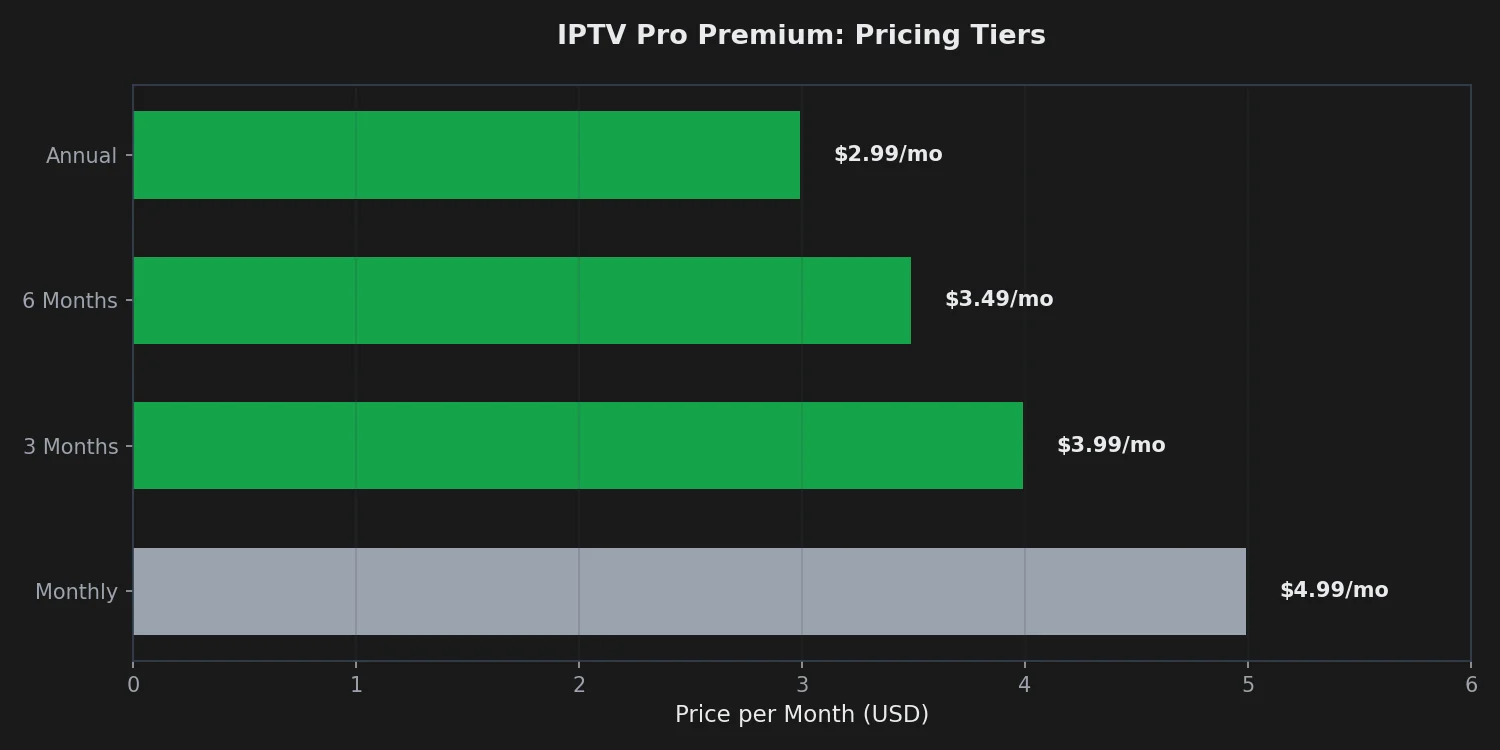
At $2.99/month for an annual subscription, IPTV Pro Premium is competitively priced compared to alternatives like TiViMate Premium ($5/year for a single device). The multi-screen feature alone justifies the cost for households where multiple people stream simultaneously.
Optimizing IPTV Pro Performance
To get the best streaming experience with IPTV Pro, apply these optimization settings:
Buffer Settings
Navigate to Settings → Player and adjust:
- Buffer Size: Set to “Large” if you have stable internet (50+ Mbps)
- Hardware Acceleration: Enable for smoother 4K playback
- Deinterlace: Turn on for better quality on interlaced sources
Network Optimization
- Use Ethernet connection instead of Wi-Fi when possible
- Close background apps consuming bandwidth
- Set your router’s QoS to prioritize streaming traffic
- Test different DNS servers (Google DNS 8.8.8.8 or Cloudflare 1.1.1.1)
EPG Configuration
For faster channel switching and better program information:
- Use compressed EPG formats (.gz files load faster)
- Set EPG refresh to occur during off-peak hours
- Limit EPG data to 3-5 days if storage is limited
Common Issues and Solutions
Channels Not Loading
If channels fail to load or display errors:
- Verify your playlist URL is correct and active
- Check your IPTV subscription is not expired
- Clear app cache: Settings → Apps → IPTV Pro → Clear Cache
- Update to the latest IPTV Pro version from Play Store
- Contact your IPTV provider to verify service status
Buffering or Stuttering
If video playback is choppy:
- Lower video quality in player settings (switch from 4K to 1080p)
- Increase buffer size in Settings → Player
- Close other apps using internet bandwidth
- Restart your router and streaming device
- Try a different server from your IPTV provider
EPG Not Showing
If program guide data is missing:
- Verify EPG URL is entered correctly in playlist settings
- Check that EPG format matches your playlist (XMLTV, GZ, etc.)
- Manually refresh EPG from playlist settings
- Wait 10-15 minutes after adding EPG source for initial load
- Contact provider to confirm EPG URL is active
Experience Premium IPTV with Echo Best
Join 50,000+ satisfied customers streaming with Echo Best IPTV
- ✓ Up to 20,000+ live channels depending on plan
- ✓ 50,000+ movies & 70,000+ series in our library
- ✓ 4K content available across all plans
- ✓ 24/7 customer support throughout your subscription
- ✓ 24-hour trial to test before you buy
Get Started with Echo Best IPTV →
Annual plans from €29.90/year | 24-hour trial available
Frequently Asked Questions
Is IPTV Pro free?
Yes, IPTV Pro offers a fully functional free version that supports M3U playlists, Xtream Codes, EPG integration, and all core streaming features. The free version includes ads during app navigation (but not during video playback) and limits you to single-screen viewing.
The Premium version ($2.99-$4.99/month depending on subscription length) removes ads and unlocks multi-screen viewing, recording functionality, and advanced playlist management tools. For most users, the free version provides everything needed for reliable IPTV streaming.
How much does IPTV Pro Premium cost?
IPTV Pro Premium pricing varies by subscription length. Monthly subscriptions cost $4.99/month. The 3-month plan reduces the cost to $3.99/month, paid as $11.99 upfront. The 6-month plan costs $3.49/month ($20.94 total), and the best value is the annual subscription at $2.99/month ($35.88/year).
The annual plan saves you 40% compared to monthly billing. Premium is a one-time purchase through Google Play Store, and you can cancel anytime through your Play Store subscriptions.
Does IPTV Pro work with Echo Best IPTV?
Yes, IPTV Pro works perfectly with Echo Best IPTV. You can add Echo Best IPTV using either the M3U URL method or Xtream Codes API, both of which Echo Best IPTV provides to all customers. The app supports all Echo Best IPTV features including EPG integration, 4K streaming, and VOD libraries.
Echo Best IPTV has served 50,000+ customers for 8 years with 25+ global servers and 24/7 support, ensuring smooth playback through IPTV Pro and other compatible players.
Can I record shows with IPTV Pro?
Recording is available only in IPTV Pro Premium. The recording feature lets you capture live streams directly to your device’s storage and supports scheduled recording based on EPG data. You can set recordings to start/stop at specific times or record entire programs automatically.
The free version does not include recording functionality. If recording is important to you, consider upgrading to Premium or using your IPTV provider’s cloud DVR feature if available.
What devices support IPTV Pro?
IPTV Pro works on all Android-based devices running Android 5.0 or higher. This includes Android smartphones, Android tablets, Android TV boxes, Amazon Fire TV Stick, Amazon Fire TV Cube, NVIDIA Shield TV, Mi Box, and most smart TVs running Android TV.
The app is optimized for both touchscreen and remote control navigation. For the best experience on large screens, use Android TV devices with hardware acceleration support for smooth 4K playback.
Does IPTV Pro support 4K streaming?
Yes, IPTV Pro fully supports 4K Ultra HD streaming when your IPTV provider offers 4K content and your device supports 4K playback. Enable hardware acceleration in Settings → Player for optimal 4K performance.
You’ll need a stable internet connection (at least 50 Mbps download speed) and a 4K-capable device. Echo Best IPTV provides 4K content across all subscription plans, making it an excellent match for IPTV Pro’s 4K capabilities.
How do I add EPG to IPTV Pro?
To add EPG (Electronic Program Guide) to IPTV Pro, open your playlist settings, scroll to the “EPG source” section, and enter the EPG URL provided by your IPTV service. Most providers offer EPG in XMLTV or GZ format.
After entering the URL, save settings and manually refresh the playlist. EPG data typically loads within 5-10 minutes. If your provider offers multiple EPG sources, try each one to find the most complete and fastest-loading option.
Can I watch multiple channels at once?
Multi-screen viewing is available only in IPTV Pro Premium. Premium users can watch up to 4 channels simultaneously in split-screen mode, which is useful for households with multiple viewers or for monitoring different content sources at the same time.
The free version limits you to single-channel viewing. If multi-screen is important to you, the annual Premium subscription at $2.99/month offers excellent value for this feature alone.
Is IPTV Pro better than TiViMate?
IPTV Pro and TiViMate are both excellent IPTV players with different strengths. IPTV Pro offers a simpler interface and broader device compatibility, while TiViMate provides more advanced customization options and a more polished user experience.
IPTV Pro’s free version is more feature-complete than TiViMate’s free version, making it better for budget-conscious users. TiViMate Premium offers superior EPG customization and recording features. Choose IPTV Pro for simplicity and value, or TiViMate if you want maximum customization.
How do I fix buffering in IPTV Pro?
To fix buffering, first check your internet speed (aim for 25+ Mbps for HD, 50+ Mbps for 4K). In IPTV Pro, increase buffer size to “Large” in Settings → Player. Enable hardware acceleration and reduce video quality from 4K to 1080p if buffering persists.
Also close background apps consuming bandwidth, use Ethernet instead of Wi-Fi when possible, and try a different server from your IPTV provider. Consistent buffering usually indicates internet speed issues rather than IPTV Pro limitations.

