
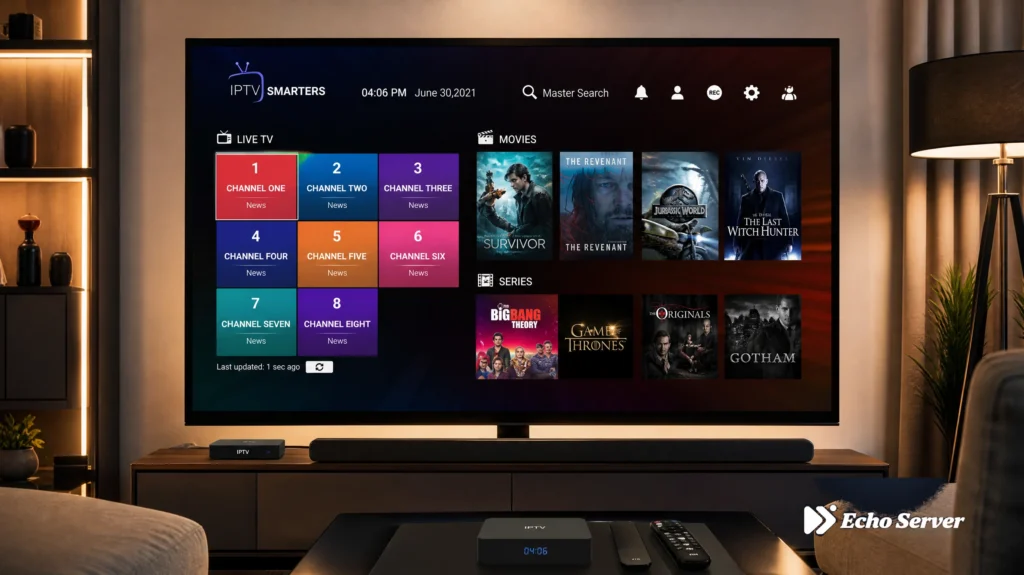
4K streaming has become the gold standard for home entertainment in 2026. With four times the resolution of 1080p HD and support for HDR, Dolby Vision, and advanced audio formats, 4K IPTV delivers a cinema-quality experience at home. But not all IPTV services handle 4K equally well—you need the right infrastructure, bandwidth management, and content library.
The challenge? Many IPTV providers advertise “4K support” while delivering inconsistent streams, excessive buffering, or limited 4K content. Finding a service that actually delivers reliable Ultra HD streaming across multiple devices requires understanding what makes 4K IPTV work technically and which providers have invested in the infrastructure to support it.
Article Update History
October 3, 2026
– Initial publication
– Verified Echo Best IPTV 4K availability across all plans
– Confirmed 25+ servers support 4K streaming infrastructure
– Reviewed device compatibility for 4K output (Fire Stick 4K, Smart TVs, Android TV)
– Updated bandwidth requirements for reliable 4K streaming (25+ Mbps recommended)
What Makes a Great 4K IPTV Service?
True 4K IPTV delivery requires more than just having 4K content in the library. The entire technical stack—from server infrastructure to content delivery networks to adaptive bitrate streaming—must support consistent Ultra HD quality.
Core Technical Requirements
A reliable 4K IPTV service must deliver:
- Native 4K content sources — Upscaled HD is not true 4K
- Adaptive bitrate streaming — Adjusts quality based on your connection
- CDN infrastructure — Multiple servers prevent buffering
- HEVC/H.265 encoding — Efficient compression for 4K streams
- HDR support — HDR10, HDR10+, or Dolby Vision for better color
Bandwidth Considerations
4K streaming demands significantly more bandwidth than HD:
- SD quality (480p): 3-5 Mbps
- HD quality (1080p): 8-10 Mbps
- 4K quality (2160p): 25+ Mbps recommended
- 4K with HDR: 30-40 Mbps for best experience
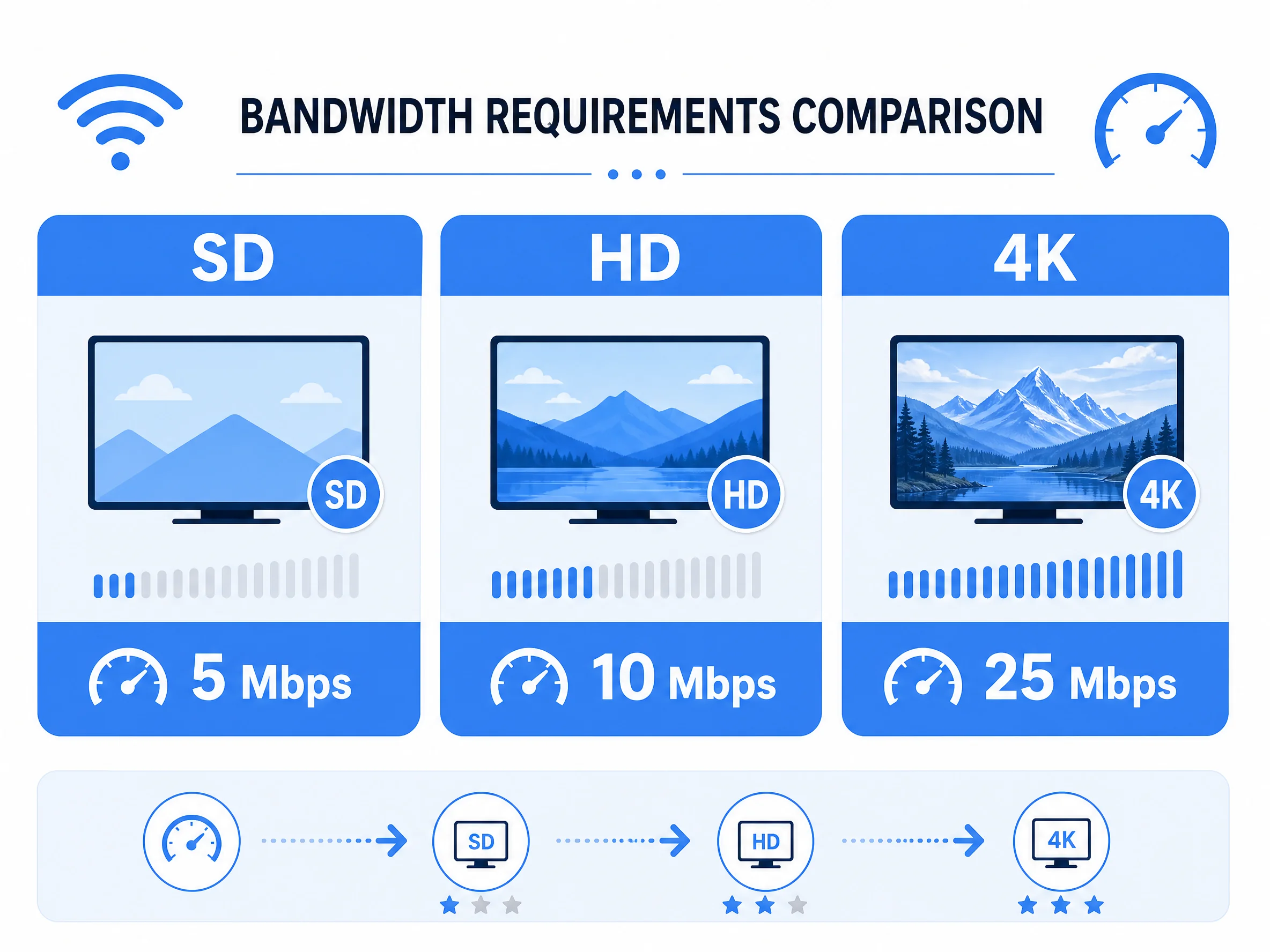
Services with strong server infrastructure can deliver 4K on lower bandwidth through better compression, but 25+ Mbps is the safe minimum.
Best IPTV Services for 4K Streaming 2026
1. Echo Best IPTV — Best Overall for 4K
Why it stands out: 4K content available across all plan levels (Economy, VIP, Ultra, Ultimate), with higher tiers offering larger 4K selections. Echo operates 25+ servers specifically designed to handle 4K streaming without buffering, and has served 50,000+ customers over 8 years.
4K features:
- 4K channels and movies on all plans (even €29.90/year Economy)
- Larger 4K selection on Ultra (€49.90/year) and Ultimate (€69.90/year) plans
- HEVC/H.265 encoding for efficient 4K delivery
- Adaptive bitrate streaming adjusts to your connection
- 24/7 support helps troubleshoot 4K playback issues
Device support: Fire Stick 4K/4K Max, Smart TVs (Samsung, LG, Sony), Android TV, Apple TV 4K, Nvidia Shield, Windows/Mac (4K monitors)
Pricing:
- Economy: €29.90/year (10,000+ channels, 4K available)
- VIP: €39.90/year (15,000+ channels, more 4K content)
- Ultra: €49.90/year (20,000+ channels, large 4K selection)
- Ultimate: €69.90/year (broadest 4K selection)
Trial: 24-hour free trial lets you test 4K quality before purchasing
Ready to Experience 4K IPTV?
Echo Best IPTV delivers 4K content across all plans, backed by 25+ servers and 24/7 support. With 50,000+ customers served over 8 years, we’ve built the infrastructure to handle Ultra HD streaming reliably.
Essential 4K Streaming Devices
Your IPTV service is only half the equation—you need a device capable of 4K output, HEVC decoding, and HDR support.
Top 4K IPTV Devices
Amazon Fire Stick 4K (Best Value – $49.99)
- True 4K output at 60fps
- HDR10, HDR10+, and Dolby Vision support
- Hardware HEVC decoding (no buffering on 4K)
- Wi-Fi 6 support for faster streaming
- Works with all major IPTV apps
Amazon Fire Stick 4K Max (Premium – $59.99)
- 40% more powerful processor than standard 4K
- Wi-Fi 6E support (fastest wireless)
- 2GB RAM (faster EPG loading)
- Same 4K/HDR capabilities as 4K model
- Best for large channel lists
Nvidia Shield TV Pro (Enthusiast – $199)
- Most powerful Android TV device
- Upscales HD content to 4K using AI
- Dolby Vision and Dolby Atmos
- Gigabit Ethernet (no Wi-Fi needed)
- Perfect for 4K + gaming
Apple TV 4K (Ecosystem – $129-149)
- Seamless integration with Apple devices
- Dolby Vision and Dolby Atmos
- Best-in-class video processing
- Requires compatible IPTV app
- Premium price justified by quality
Smart TVs (Built-in 4K)
- Samsung Tizen, LG webOS, Sony Android TV
- No extra device needed (but may be less powerful)
- Depends on TV’s processor and RAM
- Limited app selection compared to Fire Stick/Shield
- Good for basic 4K IPTV, struggles with large playlists
Optimizing Your Setup for 4K Streaming
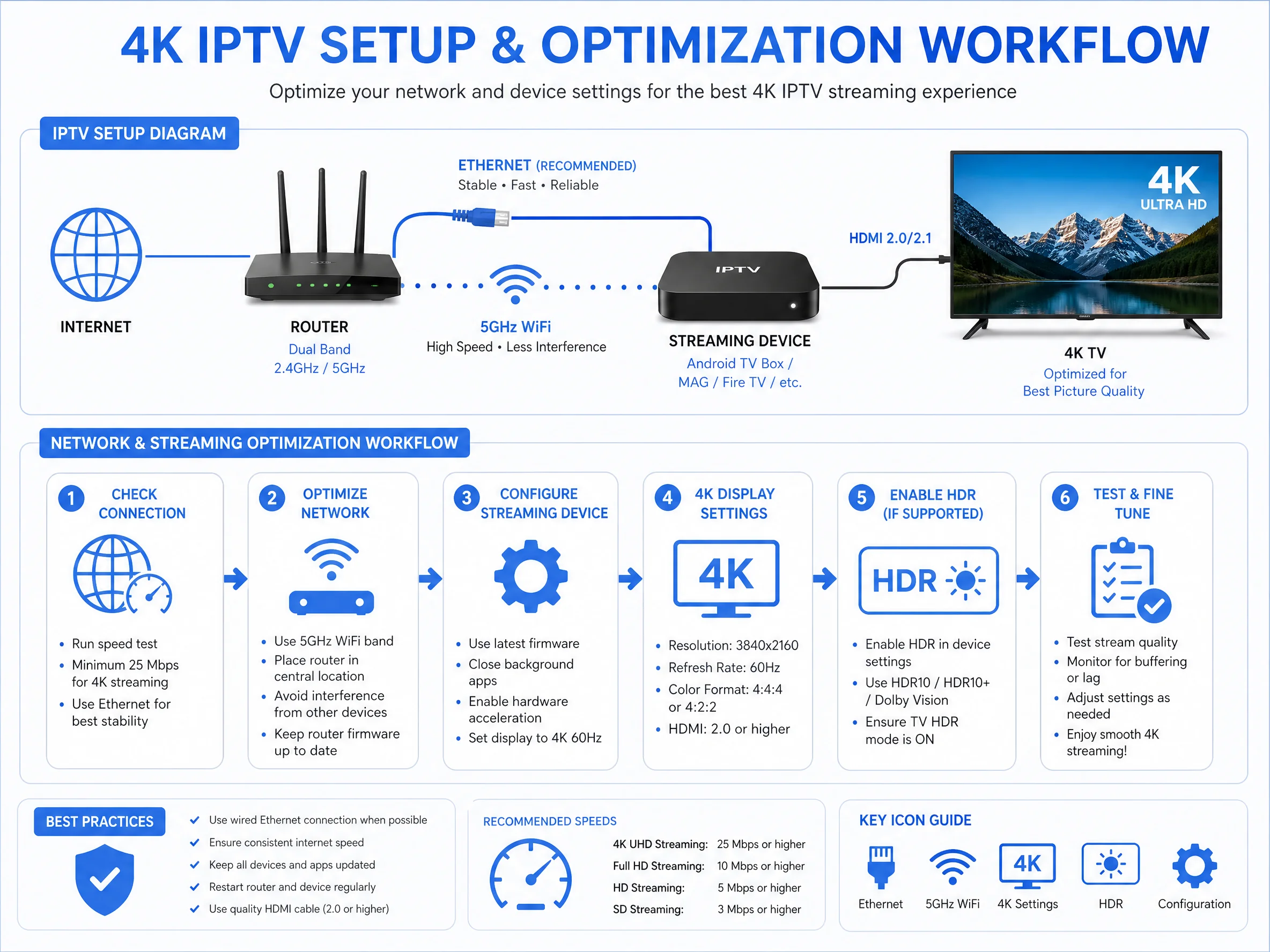
Once you have a capable device and IPTV service, proper setup optimization ensures smooth 4K playback without buffering.
Network Optimization
Ethernet over Wi-Fi when possible: Wired connections eliminate Wi-Fi interference and provide stable bandwidth for 4K.
Use 5GHz Wi-Fi (not 2.4GHz): If you must use Wi-Fi, connect to your router’s 5GHz band. 2.4GHz is too slow and congested for 4K.
Router placement matters: Position your router centrally and avoid walls/metal between router and streaming device.
Upgrade your router if needed: Wi-Fi 5 (802.11ac) minimum, Wi-Fi 6 (802.11ax) recommended for 4K.
Device Settings
Enable 4K output manually: Many devices default to 1080p. Navigate to Settings → Display → Video Resolution → 2160p (4K).
Match frame rate: Enable “Match Frame Rate” to avoid judder (24fps content on 60Hz display).
Enable HDR if supported: Check Settings → Display → HDR to enable HDR10/Dolby Vision.
Disable unnecessary background apps: Free up RAM and processing power for smooth 4K playback.
IPTV App Settings
Increase buffer size: In your IPTV app (TiViMate, IPTV Smarters Pro, etc.), increase buffer to 3-5 seconds for 4K streams.
Enable hardware acceleration: Forces device’s GPU to handle decoding instead of CPU (prevents overheating).
Select 4K stream quality: Some apps auto-detect; others require manual selection. Choose “4K” or “2160p” when available.
Common 4K Streaming Issues (And Fixes)
Buffering on 4K Streams
Problem: 4K content buffers constantly while HD plays fine.
Solutions:
- Test your speed: Fast.com should show 30+ Mbps consistently
- Switch to Ethernet or 5GHz Wi-Fi
- Close other devices using bandwidth (downloads, other streams)
- Increase buffer size in IPTV app settings
- Contact IPTV provider for alternative server (Echo offers 25+ servers)
No 4K Option Available
Problem: IPTV service claims 4K support but you don’t see 4K quality option.
Solutions:
- Verify your device supports 4K output (check Settings → Display)
- Ensure HDMI cable is HDMI 2.0 or newer (HDMI 1.4 caps at 30fps 4K)
- Confirm your TV is set to the correct HDMI input (some inputs are HD-only)
- Update your IPTV app to latest version
- Check if content itself is available in 4K (not all channels are 4K)
Washed-Out Colors in 4K
Problem: 4K content looks dull or washed out compared to HD.
Solutions:
- Enable HDR in device settings (Settings → Display → HDR)
- Verify TV’s HDMI input supports HDR (usually HDMI 1-2 only)
- Check TV picture mode: switch to “Cinema” or “Movie” mode for accurate colors
- Disable TV’s motion smoothing (makes content look soap-opera-like)
- Some content is SDR 4K (no HDR)—that’s normal, not a bug
4K Content Availability by Category
Movies
Widest 4K availability. Most IPTV services with 4K support offer 10,000+ movies in Ultra HD, including recent releases and classic films remastered in 4K.
Live TV Channels
Limited but growing. Most live channels remain 1080p or 720p due to broadcast limitations. Premium international channels and select entertainment networks offer 4K broadcasts.
Series & TV Shows
Increasing availability. Streaming-first series (Netflix originals, Apple TV+ shows, etc.) released in 4K are available through IPTV catchup features on higher-tier plans.
International Content
Higher-tier IPTV plans (like Echo’s Ultimate at €69.90/year) include broader international 4K content with more subtitle/language options.
Is 4K IPTV Worth the Extra Cost?
The good news: with services like Echo Best IPTV, 4K doesn’t cost extra. All plans include 4K content availability, with higher tiers simply offering a larger 4K selection.
When 4K IPTV Makes Sense
- You have a 4K TV: Obvious, but essential—4K content on HD TV wastes bandwidth
- Screen size 50″+ at normal viewing distance: 4K difference is subtle on small screens
- Reliable fast internet: 25+ Mbps consistently (not just peak speed)
- You watch movies/premium content: Live TV is mostly HD; movies shine in 4K
- Device supports HEVC decoding: Older devices struggle with 4K compression
When HD Is Enough
- TV smaller than 50 inches
- Internet under 25 Mbps or unstable connection
- Watching mostly live news/basic cable (not available in 4K anyway)
- Device doesn’t support 4K (older Fire Stick, basic Smart TV)
- Data cap concerns (4K uses 7GB/hour vs 3GB for HD)
Experience Premium 4K IPTV with Echo Best
Join 50,000+ satisfied customers streaming in Ultra HD with Echo Best IPTV
- ✓ 4K content available on all plans from €29.90/year
- ✓ 50,000+ movies & 70,000+ series including 4K titles
- ✓ 25+ servers optimized for 4K streaming
- ✓ 24/7 customer support for 4K setup and troubleshooting
- ✓ 24-hour trial to test 4K quality before you buy
Get Started with Echo Best IPTV →
Annual plans from €29.90/year | 24-hour trial available
Frequently Asked Questions
Do I need a 4K TV to use 4K IPTV?
Yes, you need a 4K TV to see the quality benefit. 4K IPTV services will work on HD TVs, but they’ll downscale the content to 1080p, wasting the extra bandwidth without providing better quality. If you have an HD TV, stick with HD streams until you upgrade.
Additionally, screen size matters. On a 40-inch TV at normal viewing distance, the difference between 1080p and 4K is minimal. 4K shines on 50+ inch displays where the extra resolution is noticeable.
How much internet speed do I need for 4K IPTV?
Minimum 25 Mbps dedicated to your streaming device, with 30-40 Mbps recommended for smooth 4K HDR playback. This is your actual sustained speed, not your ISP’s advertised “up to” speed.
Test your real speed at Fast.com while other devices are using your network. If it consistently shows 25+ Mbps, you’re good for 4K. Below that, you’ll experience buffering.
Keep in mind: 4K uses about 7GB per hour, so if you have a data cap, HD (3GB/hour) might be more practical.
Can all IPTV apps play 4K content?
Most modern IPTV apps support 4K playback if your device and service support it. Popular apps like IPTV Smarters Pro, TiViMate, Perfect Player, and OTT Navigator all handle 4K streams.
However, the app must support HEVC/H.265 codec (how 4K is compressed). Older apps or devices without hardware HEVC decoding will struggle with 4K, causing overheating, buffering, or crashes. Fire Stick 4K and newer devices have hardware HEVC decoders built-in.
Does Echo Best IPTV offer 4K on all plans?
Yes, 4K content is available across all Echo Best IPTV plans—Economy (€29.90/year), VIP (€39.90/year), Ultra (€49.90/year), and Ultimate (€69.90/year). The difference is the size of the 4K selection.
Economy includes 4K availability. VIP offers more 4K content. Ultra and Ultimate have the largest 4K libraries. All plans use the same server infrastructure optimized for 4K delivery.
Will 4K IPTV work on Fire Stick 4K?
Absolutely. Fire Stick 4K is one of the best devices for 4K IPTV. It supports:
- True 4K output at 60fps (2160p@60Hz)
- HDR10, HDR10+, and Dolby Vision
- Hardware HEVC/H.265 decoding (no buffering)
- Dolby Atmos audio
- All major IPTV apps
At $49.99, it’s the best value 4K streaming device. The 4K Max ($59.99) offers 40% more processing power and Wi-Fi 6E, but the standard 4K handles IPTV perfectly.
Can I watch 4K IPTV on my phone or tablet?
Technically yes, but it’s not recommended. Most phones and tablets don’t have 4K displays (they’re 1080p or 1440p), so you won’t see the quality benefit. Plus, 4K streams use 7GB per hour, which burns through mobile data quickly.
If you’re streaming over mobile data, stick with HD or SD quality. On Wi-Fi at home with a tablet, HD (1080p) provides excellent quality without the bandwidth waste.
What’s the difference between 4K and HDR?
4K and HDR are two different things:
4K (resolution): 3840×2160 pixels—four times more pixels than 1080p HD. Makes the image sharper and more detailed, especially on large screens.
HDR (color/brightness): High Dynamic Range—wider color gamut, brighter highlights, deeper blacks. Makes the image more vibrant and lifelike.
You can have 4K without HDR (sharp but standard colors) or HDR with 1080p (enhanced colors but less detail). The best experience is 4K + HDR together. Most 4K IPTV content includes HDR10, with premium content offering Dolby Vision (advanced HDR).
Does using a VPN affect 4K streaming?
Yes, VPNs can slow down 4K streaming. Encryption adds overhead and routing through a VPN server (often in another country) increases latency and reduces throughput.
If you use a VPN for privacy with IPTV:
- Choose a fast VPN provider (NordVPN, ExpressVPN, Surfshark)
- Connect to the geographically closest server
- Test your speed—you need 30+ Mbps through the VPN for smooth 4K
- Consider split tunneling (route only IPTV app through VPN)
If your VPN connection is too slow for 4K, drop to HD (1080p) instead.

