
GitHub has become the go-to platform for IPTV enthusiasts seeking free M3U playlists, open-source player tools, and community-maintained channel lists. Unlike commercial IPTV services, GitHub repositories offer publicly curated resources—but with important trade-offs in reliability, content licensing, and support.
This guide explores the IPTV GitHub ecosystem: where to find free playlists, which repositories are actively maintained, what tools developers have created, and the critical differences between GitHub resources and professional IPTV services like Echo Best IPTV.
Article Update History
October 20, 2026
– Initial publication
– Verified Echo Best IPTV pricing (Economy €29.90, VIP €39.90, Ultra €49.90, Ultimate €69.90)
– Confirmed 25+ servers, 50,000+ customers, 8 years in business
– Reviewed GitHub IPTV ecosystem and repository status against current platform state
What is IPTV GitHub?
Quick Answer: “IPTV GitHub” refers to the collection of GitHub repositories hosting free M3U playlist files, EPG (Electronic Program Guide) sources, IPTV player tools, and channel aggregation scripts. These community-maintained resources provide free access to publicly available streams, often aggregated from various sources worldwide.
GitHub is a code hosting platform where developers share open-source projects. Within the IPTV community, GitHub hosts:
- M3U Playlist Repositories: Collections of free channel URLs organized by country, category, or content type
- EPG XML Sources: Program guide data for free channels
- IPTV Player Projects: Open-source applications for viewing IPTV streams
- Aggregation Tools: Scripts that collect and organize channels from multiple sources
- Filter/Sort Utilities: Tools to process M3U files (remove duplicates, categorize, etc.)
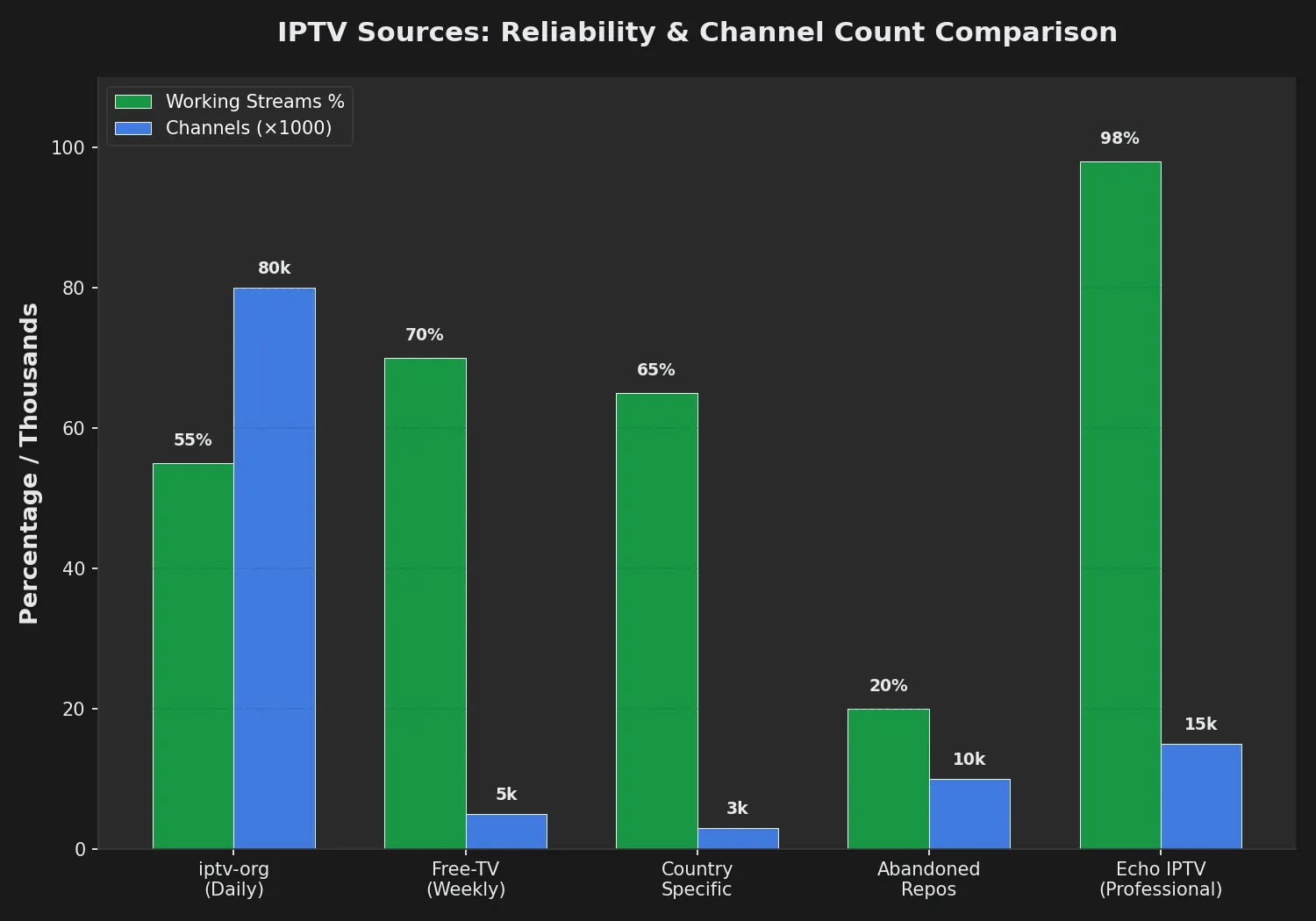
The largest IPTV repository on GitHub contains 80,000+ channel entries from public sources worldwide, updated daily through automated scripts. However, stream quality, availability, and legal status vary significantly.
Popular IPTV GitHub Repositories
These are among the most-starred and actively maintained IPTV repositories on GitHub as of October 2026:
1. iptv-org/iptv
Stars: 75,000+
Update Frequency: Daily (automated)
Content: 80,000+ publicly available channels from 200+ countries
The largest community-maintained IPTV collection on GitHub. Channels are categorized by country and content type (news, entertainment, documentary). Quality and availability vary—many streams go offline without notice.
Strengths: Massive selection, daily updates, organized by country
Weaknesses: No support, frequent dead links, legal ambiguity, no EPG for most channels
2. Free-TV/IPTV
Stars: 10,000+
Update Frequency: Weekly
Content: Curated list of legal free-to-air channels
Focuses on legally accessible free-to-air broadcasts. Smaller channel count (~5,000), but higher reliability since it prioritizes official broadcaster streams.
Strengths: Legal sources, better reliability, official broadcaster streams
Weaknesses: Limited selection, geographic restrictions, still no customer support
3. EPG Sources
Several repositories provide XMLTV-format EPG data for free channels:
- iptv-org/epg: EPG for channels in the main iptv-org playlist
- Freeview EPG: UK Freeview channel guide data
- WebGrab+Plus configs: EPG scraping configurations for various regions
EPG coverage is incomplete—many free channels lack reliable program guide data.
4. IPTV Player Tools
Open-source players built for GitHub IPTV playlists:
- IPTVnator: Cross-platform desktop player with EPG support
- FreetuxTV: Linux IPTV/WebTV player
- Hypnotix: Linux Mint’s official IPTV player
These tools consume M3U playlists from GitHub or other sources. Most lack advanced features like recording, multi-device sync, or customer support.
How to Use GitHub IPTV Playlists
Step 1: Find a Repository
Navigate to github.com and search for “iptv m3u”. Sort by stars or recent updates to find actively maintained projects. Check the README file for playlist links and usage instructions.
Step 2: Copy the M3U URL
Most repositories provide direct M3U file URLs. Look for:
- index.m3u: Master playlist with all channels
- countries/[country-code].m3u: Country-specific playlists
- categories/[category].m3u: Content-type filtered lists
Right-click the “Raw” button next to the M3U file and copy the URL (it will start with raw.githubusercontent.com).
Step 3: Load in IPTV Player
Paste the URL into your IPTV player:
- VLC: Media → Open Network Stream → Paste URL
- IPTV Smarters Pro: Add User → M3U URL tab → Paste link
- Kodi IPTV Simple Client: Settings → M3U Play List URL → Paste
- TiViMate: Add Playlist → URL → Enter link
Step 4: Optional – Add EPG
If the repository provides EPG, copy the EPG XML URL and add it to your player’s EPG settings. This enables the program guide for supported channels.
Step 5: Test Channels
Browse the channel list and test streams. Expect:
- 20-40% of channels may be offline at any time
- Buffering on popular channels during peak hours
- Geographic restrictions (some streams block non-local IPs)
- No support if streams fail
GitHub IPTV Tools & Utilities
Playlist Processors
M3U Filter: Python script to remove duplicate channels, dead links, or specific categories from M3U files. Useful for cleaning large GitHub playlists before importing.
IPTV Checker: Automated tool that tests M3U URLs and removes non-working streams. Reduces playlist size but requires technical setup.
M3U Merger: Combines multiple M3U files from different GitHub repos into a single playlist.
EPG Aggregators
WebGrab+Plus: EPG scraping tool with configuration files hosted on GitHub. Collects program guide data from broadcaster websites and generates XMLTV files.
EPG Updater Scripts: Automated scripts that download and merge EPG sources for GitHub IPTV playlists.
Channel Discovery
IPTV Crawler: Scans the web for publicly accessible HLS/M3U8 streams and generates playlists. Used by repository maintainers to discover new channels.
GitHub IPTV vs Paid IPTV Services
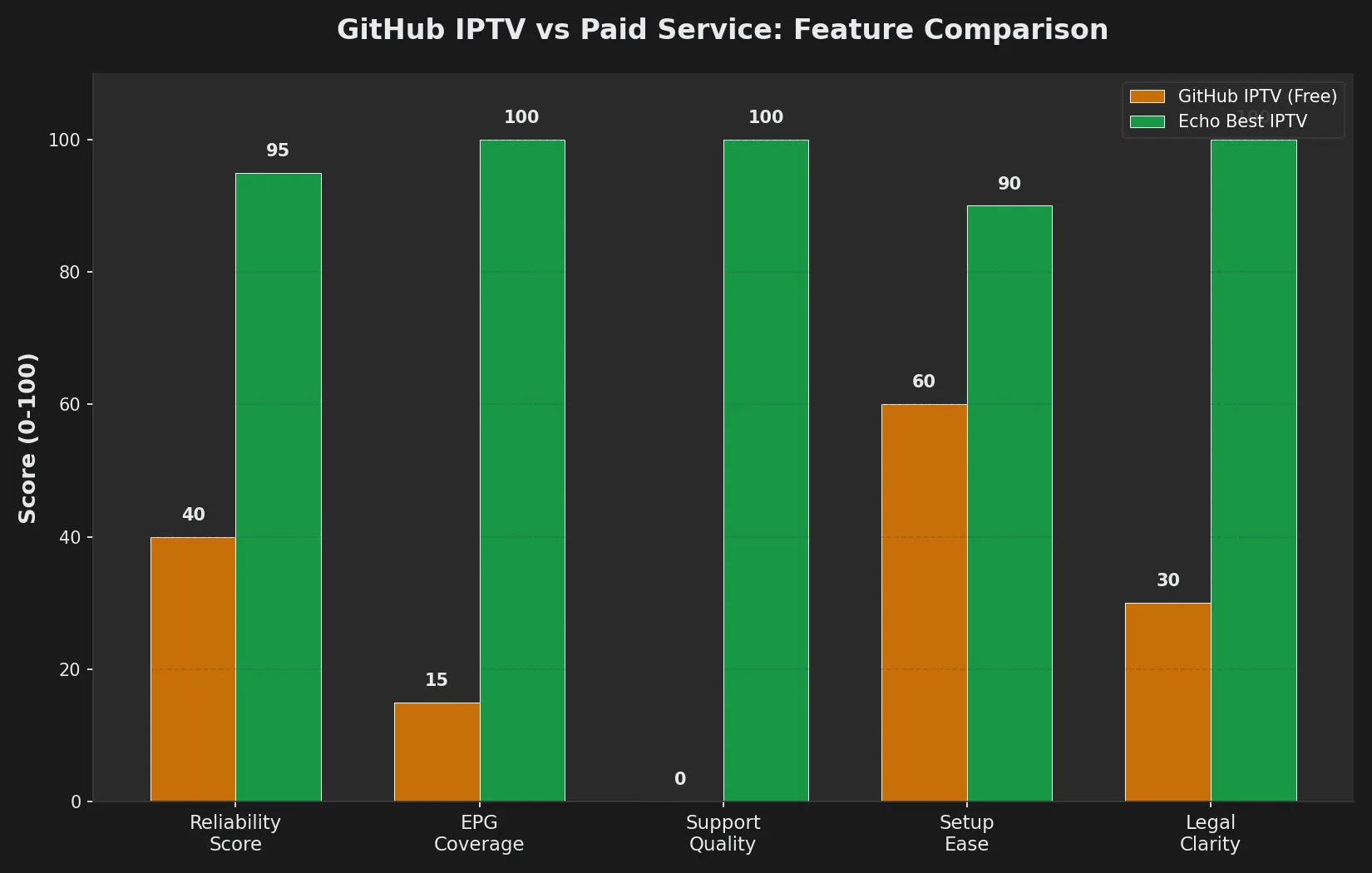
Understanding the trade-offs helps you decide which approach fits your needs:
| Factor | GitHub IPTV | Echo Best IPTV |
|---|---|---|
| Cost | Free | €29.90-69.90/year |
| Stream Reliability | 20-40% failure rate, frequent buffering | 25+ redundant servers, stable connections |
| Channel Count | 80,000+ (many offline/duplicates) | 10,000-20,000+ verified working channels |
| EPG Coverage | Partial (10-20% of channels) | Full EPG included for all channels |
| VOD Library | None (live channels only) | 50,000+ movies, up to 70,000+ series |
| 4K Quality | Rare (most SD/720p) | 4K available on all plans |
| Customer Support | None (community forums only) | 24/7 throughout subscription |
| Legal Status | Ambiguous (varies by stream) | Licensed service with authorized content |
| Trial Period | Always free (always uncertain quality) | 24-hour free trial |
| Setup Difficulty | Moderate (manual M3U import) | Simple (guided app setup) |
When GitHub IPTV Makes Sense:
- You want to experiment with IPTV before committing to a paid service
- You only need occasional access to specific free-to-air channels
- You’re technically skilled and comfortable troubleshooting stream failures
- You don’t mind browsing 80,000 channels to find 100 that work reliably
When Paid IPTV Makes Sense:
- You want reliable daily viewing without constant troubleshooting
- You value VOD libraries (movies/series) alongside live channels
- You need 4K quality and consistent streaming performance
- You want EPG for program browsing and scheduling
- You prefer 24/7 support over community forum troubleshooting
Ready to Experience Premium IPTV?
Echo Best IPTV offers 10,000-20,000+ verified working channels with full EPG coverage, 50,000+ movies, and 24/7 support. With 25+ servers and 50,000+ customers served over 8 years, we deliver reliable streaming with no guesswork.
Legal Considerations for GitHub IPTV
The legal status of GitHub IPTV playlists is complex and varies by jurisdiction:
What’s Legal
- Free-to-Air Broadcasts: Channels that broadcaster makes publicly accessible (BBC iPlayer streams, PBS channels, etc.)
- Open-Licensed Content: Streams explicitly released under Creative Commons or public domain
- Official Broadcaster URLs: Direct links to legal web streams from broadcaster websites
What’s Legally Ambiguous
- Re-streamed Content: Channels originally broadcast commercially but re-hosted elsewhere
- Geographic Bypass: Accessing free-to-air content from outside its intended region
- Aggregated Lists: Playlists mixing legal and unauthorized sources
What’s Illegal
- Pirated Streams: Unauthorized re-broadcasts of premium channels
- Pay-TV Bypasses: Streams circumventing subscription requirements
- Copyright Violation: Content shared without broadcaster authorization
GitHub repositories cannot guarantee legal compliance—they aggregate community-submitted URLs without verifying broadcasting rights. Users are responsible for ensuring their viewing complies with local laws.
Echo Best IPTV operates as a licensed service providing authorized content, removing legal ambiguity from your streaming setup.
Limitations of GitHub IPTV
1. No Reliability Guarantee
GitHub playlists are maintained by volunteers. When streams go offline (which happens constantly), there’s no support team to fix them. You’re dependent on community updates, which can lag days or weeks behind stream failures.
2. Quality Inconsistency
Free streams range from 480p SD to rare 1080p HD. Most lack consistent quality. Expect frequent resolution drops, buffering during peak hours, and stream interruptions.
3. No VOD Content
GitHub IPTV provides live channels only. There’s no on-demand movie/series library. For catch-up TV or VOD, you’ll need separate services.
4. Incomplete EPG
Only 10-20% of channels in large GitHub playlists have reliable EPG data. Most channels appear as generic entries without program schedules, making browsing difficult.
5. Geographic Restrictions
Many free-to-air streams detect and block non-local IP addresses. A channel listed as “working” may be inaccessible from your location.
6. Technical Knowledge Required
Using GitHub IPTV effectively requires:
- Understanding M3U file formats and URLs
- Ability to troubleshoot player configuration
- Willingness to manually test and curate working channels
- Comfort with command-line tools for playlist processing
Non-technical users often find the setup frustrating and abandon GitHub playlists for paid services.
Best Practices for Using GitHub IPTV
1. Test Before Committing
Before importing an 80,000-channel playlist, test 10-20 random channels first. This reveals the true working percentage before your player downloads the massive list.
2. Use Country-Specific Playlists
Instead of the master index.m3u (80,000+ channels), use country-specific files (e.g., countries/us.m3u). This reduces download time and improves usability.
3. Filter by Category
If you only want news channels, use categories/news.m3u instead of browsing the full unsorted list. Categories typically include: news, entertainment, documentary, movies, kids.
4. Bookmark Working Channels
When you find channels that work reliably, add them to favorites in your player. This creates a personal curated list separate from the constantly-changing GitHub playlist.
5. Check Repository Activity
Before using a GitHub playlist, check the repository’s last commit date. If it hasn’t been updated in 3+ months, many streams are likely dead. Look for repositories with daily or weekly automated updates.
6. Combine Multiple Sources
No single repository is complete. Use M3U merger tools to combine playlists from 2-3 active repositories, then run a checker tool to remove duplicates and dead links.
7. Understand Regional Blocks
If a channel description includes a country flag or name, that stream may only work from that region. Test channels marked for your country first.
Alternatives to GitHub IPTV
If GitHub IPTV proves too unreliable or time-consuming, consider these alternatives:
1. Professional IPTV Services
Services like Echo Best IPTV provide:
- Verified working channels (10,000-20,000+ depending on plan)
- Full EPG coverage for all channels
- VOD libraries (50,000+ movies, up to 70,000+ series)
- 24/7 customer support
- 25+ redundant servers for reliability
- 4K streaming on all plans
- €29.90-69.90/year pricing (less than €6/month)
- 24-hour free trial to test before buying
After 8 years serving 50,000+ customers, Echo Best IPTV demonstrates the reliability difference between free GitHub playlists and professional infrastructure.
2. Official Broadcaster Apps
Many free-to-air broadcasters offer official apps:
- BBC iPlayer (UK)
- PBS Video (US)
- CBC Gem (Canada)
- ABC iView (Australia)
These provide legal, reliable access to specific broadcaster content without IPTV setup complexity.
3. Pluto TV / Xumo / Plex Live TV
Free ad-supported streaming services with curated channels and official apps. More reliable than GitHub IPTV but limited channel selection and frequent commercial interruptions.
Common Problems & Solutions
Problem: 80% of Channels Don’t Work
Solution: This is normal for GitHub IPTV. Use the country-specific playlist for your region instead of the global index. Expect 50-60% functionality at best, then manually curate working channels into favorites.
Problem: No EPG Data Appears
Solution: Most GitHub channels lack EPG. Check if the repository provides a separate EPG XML file. If available, add the URL to your player’s EPG settings. Otherwise, accept that most channels won’t show program schedules.
Problem: Constant Buffering
Solution: Free streams often lack bandwidth for peak-hour traffic. Test the same channel during off-peak hours (early morning/late night). If buffering persists, that stream’s source is overloaded—try finding an alternative stream for the same channel.
Problem: Channels Block My IP
Solution: Geographic restrictions are common on free-to-air streams. Test channels marked for your country first. For international content, consider a paid IPTV service that handles geographic distribution legally through licensing.
Problem: Repository Stopped Updating
Solution: GitHub IPTV maintainers are volunteers—projects get abandoned. Check GitHub stars/forks to find actively maintained alternatives. Look for repositories with commits in the last 7 days.
Problem: Playlist Download Takes Forever
Solution: The 80,000-channel master playlist is huge (5-10MB). Use category or country-specific playlists instead. Configure your player to load playlists in the background and cache them locally.
Experience Premium IPTV with Echo Best
Join 50,000+ satisfied customers streaming with Echo Best IPTV
- ✓ Up to 20,000+ live channels depending on plan
- ✓ 50,000+ movies & 70,000+ series in our library
- ✓ 4K content available across all plans
- ✓ 24/7 customer support throughout your subscription
- ✓ 24-hour trial to test before you buy
Get Started with Echo Best IPTV →
Annual plans from €29.90/year | 24-hour trial available
Frequently Asked Questions
Is GitHub IPTV legal?
It depends on the specific streams in the playlist. GitHub IPTV repositories aggregate URLs from various sources—some legal (free-to-air broadcasts, official web streams), others unauthorized (pirated content). GitHub itself doesn’t verify broadcasting rights.
Using GitHub IPTV carries legal risk because playlists mix legitimate and unauthorized content without clear labeling. Users are responsible for ensuring compliance with copyright laws in their jurisdiction.
Professional services like Echo Best IPTV operate as licensed providers with authorized content, eliminating this legal ambiguity.
Why do so many GitHub IPTV channels not work?
Several reasons contribute to the 40-60% failure rate:
- Outdated Links: Stream URLs change when broadcasters update infrastructure, but GitHub playlists lag in updates
- Geographic Blocks: Many streams restrict access to specific countries; the playlist doesn’t indicate which
- Temporary Outages: Free streams lack redundant servers, so broadcaster maintenance = downtime
- Removed Content: Unauthorized re-streams get taken down by copyright holders
- Bandwidth Limits: Free sources often can’t handle viewer demand, leading to stream failures
This is why paid IPTV services maintain 25+ servers—redundancy ensures reliability GitHub playlists can’t match.
How often are GitHub IPTV playlists updated?
Update frequency varies by repository:
- iptv-org/iptv: Daily automated updates
- Free-TV/IPTV: Weekly manual curation
- Smaller repos: Monthly or abandoned entirely
Check the repository’s commit history before using. If the last update was 3+ months ago, most streams are likely dead. Even daily-updated repos have 20-40% non-working streams due to rapid URL changes.
Can I use GitHub IPTV on Fire Stick or Smart TV?
Yes, but setup is more complex than with paid services:
- Install an IPTV player app: IPTV Smarters Pro, TiViMate, or VLC on Fire Stick; Smart IPTV or IPTV Smarters on Smart TVs
- Find the raw GitHub M3U URL: Navigate to the playlist file on GitHub, click “Raw,” copy the full raw.githubusercontent.com URL
- Paste the URL into your player: Use the M3U URL option in your player’s playlist settings
- Wait for the list to download: 80,000-channel playlists take 5-10 minutes to load initially
- Test channels: Browse and find working streams manually
Echo Best IPTV simplifies this: install the app, enter your credentials from the welcome email, and all channels load instantly with full EPG.
Do GitHub IPTV playlists include VOD (movies/series)?
No. GitHub IPTV repositories focus exclusively on live channel streams. They don’t include on-demand movie or series libraries.
For VOD content, you need:
- Separate streaming services (Netflix, Disney+, etc.)
- A paid IPTV service that includes VOD (Echo Best IPTV offers 50,000+ movies and up to 70,000+ series depending on plan)
This is a major limitation—GitHub IPTV can’t replace the full streaming experience.
Can I get EPG for GitHub IPTV channels?
Partial EPG coverage exists, but it’s incomplete:
- The iptv-org/epg repository provides program guide data for ~15% of channels in the main playlist
- WebGrab+Plus configs can scrape EPG from broadcaster websites, but requires technical setup
- Most channels in GitHub playlists will appear without program schedules
To use available EPG, copy the EPG XML URL from the repository and paste it into your IPTV player’s EPG settings.
Paid services provide full EPG coverage—Echo Best IPTV includes program guides for all channels, making browsing and scheduling much easier.
Are GitHub IPTV playlists safe to use?
GitHub itself is safe—repositories only contain M3U playlist files (text files with channel URLs), not executable malware. However:
- Legal Risk: As discussed, playlists may include unauthorized content
- Privacy: Your ISP sees all stream traffic unless you use a VPN
- Data Usage: Free streams consume the same bandwidth as paid (3-25GB/hour for HD/4K)
- Ad Injection: Some free streams insert advertising or redirect to questionable sites
For safety and legality, professional services like Echo Best IPTV provide authorized content with no legal ambiguity or ad injection.
What’s the best GitHub IPTV repository to use?
It depends on your priorities:
- Most Channels: iptv-org/iptv (80,000+ streams, daily updates, but 40-60% failure rate)
- Legal Compliance: Free-TV/IPTV (curated legal sources, ~5,000 channels, better reliability)
- EPG Coverage: Repositories that link to iptv-org/epg for program guide data
- Specific Country: Use country-specific playlists from iptv-org (us.m3u, uk.m3u, etc.)
No GitHub repository matches the reliability, support, and legal clarity of paid IPTV services. After testing GitHub playlists and experiencing the constant troubleshooting, many users switch to services like Echo Best IPTV for the €29.90-69.90/year peace of mind.

