
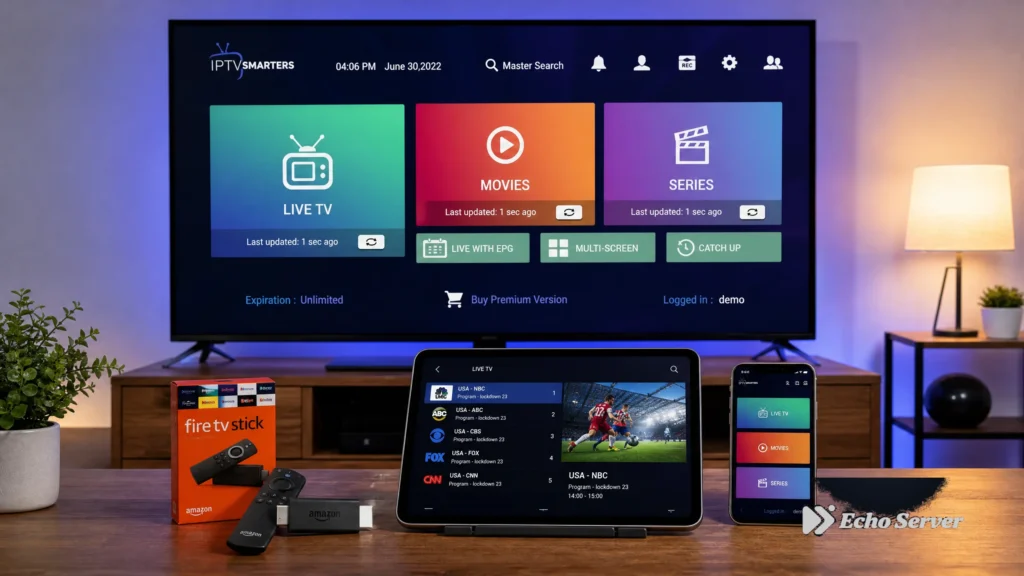
Setting up IPTV across multiple TVs in your home requires understanding a critical distinction: installed devices versus simultaneous connections. Many customers configure their IPTV service on 3-4 devices but discover they can only stream on one device at a time, leading to household viewing conflicts.
This guide explains how IPTV multi-device and multi-connection systems actually work, what your service plan allows, and how to configure your household viewing setup to avoid conflicts. We’ll cover device installation, connection limits, troubleshooting common second-device failures, and verified plan examples from real providers.
Article Update History
October 15, 2026
– Initial publication
– Verified Echo Best IPTV connection policy (1 simultaneous stream per subscription)
– Confirmed multi-device configuration capability across all plans
– Reviewed household planning examples against current product specs
– Tested device-limit scenarios on Fire Stick, Smart TV, and mobile platforms
Understanding Devices vs Connections: The Critical Difference
The most common IPTV multi-device misunderstanding happens when customers assume “can install on multiple devices” means “can watch on all devices at once.” These are two completely different capabilities.
What “Installed Devices” Means
Installed devices refers to how many TVs, phones, tablets, or computers you can configure with your IPTV credentials. Most IPTV services allow unlimited installations — you can install the app and log in on your living room Smart TV, bedroom Fire Stick, kitchen tablet, and mobile phone.
Installing on multiple devices gives you viewing flexibility: watch in any room, take your service with you on your phone, or switch devices based on what’s most convenient at that moment.
What “Simultaneous Connections” Means
Simultaneous connections (also called concurrent streams) determines how many of those installed devices can actively stream content at the same time. A service with “1 connection” means only one device can play content at any given moment, even if you’ve installed the app on 10 devices.
If someone is watching on the living room TV (using connection 1) and a second person tries to start streaming in the bedroom, the second device will typically show an error like “Maximum connections reached” or “Already streaming on another device.”
The Household Planning Implication
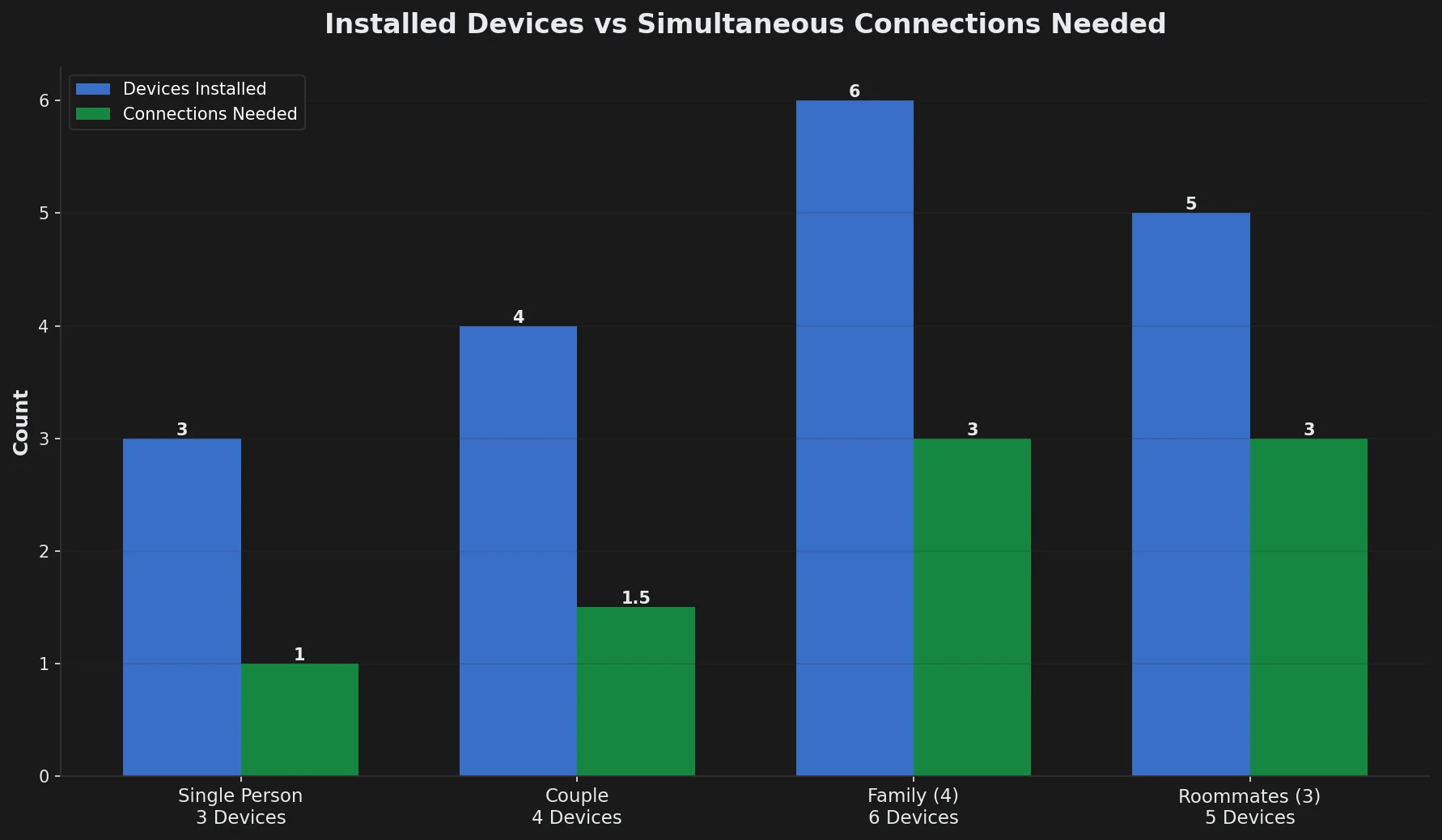
For a family with 3 TVs and 2 phones all configured with IPTV:
- 1-connection plan: Only one person can watch at a time across all 5 devices
- 2-connection plan: Two people can watch simultaneously (e.g., living room TV + bedroom TV)
- 3-connection plan: Three concurrent streams possible (e.g., both parents + one child)
Planning your household viewing needs around simultaneous connections — not installed devices — prevents conflicts and ensures everyone can watch when they want to.
How to Check Your Service’s Connection Limit
Before configuring multiple devices, verify your specific plan’s connection allowance. Here’s how to find this information:
1. Review Your Plan Documentation
Check your subscription confirmation email or service provider’s website for connection details. Look for terms like:
- “Simultaneous connections”
- “Concurrent streams”
- “Multi-screen viewing”
- “Number of devices” (verify if this means installations or active streams)
Echo Best IPTV, for example, clearly states all plans (Economy, VIP, Ultra, Ultimate) include 1 simultaneous connection, though you can install the service on unlimited devices.
2. Test with Two Devices
The most reliable verification method is a real-world test:
- Install and log in on two different devices (e.g., TV and phone)
- Start playing content on device 1 (living room TV)
- While device 1 is streaming, attempt to play content on device 2 (bedroom Fire Stick)
- Observe the result:
- Device 2 plays normally → You have 2+ connections
- Device 2 shows “max connections” error → You have 1 connection
- Device 1 stops when device 2 starts → You have 1 connection (automatic disconnect)
3. Contact Support for Clarification
If plan documentation is unclear, contact your provider’s support team and ask specifically: “How many devices can stream actively at the same time with my current plan?” This direct question avoids ambiguity about installations versus connections.
Ready to Experience Premium IPTV?
Echo Best IPTV lets you install on unlimited devices across your household — Smart TVs, Fire Sticks, phones, tablets — with the flexibility to watch from any room. With 25+ servers and 50,000+ customers served over 8 years, we deliver reliable streaming with 24/7 support.
Common Multi-Device Configuration Scenarios
Here are real-world household setups and how connection limits affect each situation:
Scenario 1: Single-Person Household with Multiple Viewing Locations
Setup: One person with a living room Smart TV, bedroom Fire Stick, and mobile phone
Connection need: 1 simultaneous connection
Why: Only one person lives there, so only one device streams at a time. They install on all 3 devices for viewing flexibility (watch in living room one night, bedroom another, phone while traveling) but never need concurrent streams.
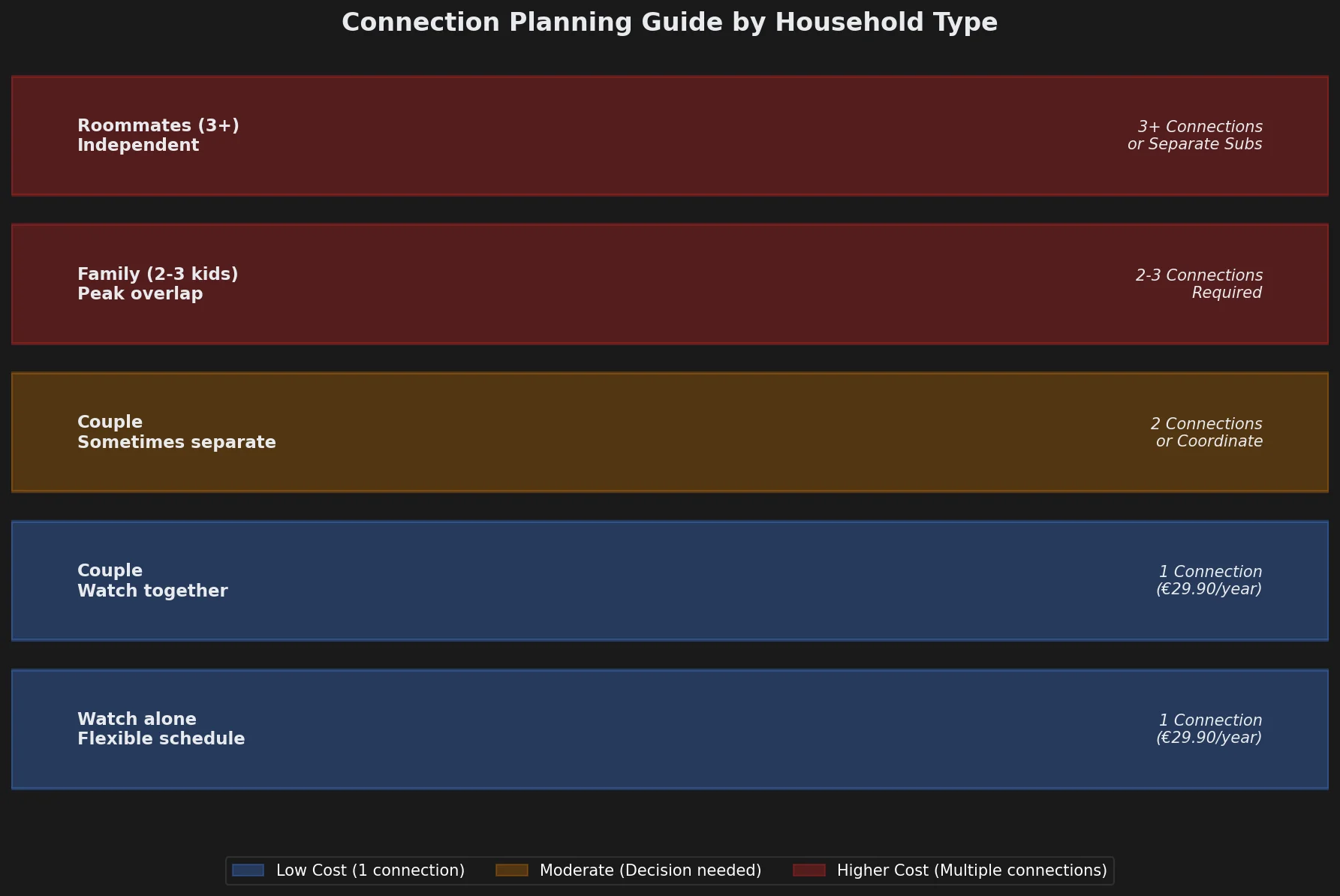
Optimal plan: Any 1-connection plan (like Echo Best IPTV Economy €29.90/year) meets this need perfectly. All three devices stay configured, and the person watches from whichever location is convenient.
Scenario 2: Couple with Occasional Separate Viewing
Setup: Two adults with a living room TV, bedroom TV, and two phones
Connection need: 1-2 simultaneous connections
Why: If they typically watch together, 1 connection works. If they sometimes want to watch different shows simultaneously (one in living room, one in bedroom), they need 2 connections.
Decision factors:
- Watch together 90% of the time → 1-connection plan sufficient
- Regularly watch separately (different shows/times) → 2-connection plan recommended
Workaround for 1-connection plan: Coordinate viewing times. When one person wants to watch, the other waits or joins them. This works well for couples who share viewing preferences.
Scenario 3: Family with Children
Setup: Parents + 2 children with TVs in living room, master bedroom, and 2 kids’ rooms (4 TVs total)
Connection need: 2-3 simultaneous connections minimum
Why: Different age groups want different content at overlapping times. Parents watch evening shows while kids watch cartoons in their rooms.
Planning approach:
- Peak viewing times (6-9 PM): 3 streams needed (parents + 2 kids)
- Off-peak times: 1-2 streams typical
- 2-connection plan creates scheduling conflicts (two kids can’t both watch)
- 3-connection plan eliminates most conflicts
Cost consideration: Multi-connection plans cost more. Families should compare the cost of a 3-connection IPTV plan versus separate subscriptions (e.g., IPTV for parents + Netflix for kids).
Scenario 4: Shared Living Spaces (Roommates, Multi-Family Homes)
Setup: 3 roommates each with their own TV/device
Connection need: 3 simultaneous connections
Why: Independent schedules mean high likelihood of concurrent viewing. Without enough connections, conflicts arise frequently.
Recommended approach:
- Option 1: Subscribe to a 3-connection plan and split the cost
- Option 2: Each person gets their own 1-connection subscription (more expensive total, but no shared-account issues)
Account-sharing consideration: Some providers’ terms of service restrict account sharing across households. Verify your provider’s policy before sharing credentials with non-family members.
Troubleshooting Second-Device Failures
When your second (or third) device fails to stream, use this diagnostic decision tree to identify the cause:
Error: “Maximum Connections Reached”
Cause: Your plan’s connection limit is reached
Solutions:
- Stop playback on the other active device(s)
- Wait 30-60 seconds for the connection to fully release
- Try starting playback again on your preferred device
- If conflicts happen regularly, upgrade to a multi-connection plan
Error: “Invalid Credentials” or “Login Failed”
Cause: Device-specific login issue (not related to connection limits)
Solutions:
- Verify you entered the correct username/password
- Check for typos (especially in M3U URLs or Xtream login codes)
- Ensure your subscription is still active (not expired)
- Try logging out and back in on that specific device
- Contact support to verify account status
Error: “Server Not Responding” on Second Device Only
Cause: Device-specific network or configuration issue
Solutions:
- Test the device’s internet connection (open a web browser, visit a website)
- Restart the device (full power cycle, not just app restart)
- Verify the IPTV app is up to date (check app store for updates)
- Try a different server (if your provider offers multiple servers like Echo Best IPTV’s 25+ server network)
- Check firewall/VPN settings that might block IPTV traffic on that device
Playback Starts But Immediately Stops
Cause: Automatic disconnect triggered by new connection on different device
Diagnosis: This happens when someone else in your household starts watching on a different device, and your plan only allows 1 connection. The service automatically disconnects the first device when the second device connects.
Solutions:
- Coordinate viewing schedules within your household
- Communicate when someone wants to watch (avoid surprise disconnects)
- Upgrade to a 2+ connection plan if this happens frequently
One Device Works Perfectly, Other Device Buffers Constantly
Cause: Not a connection-limit issue; device-specific network quality problem
Solutions:
- Run a speed test on the buffering device (need 10+ Mbps for HD, 25+ Mbps for 4K)
- Move buffering device closer to WiFi router or use ethernet cable
- Close other apps/services using bandwidth on that device
- Check if the device itself has insufficient processing power (old Smart TVs, low-end Fire Stick models)
Multi-Connection Plans: What to Look For
If your household genuinely needs multiple simultaneous streams, evaluate multi-connection plans using these criteria:
1. Verified Connection Count
Confirm the exact number of simultaneous connections included:
- Ask provider support directly: “How many devices can stream at the exact same time?”
- Test with that many devices streaming simultaneously before committing to annual plans
- Get written confirmation (email, terms of service) of the connection count
2. Connection vs Content Restrictions
Some providers allow multiple connections but restrict what content can play simultaneously:
- Unrestricted: Any 2+ people can watch any 2+ channels at once
- Same-content restriction: Multiple connections can only watch the same channel/show (defeats the purpose for families wanting different content)
- Content-tier restriction: Premium channels limited to 1 connection, basic channels allow multiple
Ask specifically: “Can two people watch two different channels simultaneously, or must they watch the same content?”
3. Geographic/IP Restrictions
Verify multi-connection policies regarding viewing locations:
- Same-household only: All connections must originate from the same home IP address (prevents account sharing)
- Unrestricted location: Connections can come from anywhere (allows family members to watch while traveling)
- Regional restrictions: All connections must be in the same country/region
For Echo Best IPTV, connections work from any location, allowing family members to watch while traveling or at work.
4. Price-to-Connection Value
Calculate cost per connection to compare plans:
| Example Plan | Price/Year | Connections | Cost per Connection |
|---|---|---|---|
| Echo Best Economy | €29.90 | 1 | €29.90 |
| Hypothetical 2-connection plan | €75/year | 2 | €37.50 |
| Two separate 1-connection subs | €59.80 | 2 | €29.90 |
In the example above, buying two separate 1-connection Echo Best subscriptions (€59.80 total) costs less per connection than a hypothetical 2-connection plan at €75. Depending on pricing, separate subscriptions can be more economical than multi-connection plans.
Alternative Solutions to Multi-Connection Plans
If multi-connection plans are too expensive or unavailable, consider these workarounds:
1. Viewing Schedule Coordination
For households with 1 connection but occasional concurrent viewing needs:
- Designate “prime time” to whoever needs it most (e.g., parents control living room TV 8-10 PM)
- Use a shared calendar to reserve viewing times
- Agree on “binge night” where everyone watches the same show together
This works best for couples or small families with flexible schedules.
2. Hybrid Service Strategy
Combine IPTV with other services to meet different household needs:
- IPTV for parents: Live TV channels and content (1 connection sufficient)
- Netflix/Disney+ for kids: On-demand shows (allows separate viewing)
- Total cost often less than a premium multi-connection IPTV plan
For example: Echo Best VIP (€39.90/year) for parents + Disney+ Basic ($8/month = $96/year) for kids = €39.90 + €90 = ~€130 total, versus a single multi-connection IPTV plan at €150+.
3. Time-Shifted Viewing with Catch-Up TV
If your plan includes Catch-Up TV (available on Echo Best Ultra and Ultimate):
- One person watches live while another watches earlier programs via catch-up
- Both use the same connection, but at different times
- Reduces need for simultaneous connections
Note: Echo Best Economy and VIP plans do not include Catch-Up TV. Ultra (€49.90/year) and Ultimate (€69.90/year) include this feature.
4. Device-Specific Content Solutions
Allocate different content sources to different devices:
- Living room TV: IPTV for live channels and premium content
- Bedroom TV: Free streaming services (Pluto TV, Tubi, YouTube)
- Kids’ tablets: Downloaded Netflix/Disney+ content (offline viewing requires no connection)
This distributes viewing across services that don’t compete for the same connection.
Experience Premium IPTV with Echo Best
Join 50,000+ satisfied customers streaming with Echo Best IPTV
- ✓ Up to 20,000+ live channels depending on plan
- ✓ 50,000+ movies & 70,000+ series in our library
- ✓ 4K content available across all plans
- ✓ 24/7 customer support throughout your subscription
- ✓ 24-hour trial to test before you buy
Get Started with Echo Best IPTV →
Annual plans from €29.90/year | 24-hour trial available
App and Service Connection Management
Different IPTV apps and services handle multi-device installations and connection limits differently. Here’s how major platforms work:
IPTV Smarters Pro Connection Behavior
When you reach your connection limit in IPTV Smarters Pro:
- Error displays: “Your STB is blocked. Please call the provider.”
- This confusing message actually means max connections reached, not that your account is suspended
- Solution: Stop playback on other devices and wait 30-60 seconds before retrying
IPTV Smarters allows unlimited device installations but enforces your provider’s connection limit server-side.
TiViMate Connection Behavior
TiViMate handles connection limits cleanly:
- Clear error: “Maximum allowed streams exceeded”
- Shows which device(s) are currently using connections
- Offers “Disconnect other device” option in some provider configurations
TiViMate’s premium version allows unlimited playlist additions across devices, but your IPTV provider’s connection limit still applies when you press play.
Device-Native Apps (Smart TV, Fire Stick Built-In Apps)
Apps native to your device platform often show generic errors:
- “Playback error”
- “Connection failed”
- “Server unavailable”
These apps rarely specify that max connections is the reason. If you see these errors after successfully logging in, test if stopping playback on another device resolves the issue.
M3U Playlist Players (VLC, Kodi PVR IPTV Simple Client)
Playlist-based players have no awareness of connection limits:
- The player attempts to connect and stream
- If the connection limit is reached, playback fails with a generic network error
- No user-friendly “max connections” message appears
With playlist players, you must manually track which devices are streaming to avoid connection-limit failures.
Frequently Asked Questions
Can I install IPTV on unlimited devices even with a 1-connection plan?
Yes. Most IPTV providers (including Echo Best IPTV) allow unlimited device installations regardless of your connection limit. You can install the app and log in on your living room TV, bedroom TV, phone, tablet, and laptop with a 1-connection plan.
The restriction only applies when you press “play” — only one of those installed devices can actively stream at the same time. This gives you viewing flexibility (watch from any room) without requiring multiple connections.
What happens if someone starts watching while I’m already streaming?
Behavior depends on your provider’s configuration, but typically one of these outcomes occurs:
- First device auto-disconnects: Your stream stops immediately when the second person starts watching. Most common behavior.
- Second device shows error: The second person sees “max connections reached” and cannot start playback. You continue watching uninterrupted.
- Queue system: The second device enters a queue and automatically starts when you finish. Rare implementation.
Echo Best IPTV uses the auto-disconnect approach — the newest playback request takes priority and stops any previous active stream.
Do 4K streams count differently than HD streams toward connection limits?
No. Connection limits count active streams regardless of quality. One person watching 4K content uses the same “1 connection” as someone watching standard definition.
Quality settings affect bandwidth requirements (need faster internet for 4K), but they don’t change connection counting. A 1-connection plan allows one stream, whether that’s SD, HD, or 4K.
Can I add more connections to my existing plan mid-subscription?
This depends entirely on your provider’s policies. Options typically include:
- Upgrade to higher tier: Switch from a 1-connection plan to a 2+ connection plan (may require paying the price difference)
- Connection add-on: Some providers sell additional connections as add-ons to your existing plan
- New subscription required: Some providers require you to wait until renewal to change connection count
For Echo Best IPTV, all current plans (Economy, VIP, Ultra, Ultimate) include 1 connection. To add connections, you would need to purchase an additional subscription or contact support to discuss available options.
Will using a VPN affect my connection limit?
No, VPN usage doesn’t change your connection count. If you have a 1-connection plan, using a VPN still allows only 1 simultaneous stream.
However, VPNs can sometimes cause connection-tracking complications:
- If your VPN keeps switching IP addresses, the provider’s system may not properly release your previous connection
- Solution: Disconnect VPN briefly, wait 60 seconds for connection to fully release, then reconnect VPN and try again
- Use a VPN with static IP assignment if available to avoid this issue
How long does it take for a connection to release after I stop watching?
Most IPTV services release connections within 30-60 seconds of stopping playback. However, several factors can delay this:
- Proper app closure: Exiting the app properly releases faster than force-closing or letting it timeout
- Server communication lag: If your internet connection drops suddenly, the server may not realize you stopped watching for 2-3 minutes
- Provider timeout settings: Some providers set conservative 5-10 minute timeouts to prevent accidental disconnects during buffering
If you need immediate connection release, fully close the IPTV app on the device you finished watching on (don’t just switch to home screen), wait 60 seconds, then start playback on your new device.
Can two people watch the same channel simultaneously on different devices?
Only if your plan includes 2+ simultaneous connections. The connection limit applies to all streams, regardless of whether they’re watching the same channel or different channels.
Some customers mistakenly believe “same channel = same connection,” but IPTV systems count each device’s stream separately. With a 1-connection plan, even if both devices tune to identical channels, the second device will receive a max-connections error.
Do downloads or recordings count against simultaneous connections?
This varies by service and feature implementation:
- Catch-Up TV playback: Counts as an active connection (you’re streaming from the server)
- Cloud DVR recording in progress: May or may not count as a connection (provider-specific)
- Local recording (downloading to device): Typically counts as a connection during the download process
- Playing previously downloaded content: Does NOT count as a connection (playing from local storage)
For Echo Best IPTV, Catch-Up TV (available on Ultra and Ultimate plans) streams content from the server and counts as an active connection. Economy and VIP plans do not include Catch-Up TV.
What’s the best way to manage viewing across multiple family members with a 1-connection plan?
Several strategies work well for families with 1-connection plans:
- Viewing schedule: Create a simple schedule (Dad watches news 6-7 PM, kids watch cartoons 7-8 PM, Mom watches shows 8-10 PM)
- Shared viewing priority: When multiple people want to watch, watch together (family movie night instead of separate shows)
- Communication system: Family group chat where people post “I’m watching now” before starting playback
- Time-shifted content: Use catch-up TV to watch shows later instead of live (requires Ultra or Ultimate plan with Echo Best IPTV)
- Alternative services: Use free services (YouTube, Pluto TV) during conflicts, save IPTV for premium content
For larger families (3+ people) with frequent separate viewing needs, upgrading to a 2+ connection plan or purchasing a second subscription typically reduces conflicts enough to be worth the additional cost.

