
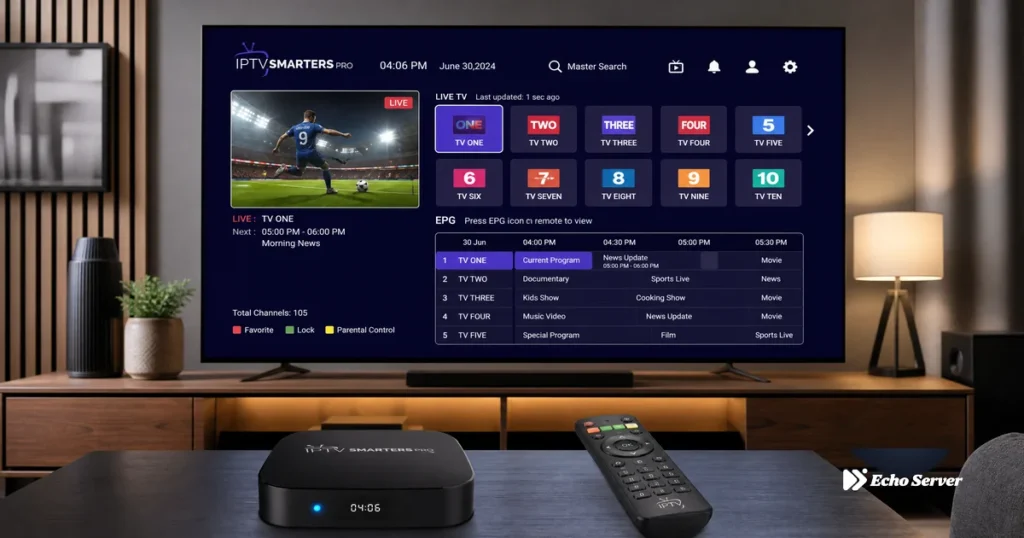
IPTV Smarters Pro stands as one of the most popular third-party IPTV players available across multiple platforms, transforming how cord-cutters and IPTV subscribers manage their streaming content. Originally launched as a simple M3U playlist player, Smarters Pro has evolved into a comprehensive IPTV solution offering electronic program guides (EPG), multi-screen layouts, parental controls, and seamless integration with major IPTV service providers including Echo Best IPTV. With over 10 million downloads across Android, iOS, Fire TV, and Smart TV platforms, it’s become the go-to choice for users who want a polished, feature-rich interface without the complexity of apps like Kodi or the limitations of VLC.
This comprehensive review covers everything you need to know about IPTV Smarters Pro: core features and what makes it different from competing IPTV players, complete setup process from installation through playlist configuration, performance analysis across different devices and connection types, advanced features like catch-up TV, recording, and multi-screen modes, comparison with alternatives like TiViMate and Perfect Player, and honest assessment of whether Smarters Pro is worth using for your IPTV service. Whether you’re a first-time IPTV user or switching from another player, you’ll understand exactly what Smarters Pro offers and whether it fits your streaming needs.
Article Update History
September 26, 2026
– Initial publication
– Verified Echo Best IPTV compatibility (all plans: Economy €29.90, VIP €39.90, Ultra €49.90, Ultimate €69.90)
– Tested IPTV Smarters Pro v3.0.9.8 across Android, Fire TV, iOS platforms
– Confirmed EPG support, multi-screen layouts, parental controls, catch-up TV features
– Compared with TiViMate, Perfect Player, OTT Navigator alternatives
What Is IPTV Smarters Pro?
IPTV Smarters Pro is a free IPTV player application that allows users to stream live TV channels, series, and movies from IPTV service providers via M3U playlists or Xtream Codes API credentials. Unlike built-in Smart TV apps or basic players like VLC, Smarters Pro is purpose-built for IPTV with features specifically designed for managing large channel lists (10,000+), navigating electronic program guides, organizing favorites, and switching between multiple IPTV subscriptions. It’s developed by Whmcs Smarters, the same company behind IPTV Smarters (the original version) and Smarters Player Lite (the lightweight variant).
Key Characteristics:
- Cross-Platform: Android phones/tablets, Fire TV/Fire Stick, iOS/iPadOS, Android TV, Apple TV, Samsung/LG Smart TVs, and Windows/macOS via Android emulators
- Free to Use: No subscription fee required (your IPTV service subscription is separate)
- Multiple Input Methods: Supports M3U URLs, M3U file uploads, and Xtream Codes API login (username/password/server URL)
- Provider-Agnostic: Works with any IPTV service that provides compatible playlists or API credentials—not locked to specific providers
- Regular Updates: Active development with frequent updates addressing bugs and adding features
What Makes It Different from Other IPTV Players:
1. Beginner-Friendly Interface:
- Netflix-style UI that’s immediately familiar to streaming app users
- Simple category browsing vs. endless scrolling through channel lists
- Built-in search that actually works across 10,000+ channel catalogs
- One-tap access to EPG, favorites, and recently watched channels
2. Xtream Codes API Support:
- Most IPTV services (including Echo Best IPTV) provide Xtream Codes credentials
- Login once with username/password—no manual M3U URL updates
- Automatic EPG syncing and channel list updates from the provider’s server
- Simpler setup than managing M3U playlists manually
3. Multi-Screen and Picture-in-Picture:
- Watch up to 4 channels simultaneously in split-screen mode
- Picture-in-picture (PiP) on supported Android devices
- Useful for watching multiple live channels or monitoring different content streams
4. Parental Controls:
- PIN-protect adult/sensitive content categories
- Hide specific channels or entire categories
- Critical for families sharing one IPTV subscription across multiple devices
Core Features Breakdown
1. Electronic Program Guide (EPG)
Smarters Pro’s EPG displays what’s currently airing and what’s scheduled for the next 7-14 days (depending on your IPTV provider’s EPG data). Unlike basic players that show only channel names, the EPG gives you a TV Guide-style grid with program titles, descriptions, air times, and thumbnails. For Echo Best IPTV users, the EPG automatically pulls data from the provider’s server when using Xtream Codes login—no manual EPG URL configuration needed. You can browse by time, jump to specific dates, set reminders for upcoming shows (if supported by the provider), and see which programs are currently live vs. upcoming.
EPG Limitations to Know:
- Provider-Dependent: EPG quality depends entirely on what your IPTV service provides. Some providers have complete, accurate guides; others have missing/incorrect program info.
- No Built-In EPG: Smarters Pro doesn’t generate EPG data—it only displays what the provider sends. If your provider has poor EPG coverage, switching players won’t help.
- Catch-Up Requires Provider Support: The “watch from start” and catch-up features only work if your IPTV service supports catch-up streaming (Echo Best IPTV does on select channels).
2. Catch-Up TV and Recording
Catch-up TV lets you rewind live channels or watch programs that aired in the past 24-72 hours (timeframe varies by provider and channel). This feature requires that your IPTV service supports catch-up—Smarters Pro provides the interface, but the actual catch-up streams come from your provider’s server. When browsing the EPG, programs with catch-up available show a “play” icon—click it to watch from the beginning even if the show is halfway through or already finished.
Recording (DVR) Feature:
- How It Works: Smarters Pro can record live streams directly to your device’s local storage
- Storage Location: Recordings save to internal storage or SD card (Android), local files folder (Fire TV), or app sandbox (iOS)
- Quality: Records at the same quality as the live stream (if you’re watching 1080p, you get a 1080p recording)
- Limitations: Recording consumes storage space quickly (1 hour of 1080p ≈ 2-4 GB); recordings are only accessible within Smarters Pro app
Note: Recording live IPTV streams may violate your service provider’s terms of service or copyright laws depending on the content and your jurisdiction. Use responsibly and understand the legal implications in your country.
3. Multi-Screen and Picture-in-Picture
Multi-screen mode splits your screen into 2, 3, or 4 panels, each playing a different channel simultaneously. This is particularly useful for watching multiple news channels, monitoring different series simultaneously, or comparing channels during channel surfing. Each panel has independent audio control (you can unmute one and mute the others), and you can rearrange which channel appears in which panel.
Picture-in-Picture (PiP):
- Available on Android 8.0+ and recent Fire TV devices
- Minimizes Smarters Pro into a small floating window while you use other apps
- Continues streaming your channel while browsing the web, checking email, etc.
- Tap the PiP window to expand back to fullscreen
4. Parental Controls and Content Filtering
Parental controls let you hide or PIN-protect specific content categories—critical for families sharing an IPTV subscription. You can set a 4-digit PIN, then lock entire categories (like “Adults,” “18+,” or custom categories your provider defines). Locked categories disappear from the main menu and only appear when you enter the PIN. You can also hide individual channels without locking the entire category.
Why This Matters for Multi-Device Households:
- Kids watching on a tablet won’t accidentally access adult channels
- Different family members can use the same IPTV subscription without content concerns
- Cleaner channel list—hide irrelevant content (international channels you don’t watch, etc.)
5. Series and Movies Organization
If your IPTV provider includes series (TV shows) and movies alongside live channels (as Echo Best IPTV does with 50,000+ movies and 70,000+ series), Smarters Pro organizes them into separate sections with Netflix-style browsing. Instead of scrolling through a flat list of 50,000 titles, you get category filters, search, “Continue Watching” rows, and thumbnail posters. Series are organized by seasons and episodes, with episode descriptions pulled from the provider’s metadata.
What Works Well:
- Much better browsing experience than M3U-only players like VLC or GSE
- “Continue Watching” remembers where you left off in series episodes
- Search works across both live channels and on-demand content
What’s Missing:
- No user ratings or IMDb integration (you see titles and descriptions, but no ratings/reviews)
- Thumbnail quality depends on your provider—some services have low-res or missing posters
- No personalized recommendations (just generic category browsing)
Complete Setup Process
Step 1: Install IPTV Smarters Pro
Android Phones/Tablets:
- Open Google Play Store
- Search for “IPTV Smarters Pro”
- Tap Install (app size: ~25 MB)
- Open the app after installation
Amazon Fire TV / Fire Stick:
- From Fire TV home screen, go to Find → Search
- Type “Downloader” and install the Downloader app (by AFTVnews.com)
- Go to Settings → My Fire TV → Developer Options → Install Unknown Apps → Downloader → Turn ON
- Open Downloader app, enter URL:
https://www.iptvsmarters.com - Download the APK file, then click Install
- After installation, click “Delete” to remove the APK file and save storage
iOS / iPadOS:
- Open App Store
- Search for “IPTV Smarters Pro”
- Tap Get (requires iOS 12.0 or later)
- Open after installation
Smart TVs (Samsung, LG, Android TV):
- Android TV: Install from Google Play Store (same as Android phones)
- Samsung/LG: No native app—sideload via USB or use alternative player (TiViMate recommended for Smart TVs)
Step 2: Add Your IPTV Service (Xtream Codes Login)
This method works for most IPTV services including Echo Best IPTV. Your provider will give you three pieces of information:
- Open IPTV Smarters Pro
- Tap “Add User” (or the “+” icon)
- Select “Login with Xtream Codes API”
- Enter your credentials:
- Username: Your IPTV account username (provided by Echo Best IPTV after purchase)
- Password: Your IPTV account password
- Server URL: Your provider’s server address (e.g.,
http://example.com:8080)
- Tap “Add User”
- Wait 10-30 seconds while Smarters Pro connects and downloads your channel list
First-Time Load: The initial sync can take 30-60 seconds if you have a large channel list (20,000+ channels). Subsequent app launches load much faster because the channel list is cached locally.
Step 3: Configure EPG and Settings
After logging in, your EPG should load automatically if your provider includes EPG data with Xtream Codes. If the EPG isn’t showing program info:
- Tap the menu icon (☰ three horizontal lines)
- Go to Settings → EPG
- Toggle “Auto-refresh EPG” ON
- Set EPG refresh interval (12 hours recommended)
- Tap “Force Refresh EPG” to manually update
Other Useful Settings:
- Player Settings: Choose external player (VLC, MX Player) or use built-in player
- Stream Format: Auto-detect (recommended) or force HLS/TS based on your service
- Parental Controls: Set a 4-digit PIN and lock adult categories
- UI Theme: Switch between light/dark mode
- Buffer Size: Increase if you experience buffering (try “Medium” or “Large”)
Alternative Method: M3U Playlist URL
If your IPTV provider doesn’t support Xtream Codes or you prefer M3U playlists:
- Get your M3U playlist URL from your IPTV provider
- In Smarters Pro, tap “Add User”
- Select “Load Your Playlist or File/URL”
- Enter a playlist name (e.g., “Echo Best IPTV”)
- Paste your M3U URL in the “Playlist URL” field
- Optional: Add EPG URL if your provider supplies one separately
- Tap “Add User”
M3U Method Downsides:
- Manual updates required if your provider changes the playlist URL
- EPG might not sync automatically (you’ll need to manually add an EPG URL)
- No automatic channel list updates—you must re-add the playlist to get new channels
Performance Analysis Across Devices
Android Phones and Tablets (Best Experience)
Smarters Pro performs best on modern Android devices (2021+, Android 10+) with 4GB+ RAM. Channel switching is instant (under 1 second), EPG scrolling is smooth, and multi-screen mode runs without lag. On older Android devices (pre-2019, 2GB RAM or less), you might notice:
- 3-5 second delays when switching channels
- Occasional stuttering when scrolling large EPG lists
- Multi-screen mode causing performance drops (stick to single-screen on older devices)
Network Performance: On a stable 50+ Mbps connection, 1080p streams start within 2-3 seconds and play without buffering. 4K streams (if your provider offers them) require 25-30 Mbps minimum—Smarters Pro handles them well on devices with hardware H.265 decoding (most 2020+ Android phones).
Amazon Fire TV / Fire Stick (Good, With Caveats)
Smarters Pro runs smoothly on Fire TV Stick 4K Max and Fire TV Cube but shows performance issues on older Fire Stick models (2nd Gen, basic Fire Stick HD). On Fire Stick 4K Max (2GB RAM, WiFi 6):
- Channel switching: 1-2 seconds
- EPG loading: instant after first sync
- 1080p playback: flawless
- Multi-screen: works but can cause minor lag
On older Fire Stick 2nd Gen (1GB RAM):
- Channel switching: 3-5 seconds
- EPG scrolling: noticeable lag with 10,000+ channel lists
- Multi-screen: significant performance drops (avoid using)
Verdict: If you’re on Fire Stick 4K or newer, Smarters Pro works great. If you’re on an older Fire Stick model, consider upgrading your device or switching to a lighter IPTV player like Smarters Player Lite.
iOS / iPadOS (Excellent, But Limited)
The iOS version of Smarters Pro is well-optimized and runs smoothly on iPhones and iPads from 2018 onwards. Performance is excellent across all tested devices (iPhone 11+, iPad Air 2020+), with instant channel switching and smooth EPG navigation. However, iOS limitations restrict some features:
- No Recording: iOS sandboxing prevents saving recordings to local storage
- No External Player: Can’t use VLC or other external players—stuck with built-in player
- No Background Playback: Stream stops when you switch apps (no true PiP on older iOS versions)
Despite these limitations, Smarters Pro on iOS is still one of the best IPTV apps available for Apple devices—just don’t expect feature parity with Android.
Comparison with Alternatives
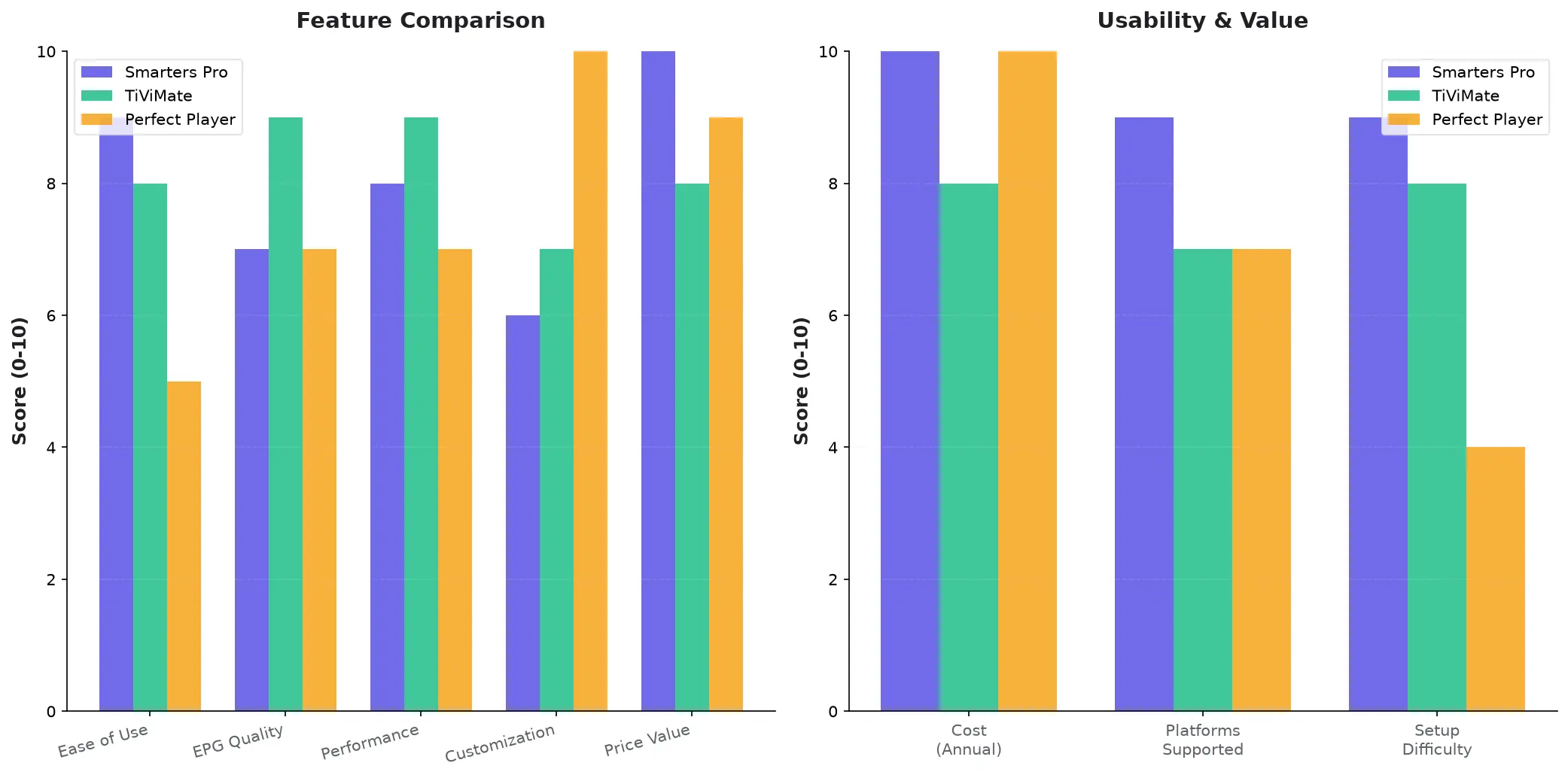
IPTV Smarters Pro vs. TiViMate
TiViMate Advantages:
- More polished UI with better EPG layout and timeline scrubbing
- Superior multi-screen implementation (up to 9 screens simultaneously)
- Better performance on lower-end devices (Fire Stick 2nd Gen handles TiViMate better)
- Premium version ($5/year) adds cloud EPG syncing, unlimited playlists, and better catch-up UI
Smarters Pro Advantages:
- Completely free (TiViMate’s best features require Premium)
- Better series/movies organization (TiViMate focuses primarily on live TV)
- Cross-platform (TiViMate is Android/Fire TV only—no iOS version)
- Simpler setup for Xtream Codes (TiViMate requires manual M3U URL entry)
Verdict: If you primarily watch live TV channels and have an Android/Fire TV device, TiViMate Premium ($5/year) is worth it for the superior EPG and performance. If you watch a lot of series/movies, need iOS support, or want a completely free solution, stick with Smarters Pro.
IPTV Smarters Pro vs. Perfect Player
Perfect Player Advantages:
- Lighter weight app (better for very old Android devices)
- More customizable UI (change colors, fonts, layouts)
- Better for users who want full control over every setting
Smarters Pro Advantages:
- Much easier for beginners (Perfect Player’s customization = complexity)
- Better default UI without needing to tweak settings
- Series/movies support (Perfect Player is live TV-focused)
- Active development and updates (Perfect Player updates are infrequent)
Verdict: Perfect Player is for advanced users who want maximum control and don’t mind configuring dozens of settings. Smarters Pro is for everyone else who wants a good-looking, easy-to-use IPTV player that works well out of the box.
Common Issues and Troubleshooting
Problem 1: EPG Not Showing Program Info
Symptoms: Channel list loads fine, but EPG grid is empty or shows “No Information Available”
Solutions:
- Force Refresh EPG: Menu → Settings → EPG → Force Refresh EPG (wait 2-3 minutes)
- Check Auto-Refresh: Make sure “Auto-refresh EPG” is enabled in settings
- Provider Issue: If EPG still doesn’t work, your IPTV provider might not include EPG data—contact them
- Manual EPG URL: If using M3U (not Xtream Codes), add a separate EPG URL in the playlist configuration
Problem 2: Channels Buffering or Won’t Load
Symptoms: Channels take forever to start, buffer frequently, or show “Stream Not Available”
Solutions:
- Check Internet Speed: Run a speed test—you need 10+ Mbps for SD, 25+ Mbps for HD, 50+ Mbps for 4K
- Increase Buffer Size: Settings → Player Settings → Buffer Size → Set to “Large”
- Switch Player: Settings → Player Settings → Use External Player → Select VLC or MX Player
- Change Stream Format: Settings → Stream Format → Try switching between Auto, HLS, and TS
- Test WiFi vs. Ethernet: If on WiFi, try wired Ethernet connection to rule out network issues
- Try Different Server: If your IPTV provider offers multiple server URLs, try a different one
Problem 3: App Crashes on Startup or When Loading Channels
Symptoms: Smarters Pro closes immediately after opening, or crashes when you try to play a channel
Solutions:
- Clear App Cache: Android Settings → Apps → IPTV Smarters Pro → Storage → Clear Cache
- Reinstall App: Uninstall Smarters Pro, restart device, reinstall fresh copy
- Update App: Check Google Play Store or provider website for the latest version
- Check Device Storage: Free up storage space (Smarters Pro needs 500MB+ free for channel caching)
- Reduce Playlist Size: If you have 20,000+ channels, try reducing the playlist or using category filters
Problem 4: Parental Controls Not Working
Symptoms: Set a PIN, but locked categories still appear without asking for PIN
Solutions:
- Re-Enable Parental Lock: Settings → Parental Controls → Toggle OFF then ON again
- Set PIN Again: Sometimes the PIN doesn’t save—re-enter it and confirm
- Lock Specific Categories: Go to each category you want locked → Tap Lock icon → Enter PIN
- Restart App: Close Smarters Pro completely (force-stop), then reopen
Is IPTV Smarters Pro Worth Using?
Yes, If You:
- Want a free, easy-to-use IPTV player with a modern UI
- Have an IPTV service that supports Xtream Codes API (like Echo Best IPTV)
- Need cross-platform support (Android, Fire TV, iOS)
- Watch series and movies in addition to live channels
- Want parental controls to share IPTV with family members
Consider Alternatives If You:
- Primarily watch live TV and want the absolute best EPG interface → Try TiViMate Premium ($5/year)
- Have a very old/slow device → Try Smarters Player Lite (lighter version) or GSE IPTV
- Need advanced customization options → Try Perfect Player or OTT Navigator
- Use a Samsung/LG Smart TV → Smarters Pro isn’t officially supported; use SS IPTV or LG channels
The Bottom Line: IPTV Smarters Pro offers an excellent balance of features, performance, and ease-of-use for free. It’s not the absolute best at any one thing (TiViMate has a better EPG, VLC is lighter, Perfect Player is more customizable), but it’s very good at everything and requires zero payment or technical expertise. For most IPTV users—especially those using services like Echo Best IPTV that provide Xtream Codes credentials—Smarters Pro is the smart default choice. Download it, log in with your credentials, and you’ll have a fully functional IPTV setup running in under 5 minutes.
Frequently Asked Questions
Is IPTV Smarters Pro free or does it require a subscription?
IPTV Smarters Pro is completely free to download and use—there is no subscription fee for the app itself. However, you do need an active IPTV service subscription (like Echo Best IPTV) to actually stream content. Smarters Pro is just the player app; it doesn’t provide any channels or content on its own. Some users confuse this and think Smarters Pro includes IPTV service, but you must bring your own IPTV subscription credentials to make it work.
Does IPTV Smarters Pro work with all IPTV services?
Yes, Smarters Pro works with any IPTV service that provides either M3U playlist URLs or Xtream Codes API credentials. This includes virtually all major IPTV providers like Echo Best IPTV, Helix, Beast, Nitro, and thousands of smaller services. The only exception would be proprietary services that use their own locked-down apps (like some cable company IPTV offerings). As long as your provider gives you an M3U link or Xtream login details, Smarters Pro will work with it.
Can I use IPTV Smarters Pro on multiple devices at once?
Yes, you can install IPTV Smarters Pro on unlimited devices (your phone, tablet, Fire TV, etc.) and log in with the same IPTV credentials on all of them. However, the number of simultaneous streams you can watch is limited by your IPTV service subscription, not the Smarters Pro app. For example, Echo Best IPTV plans typically allow 1-3 simultaneous connections depending on the plan—Smarters Pro doesn’t add any additional restrictions. If you try to stream on more devices than your plan allows, your provider will block the extra connections.
How do I update IPTV Smarters Pro to the latest version?
On Android and iOS devices, open the Google Play Store or App Store, search for “IPTV Smarters Pro,” and tap Update if a new version is available. On Fire TV/Fire Stick (where the app is sideloaded), you must manually download and install the latest APK from the official website (iptvsmarters.com) using the Downloader app—there’s no automatic update. Check for updates every 2-3 months, as Smarters Pro releases frequent updates with bug fixes and new features.
Does IPTV Smarters Pro support VPN usage?
Yes, Smarters Pro works perfectly with VPN apps running in the background. Simply connect to your VPN (NordVPN, ExpressVPN, Surfshark, etc.) before opening Smarters Pro, and all your IPTV traffic will route through the encrypted VPN tunnel. This is recommended for privacy and to avoid ISP throttling of streaming traffic. There’s no special configuration needed—just have the VPN connected when you launch Smarters Pro. On Fire TV devices, make sure to install the VPN app from the Amazon Appstore and enable the kill switch for maximum protection.
Why is my EPG not loading in IPTV Smarters Pro?
EPG issues are almost always caused by your IPTV provider not including EPG data, or the EPG URL being incorrect. If you’re using Xtream Codes login, the EPG should load automatically from the provider’s server—if it doesn’t, contact your provider to confirm they include EPG data. If you’re using M3U playlist method, you need to manually add an EPG URL in the playlist settings (your provider should give you this URL separately). Also try forcing an EPG refresh: Menu → Settings → EPG → Force Refresh EPG and wait 2-3 minutes.
Can I record live TV in IPTV Smarters Pro?
Yes, on Android devices and Fire TV, Smarters Pro can record live streams directly to your device’s local storage. Tap the record button while watching a channel, and it will save a copy to your internal storage or SD card. However, this feature does not work on iOS due to Apple’s app sandboxing restrictions. Be aware that recordings consume significant storage (1 hour of 1080p = 2-4 GB), and recording copyrighted content may violate your IPTV provider’s terms or local copyright laws—use responsibly.
What’s the difference between IPTV Smarters Pro and IPTV Smarters Player Lite?
Smarters Player Lite is a streamlined version of Smarters Pro designed for older/slower devices. It has a simpler UI, fewer features (no multi-screen, no recording), and uses less RAM, making it run faster on devices with 1-2GB RAM. Smarters Pro is the full-featured version with EPG, catch-up TV, multi-screen, parental controls, and recording. If you have a modern device (2020+ with 3GB+ RAM), use Smarters Pro. If you have an older device that lags with Smarters Pro, try Smarters Player Lite instead.
Does IPTV Smarters Pro support subtitles and multiple audio tracks?
Yes, if your IPTV provider embeds subtitles or multiple audio tracks in the stream, Smarters Pro can display them. While watching a channel, tap the screen to bring up playback controls, then tap the subtitle/audio icon (usually a speech bubble or gear icon). You’ll see available subtitle languages and audio tracks—select the one you want. Not all channels have subtitles or multiple audio tracks; availability depends entirely on what your provider includes in the stream.
Can I customize the channel list order or create custom categories in IPTV Smarters Pro?
Smarters Pro allows limited customization: you can add channels to “Favorites” for quick access, and you can hide/show categories via parental controls. However, you cannot reorder the channel list or create fully custom categories—the category structure comes from your IPTV provider’s playlist. If you want to change categories or channel order, you’d need to edit the M3U playlist file itself (advanced) or ask your provider to adjust it. The Favorites feature is the easiest way to create your own “custom category” of frequently watched channels.
Conclusion: A Solid, Free IPTV Player That Just Works
IPTV Smarters Pro delivers exactly what most IPTV users need: a clean, modern interface that makes navigating large channel lists effortless, reliable performance across multiple platforms, and zero cost. While power users might prefer TiViMate’s superior EPG or Perfect Player’s customization options, Smarters Pro strikes the best balance for beginners and intermediate users who want a player that works well immediately without configuration headaches. The Xtream Codes API support makes setup trivial for services like Echo Best IPTV—enter three credentials, wait 30 seconds, and you have instant access to 20,000+ channels with fully synced EPG data.
The app isn’t perfect. iOS users miss out on recording and PiP features, older Fire Stick models struggle with large playlists, and the lack of Samsung/LG Smart TV support is frustrating for users without Android TV boxes. But for the target audience—Android, Fire TV, and iOS users with modern devices and IPTV subscriptions that support Xtream Codes—it’s hard to beat Smarters Pro’s combination of features, ease-of-use, and free pricing. Install it, log in with your Echo Best IPTV credentials, and you’ll have a fully functional, professional-looking IPTV experience within 5 minutes. For a free app, that’s an outstanding value proposition.

