
Cutting the cable cord is one of the most common money-saving decisions American households make—but is IPTV the right replacement? With cable bills averaging $120-180/month and IPTV services starting at $10-25/month, the cost savings seem obvious. But cheaper doesn’t always mean better.
This comprehensive comparison breaks down IPTV vs Cable TV across five critical factors: cost, channel selection, streaming quality, device flexibility, and reliability. By the end, you’ll know which service fits your viewing habits, budget, and household needs.
Quick Comparison Table
| Factor | Premium IPTV | Traditional Cable TV |
|---|---|---|
| Monthly Cost | $10-25 | $80-180 |
| Setup Fees | $0 (usually) | $50-150 installation + equipment |
| Channel Count | 8,000-20,000+ | 125-500 |
| Contract Required | No | 12-24 months typical |
| Device Flexibility | Any internet-connected device | TV-only (unless you rent extra boxes) |
| Internet Required | Yes (25+ Mbps) | No |
| 4K Content | Common (200+ channels) | Limited (20-50 channels) |
| DVR/Cloud Storage | Included | $10-20/month extra |
| Local Channels | Varies by provider | Guaranteed |
| Reliability | Depends on internet | Very high (dedicated line) |
Cost Breakdown: IPTV vs Cable TV
Upfront Costs
Cable TV:
– Installation fee: $50-150 (waived with contracts)
– Equipment rental (cable box): $10-15/month ($120-180/year)
– DVR box upgrade: +$10-20/month ($120-240/year)
– Additional room boxes: $7-10/each/month
– Total first-year equipment: $240-600 minimum
IPTV:
– Installation: $0 (self-setup)
– Equipment: Use existing devices (Fire Stick $25-50 one-time, or Smart TV built-in)
– Total first-year equipment: $0-50 one-time
Winner: IPTV — No installation fees, no box rentals, use devices you already own.
Monthly Subscription Costs
Cable TV Plans (Spectrum, Comcast, Cox):
– Basic (125+ channels): $80-100/month
– Standard (200+ channels): $100-130/month
– Premium (300+ channels + HBO/Showtime): $150-180/month
– Sports packages: +$10-30/month
– Hidden fees (broadcast TV fee, regional sports fee): +$15-25/month
– Realistic total: $100-200/month
IPTV Plans:
– Budget tier (8,000-12,000 channels): $10-15/month
– Standard tier (12,000-18,000 channels): $15-20/month
– Premium tier (18,000-20,000+ channels + 4K + sports): $20-25/month
– Realistic total: $10-25/month
Annual Cost Comparison:
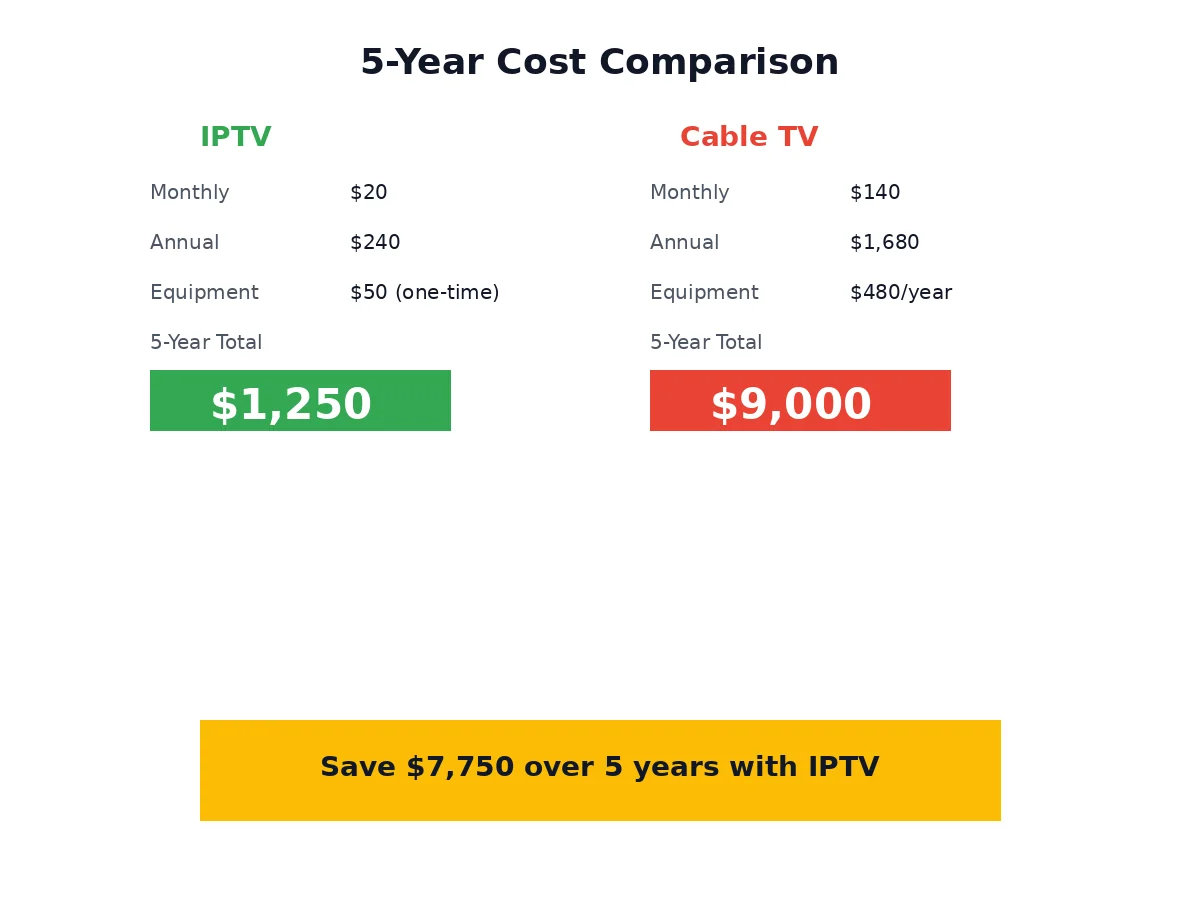
– Cable TV: $1,200-2,400/year + equipment ($240-600) = $1,440-3,000/year
– IPTV: $120-300/year + one-time device ($0-50) = $120-350/year
Savings with IPTV: $1,100-2,650/year (77-85% cheaper)
Winner: IPTV — Saves the average household $1,500-2,000 annually.
Channel Selection & Content Depth
Cable TV Channels
What You Get:
– 125-500 channels depending on package tier
– Guaranteed local channels (ABC, NBC, CBS, Fox) from your DMA
– Regional sports networks (RSNs) for local teams
– Premium add-ons: HBO ($15/mo), Showtime ($11/mo), Starz ($9/mo)
– On-demand library (10,000-30,000 titles, mostly rentals)
What’s Missing:
– International channels (requires expensive add-on packages $20-40/mo)
– Niche content (limited documentary, hobby, educational channels)
– Out-of-market sports (NFL Sunday Ticket $300/season, MLB.TV extra)
Premium IPTV Channels
What You Get:
– 8,000-20,000+ live channels (10-40x more than cable)
– US local channels from 50+ markets (not just your DMA)
– 500+ international channels (Spanish, Arabic, Hindi, French, Chinese)
– Premium sports (NFL, NBA, MLB, NHL, UFC, international soccer)
– 50,000-80,000 VOD titles (movies + TV shows)
– Premium channels included (HBO, Showtime, Starz — no extra fees)
What’s Missing:
– Some cable-exclusive networks (a few niche cable channels may not be available)
– Guaranteed local channels (depends on provider; some don’t carry locals)
Winner: IPTV (for variety) — 10-20x more channels, international content, and no premium channel upcharges. Cable wins if local news and guaranteed RSNs are critical.
Streaming Quality & Reliability
Cable TV Quality
Pros:
– Consistent reliability — Dedicated coaxial cable line, not affected by internet congestion
– Guaranteed uptime — 99.9% service availability
– 4K availability — 20-50 channels in 4K (limited but growing)
– No buffering — Direct signal, zero lag
Cons:
– Compression artifacts — Most channels broadcast in 720p-1080i, not true HD
– Limited 4K — Only premium channels + select sports offer 4K
– No streaming flexibility — Watching on your phone or laptop requires cable company apps (often clunky)
IPTV Quality
Pros:
– 4K abundance — 200+ channels available in true 4K (if internet supports it)
– HD/Full HD standard — Most channels stream 1080p
– Modern codecs — H.265 compression = better picture at lower bandwidth
– Catch-up TV + replay — Rewind live TV, watch from the beginning mid-broadcast
Cons:
– Internet-dependent — Buffering during peak hours if internet is slow
– Variable quality — Stream quality varies by provider and your connection
– Requires fast internet — Need 25+ Mbps for HD, 50+ Mbps for 4K
– Potential downtime — If your ISP goes down or provider has server issues, no TV
Winner: Cable (for reliability), IPTV (for quality potential)
Cable never buffers, but IPTV delivers better picture quality if your internet can handle it.
Device Flexibility & User Experience
Cable TV Devices
Where You Can Watch:
– TV only (with cable box)
– Additional TVs require additional boxes ($7-10/month each)
– Mobile/laptop via cable company apps (limited channel selection, often buggy)
User Experience:
– Traditional channel guide (familiar but slow)
– DVR requires box upgrade ($10-20/month)
– Recording limits (20-100 hours storage depending on plan)
– Can’t watch recordings outside your home
IPTV Devices
Where You Can Watch:
– Fire Stick, Android TV, Smart TVs
– Apple TV, Roku
– iPhones, iPads, Android phones/tablets
– Windows/Mac computers via browser or apps
– Same subscription = all devices (up to 2-5 concurrent connections)
User Experience:
– Modern app interfaces (Netflix-like browsing)
– Cloud DVR included (unlimited storage on many providers)
– Watch anywhere with internet
– Multi-view (watch 4 games simultaneously)
– Pause on one device, resume on another
Winner: IPTV — Ultimate flexibility to watch anywhere, on any device, with modern interfaces.
Internet Requirements
IPTV Internet Speed Needs:
– SD quality: 3-5 Mbps per stream
– HD quality: 8-12 Mbps per stream
– 4K quality: 25-35 Mbps per stream
– Multiple users: If 3 people are streaming 4K simultaneously, you need 80-100 Mbps internet
Cable TV Internet Needs:
– None — Cable TV uses a separate coaxial line, works even if your internet is down
Important Note: IPTV + internet cost must be compared to cable TV bundles. If you’re paying $70/month for internet + $20/month for IPTV = $90 total vs. a $120 cable+internet bundle, your real savings are $30/month, not $100/month.
Winner: Cable (for simplicity) — Doesn’t require fast internet or add to bandwidth usage.
Pros & Cons at a Glance
Premium IPTV
Pros:
✅ 77-85% cheaper than cable ($120-300/year vs. $1,440-3,000/year)
✅ 10-20x more channels (8,000-20,000 vs. 125-500)
✅ No contracts — Cancel anytime
✅ Watch anywhere on any internet-connected device
✅ 4K abundance — 200+ channels vs. cable’s 20-50
✅ International content — 500+ channels in 30+ languages
✅ Included premiums — HBO, Showtime, sports packages at no extra charge
✅ Modern features — Cloud DVR, multi-view, catch-up TV
Cons:
❌ Internet-dependent — No internet = no TV
❌ Variable quality — Buffering during peak hours on slow connections
❌ Local channels not guaranteed — Depends on provider
❌ Legal gray area — Many providers don’t hold proper content rights
❌ Provider instability — Unverified services can shut down unexpectedly
Traditional Cable TV
Pros:
✅ Rock-solid reliability — 99.9% uptime, dedicated line
✅ Guaranteed local channels — ABC, NBC, CBS, Fox from your market
✅ No internet required — Works independently
✅ Legally compliant — Clear content licensing
✅ Professional support — 24/7 phone support from major providers
✅ Regional sports networks — Local teams guaranteed
Cons:
❌ Expensive — $100-200/month ($1,440-3,000/year)
❌ Equipment rental fees — $10-20/month per box
❌ Limited channels — 125-500 channels max
❌ Contracts required — 12-24 month commitments, early termination fees
❌ No flexibility — Watching on phones/laptops is clunky
❌ Extra fees — Broadcast TV fee, regional sports fee, DVR fee stack up
Is IPTV Worth Switching From Cable?
IPTV is worth it if you:
– Have reliable 50+ Mbps internet
– Want to save $1,100-2,000 annually
– Don’t watch local news religiously
– Value channel variety (international, niche content)
– Want to watch on multiple devices
– Don’t mind potential buffering during peak hours
Stick with cable if you:
– Live in an area with slow/unreliable internet
– Need guaranteed local channels and RSNs
– Value 99.9% uptime over cost savings
– Prefer traditional channel surfing
– Want legal peace of mind
– Are locked into a favorable cable bundle ($100 or less for TV+internet)
Decision Framework
Use this 5-question framework to decide:
1. What’s your internet speed?
– Under 25 Mbps → Cable TV (IPTV will buffer)
– 25-50 Mbps → IPTV works for HD (1-2 streams)
– 50+ Mbps → IPTV thrives (4K, multiple users)
2. How much do you watch local news/sports?
– Daily local news → Cable TV (guaranteed local channels)
– Occasionally → IPTV (most providers include some locals)
– Rarely → IPTV (you won’t miss them)
3. What’s your monthly TV budget?
– Under $30 → IPTV only (cable doesn’t fit your budget)
– $30-100 → IPTV (save $1,000-2,000/year)
– $100-200 → Either works (cable is viable if you value reliability)
4. How many devices/rooms watch simultaneously?
– 1-2 devices → Either works
– 3-4 devices → IPTV (multi-device support included)
– 5+ devices → IPTV (cable box costs skyrocket)
5. How important is legal certainty?
– Critical → Cable TV or legal IPTV (YouTube TV, Hulu Live)
– Important → Research provider legitimacy
– Not a concern → Any IPTV provider works
IPTV vs Cable: Final Verdict
Best Overall Value: IPTV
For 80% of households, IPTV’s combination of massive channel selection (10-20x more than cable), 77-85% cost savings ($1,100-2,000/year), device flexibility, and modern features (4K, cloud DVR, catch-up TV) make it the smarter choice in 2026.
Best Reliability: Cable TV
If you have slow internet, require guaranteed local news and sports, or value zero-buffering 99.9% uptime above all else, cable still wins on reliability.
Best Hybrid: Legal IPTV Alternatives
Services like YouTube TV ($73/mo), Hulu + Live TV ($77/mo), or Sling TV ($40/mo) offer middle-ground pricing with legal compliance. They cost more than unverified IPTV but less than cable, with cable-like reliability.
Frequently Asked Questions
Is watching IPTV legal in the USA?
Using IPTV services is not inherently illegal for consumers in the USA. Legal IPTV platforms like YouTube TV, Hulu + Live TV, and Sling TV hold proper broadcasting licenses. However, many third-party IPTV providers operate in a legal gray area—they may not hold content rights, which makes the service potentially illegal, though enforcement targets providers, not individual viewers. To stay safe, choose providers that clearly explain their licensing or use established legal IPTV alternatives.
How does IPTV compare to cable TV in cost?
IPTV is 77-85% cheaper than cable TV. IPTV costs $10-25/month ($120-300/year), while cable TV costs $100-200/month ($1,440-3,000/year including equipment rentals and hidden fees). The average household saves $1,100-2,000 annually by switching to IPTV. However, factor in internet costs—you need 50+ Mbps internet ($50-80/mo) for IPTV, while cable TV doesn’t require fast internet.
Why are people getting rid of cable TV?
People are cutting cable primarily due to high costs ($100-200/month), mandatory contracts (12-24 months), equipment rental fees ($10-20/month per box), and lack of flexibility (can’t easily watch on phones/tablets). Cord-cutters switch to cheaper alternatives like IPTV ($10-25/mo) or streaming services (Netflix, Hulu) that offer on-demand viewing without contracts. The average cord-cutter saves $1,000-1,500 annually.
What are the downsides of IPTV?
IPTV’s main downsides are: (1) Internet dependency — No internet = no TV, and buffering occurs during peak hours if your connection is slow; (2) Variable quality — Stream reliability varies by provider and your internet speed; (3) Local channel gaps — Not all IPTV providers guarantee local ABC/NBC/CBS/Fox channels; (4) Legal uncertainty — Many providers operate without proper content licenses, risking service shutdowns; (5) Fast internet required — Need 25+ Mbps for HD, 50+ for 4K.
Can I get local channels with IPTV?
It depends on the provider. Premium IPTV services like Echo Best IPTV, Premium IPTV Plus, and Global TV Stream include local channels (ABC, NBC, CBS, Fox) from 50+ US markets, but you may not get your specific local DMA. Budget IPTV providers often skip local channels entirely. If local news is critical, verify your provider’s local channel coverage before subscribing. Alternatively, use an HD antenna (free, over-the-air) to get local channels and IPTV for everything else.
Do I need a special device for IPTV?
No special device required—IPTV works on devices you likely already own. Supported devices include Fire Stick ($25-50), Android TV boxes, Smart TVs (Samsung, LG, Sony), Apple TV, Roku, iPhones/iPads, Android phones/tablets, and Windows/Mac computers via browser or apps. All you need is an internet connection. For TVs without smart features, a $30-50 Fire Stick turns any HDMI TV into an IPTV-ready device.
How much internet speed do I need for IPTV?
Minimum internet speeds per stream: SD (480p): 3-5 Mbps | HD (720p-1080p): 8-12 Mbps | 4K (2160p): 25-35 Mbps. For multiple users watching simultaneously, multiply by the number of streams. Example: 3 people watching HD at once need 30-36 Mbps internet. We recommend 50+ Mbps for smooth IPTV performance with multiple devices. If your internet is under 25 Mbps, stick with cable TV to avoid constant buffering.
Can I watch IPTV and cable TV at the same time?
Yes, you can run IPTV and cable TV simultaneously. Many cord-cutters use a hybrid approach: keep basic cable ($20-40/mo) for guaranteed local channels and reliable sports, then add IPTV ($10-20/mo) for international content, premium channels, and 4K streams. This hybrid costs $30-60/month—still 50-70% cheaper than full cable packages ($100-200/mo). Cancel cable once you verify IPTV meets all your needs.
What happens if my IPTV provider shuts down?
If your IPTV provider shuts down (common with unlicensed services), you lose access immediately with no refund guarantee. To minimize risk: (1) Choose established providers with positive reviews and transparent operations, (2) Avoid long-term prepayments (pay monthly or quarterly, not annual), (3) Keep contact info and have a backup provider researched, (4) Consider legal IPTV alternatives (YouTube TV, Hulu Live) that won’t disappear. Illegal IPTV crackdowns are increasing, so provider longevity is never guaranteed.
Is IPTV better than streaming services like Netflix?
IPTV and Netflix serve different purposes. IPTV provides live TV channels (sports, news, cable networks) like traditional TV, plus VOD libraries. Netflix offers only on-demand shows and movies, no live channels. If you want live sports and news, IPTV wins. If you only watch on-demand shows, Netflix/Hulu/Disney+ are simpler and legal. Many households use both: IPTV for live content ($15-25/mo) + Netflix/Hulu for on-demand ($10-20/mo) = $25-45/mo total, still 60-75% cheaper than cable.
Conclusion
For most households, IPTV is the smarter choice in 2026. The $1,100-2,000 annual savings, 10-20x more channels, 4K abundance, and device flexibility outweigh cable’s reliability advantage—especially as internet infrastructure improves nationwide.
The exceptions: If you have slow internet (under 25 Mbps), need guaranteed local news/sports, or can’t tolerate occasional buffering, cable TV still makes sense.
Our Recommendation:
Try IPTV risk-free with a short-term subscription (monthly or quarterly, not annual). Test it on your devices for 30 days. If it meets your needs, cancel cable and save $100-180/month. If you experience too much buffering or miss local channels, stick with cable or try a legal hybrid (YouTube TV + IPTV for international content).
The cable cord is expensive and restrictive. In 2026, IPTV gives you more channels, more flexibility, and more value for 20-25% of the cost.
Last updated: September 20, 2026

