
Buffering has one of six or seven possible causes, and “restart your router” only fixes one of them. If you’ve already tried the obvious things and it’s still happening, the fastest way forward isn’t another generic tip list — it’s figuring out which category the problem actually falls into first.
This guide is built around that diagnosis step, then walks through fixes for each category. For a broader look at how IPTV works day to day — including a quick take on common problems — see our premium IPTV explainer.
Step 1: Isolate the Problem Before You Fix Anything
Before touching any settings, answer three questions. They narrow down the cause faster than anything else in this guide:
Does it happen on one channel, or all of them?
One channel or a handful → the problem is likely on the source/provider side for that specific feed, not your setup.
Everything buffers → the problem is more likely your network, device, or app.
Does it happen on one device, or every device?
One device → look at that device’s app, cache, or hardware.
Every device on the same network → look at your router or internet connection.
Does it happen at specific times, or constantly?
Mainly during peak evening hours or big live events → likely bandwidth contention (yours or the provider’s server load), not a broken setup.
Constant, regardless of time → more likely a persistent configuration or hardware issue.
Keep your answers in mind — the rest of this guide is organized by cause, and your answers point you to the right section.
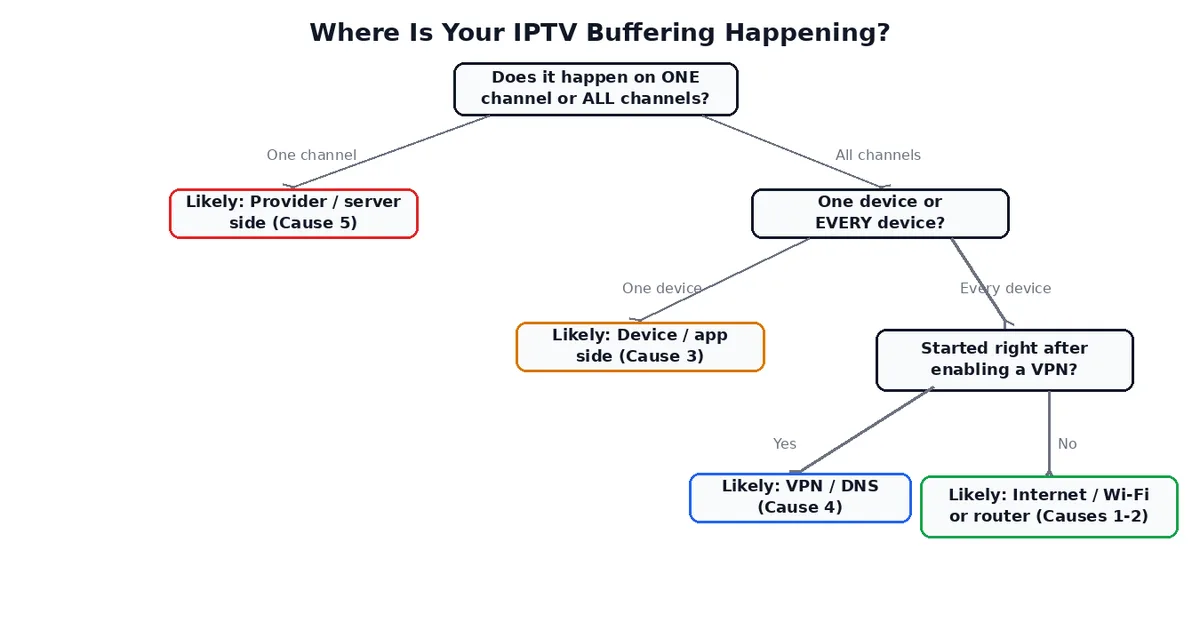
Quick reference:
| Pattern | Most likely category |
|---|---|
| One channel only | Provider/server-side (Cause 5) |
| Every channel, one device | Device/app (Cause 3) |
| Every channel, every device | Internet/Wi-Fi or router (Causes 1–2) |
| Worse during big live events | Provider server load (Cause 5), or your own bandwidth contention (Cause 1) |
| Started right after enabling a VPN | VPN/DNS (Cause 4) |
| Only on 4K/highest-quality streams | Bitrate/bandwidth mismatch (Cause 6) |
Cause 1: Your Internet & Wi-Fi
This is the most common assumption, but it isn’t automatically the right one — treat it as one possibility to test, not the default explanation.
What to check:
– Run a wired speed test if possible; Wi-Fi speed tests are affected by distance, walls, and interference in ways that don’t reflect your real streaming conditions.
– If you’re on Wi-Fi, try switching to the 5GHz band (or Ethernet) instead of 2.4GHz — 2.4GHz has more range but is more crowded and more prone to interference from other devices.
– Streaming isn’t just about raw speed; it’s sensitive to jitter (variation in delay between packets) and packet loss, both of which can cause buffering even on a connection that tests “fast enough” on paper (Source: IETF RFC 4594, MDN: Jitter).
If buffering happens on every device and every channel, especially during evenings, this category is the most likely culprit.
Cause 2: Wi-Fi & Router Configuration
Related to but distinct from your raw internet connection — this is about how your router is handling traffic, not how much bandwidth you’re paying for.
Common issues:
– Band congestion — too many devices (phones, laptops, smart-home gadgets) competing for the same Wi-Fi band as your streaming device
– Router age and capability — an older router built before multi-stream 4K households were common can struggle even when your internet plan itself is fast enough
– QoS (Quality of Service) settings — some routers deprioritize streaming traffic by default, or apply bandwidth limits per device that weren’t intended for sustained video
– Router placement — walls, distance, and interference from other electronics degrade Wi-Fi signal in ways a speed test run right next to the router won’t reveal
A full router-settings walkthrough (channel selection, QoS configuration, firmware updates) is its own topic — we cover it in a dedicated guide on best router settings for IPTV.
Cause 3: Device & App-Side Issues
If buffering is isolated to one device or one app, the network usually isn’t the problem.
What to check first:
– Clear the app’s cache — a corrupted cache is one of the most common single causes of playback issues that look like buffering but aren’t network-related.
– Confirm the app is up to date — older versions can mishandle stream formats that a provider has since changed.
– Older or lower-powered devices can struggle to decode higher-bitrate streams in real time, which shows up as stuttering that looks identical to network buffering but has nothing to do with your connection.
Device-specific quirks are common enough that they’re worth checking against your specific hardware — see our guide to IPTV providers and setup on Firestick if that’s what you’re running.
Cause 4: VPN & DNS
A VPN adds an extra hop and encryption overhead to every packet, which can reduce speed and add latency — sometimes enough to trigger buffering that wasn’t there before. It can also help in some cases, if your ISP is throttling streaming traffic specifically. Because the effect depends on your specific ISP, VPN provider, and server location, we’ve covered this question on its own rather than guessing at a one-size-fits-all answer.
DNS is a smaller but real factor: a slow or overloaded DNS resolver can add delay before a stream even starts loading. Switching to a public DNS resolver is a low-risk test if you suspect this (Source: Google Public DNS).
Cause 5: Provider / Server-Side Issues
This is the category most troubleshooting guides skip, because it’s the one users can’t fix themselves — but it’s genuinely common, especially during high-demand events.
Signs it’s server-side rather than yours:
– It’s happening on one specific channel or feed, not others
– It started suddenly with no change on your end
– It’s worse during a major live event (a title fight, a big match, a season premiere) when many subscribers are hitting the same servers at once
– Other people report the same issue on the same service at the same time
If your own connection and devices test clean and the pattern points here, the fix isn’t on your end — it’s contacting the provider or waiting out a high-demand window.
Cause 6: Bitrate, Resolution & Bandwidth Mismatch
Sometimes the stream itself is asking for more than your connection can reliably deliver at that moment — a 4K stream needs meaningfully more sustained bandwidth than an HD one, and “meets the minimum” isn’t the same as “comfortably handles it alongside everything else on your network.” If you’re regularly pushing 4K, our dedicated guide on internet speed requirements and 4K bandwidth needs for IPTV breaks down realistic numbers rather than marketing minimums.
Lowering the stream’s resolution or bitrate, where the app allows it, is a legitimate fix — not a downgrade you should feel bad about — if your goal is a stable picture over a technically-higher-but-unstable one.
When to Contact Your Provider vs. Fix It Yourself
Use your Step 1 answers: if it’s one channel, one device, or tied to peak-demand windows, that points toward the provider or device side, and it’s worth reporting to support with specifics (which channel, what time, what device) rather than assuming it’s unfixable. If it’s every channel, every device, all the time, work through Causes 1–2 first — that’s squarely in your own network’s territory.
Frequently Asked Questions
Does buffering mean my subscription is bad?
Not by itself. Occasional buffering during a specific live event, on a specific channel, is common across even well-run services and usually points to a temporary server-side load issue rather than a subscription-quality problem.
Will a faster internet plan definitely fix it?
Only if Cause 1 (or Cause 6) is actually the reason. If the real cause is a device, app cache, or provider-side issue, a faster plan won’t change anything — which is exactly why the diagnosis step at the top of this guide matters before spending money on an upgrade.
No IPTV service is immune to every cause on this list — network conditions and high-demand events affect any provider. If you’re evaluating whether your current service holds up, or comparing options, take a look at Echo Best IPTV and weigh it against the diagnosis steps above.

